
The short answer
For contract negotiation in Word, evaluate Spellbook and CASUS first, using the actual offered playbooks and review scope. [1] [2] [3] For structured review across a portfolio, start with Legora. For research-supported work in the Thomson Reuters ecosystem, evaluate CoCounsel. For a broader legal matter workflow, include Whisperit.
If the bottleneck is intake, approval routing or obligation management, define those requirements separately. A good contract assistant does not automatically establish a complete lifecycle replacement.
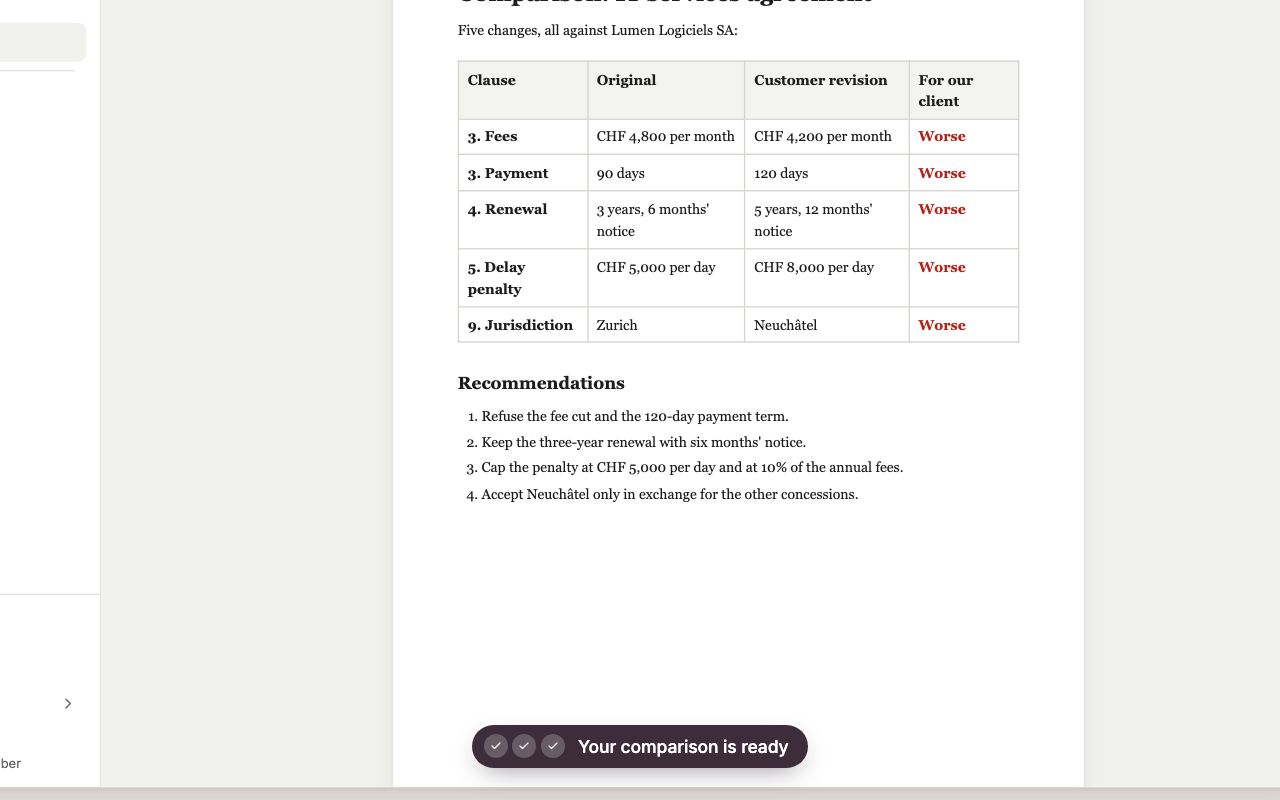
Illustrative product demonstration
Whisperit: turn document changes into a reviewable note
A recreated demonstration with a fictional agreement. Inspect the changes and finish the review in Word. An exported comparison note does not establish a native Word add-in or portfolio-review capability.
Source: Whisperit · Document-comparison walkthrough
Open full-size imageInspect the comparison evidence: Spellbook · Review
These examples show different workflows, not a controlled comparison. The recommendation below explains when the competing product is the stronger choice.
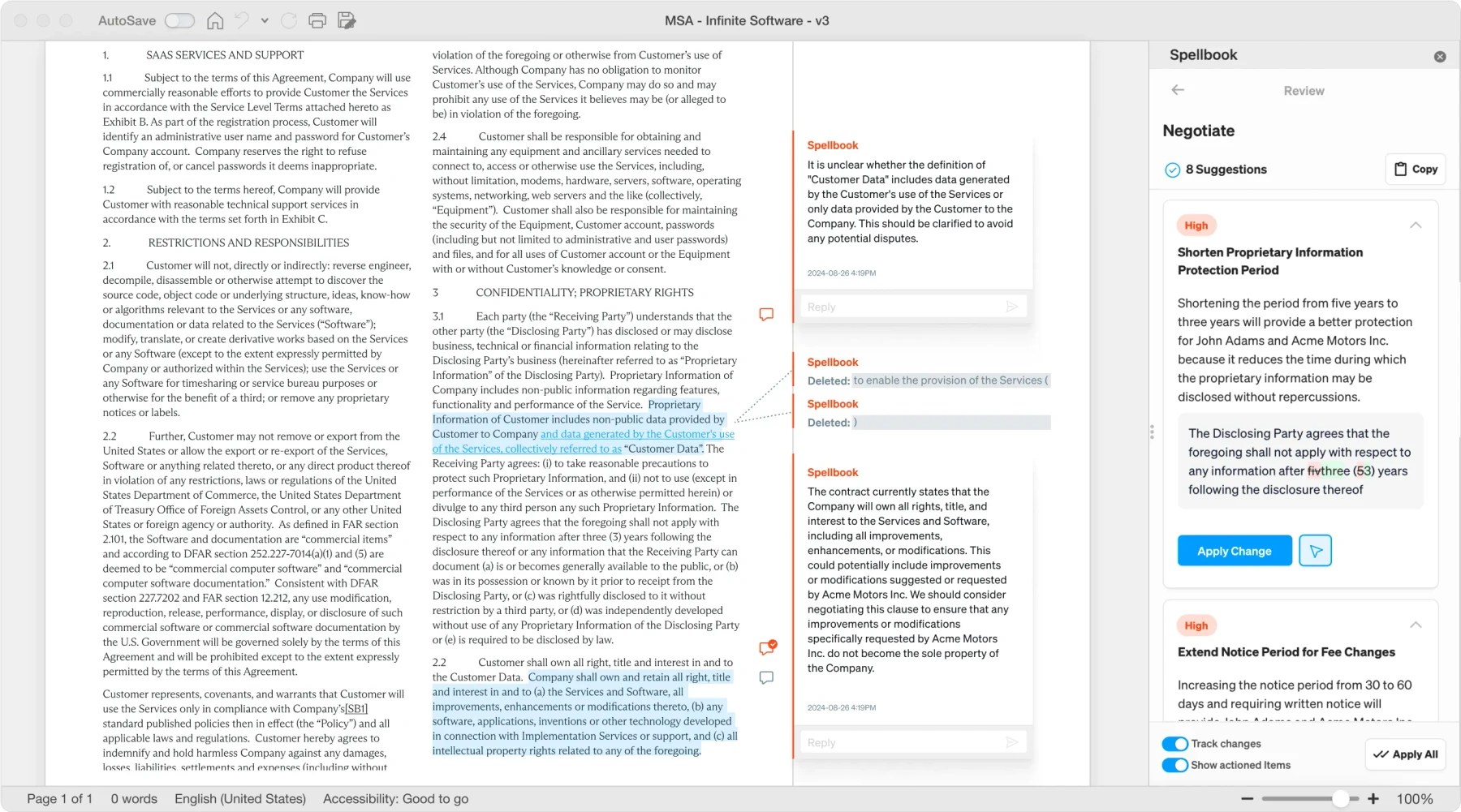
Public product image
Keep the proposed change beside the contract
Spellbook keeps suggestions and redlines in Word. Check whether each proposed change follows your playbook and remains usable when the document leaves the tool.
Source: Spellbook · Review
Open full-size imageThe picks at a glance
| Product | First evaluate for | Proof to ask for | Main limit |
|---|---|---|---|
| Spellbook | Individual contract negotiation | Useful redlines in the final document | Wider process needs separate evaluation |
| CASUS | Native Word review and document benchmarking | Party-specific changes in the final document | Advanced playbooks/governance require scoped purchasing |
| Legora | Multi-document review with a team | Checked findings and exceptions | Requires clear review questions |
| CoCounsel | Research and guidance alongside contracts | The relevant content in the offered plan | Packages do not include identical resources |
| Whisperit | The legal matter surrounding the agreement | Instructions to reviewed work product | Do not infer Word add-in parity |
Define the queue before buying the assistant
An in-house team may call all of its work “contract review,” but the actual queue can include supplier agreements, urgent customer edits, policy questions, diligence and internal advice. The outputs and reviewers differ.
Start by mapping the five contract types that consume most of the team's attention. For each, identify the normal negotiating position, fallback, business owner and escalation condition. If those decisions are not defined, the assistant will have an incomplete standard to apply.
Next, distinguish a single negotiation from a portfolio question. One requires precise edits in a working document. The other may require a consistent extraction and exception process across hundreds of agreements. Choose the evaluation around the queue that justifies the purchase.
1. Spellbook: our first evaluation for Word negotiation
Spellbook's review offering produces proposed contract redlines inside Word. [1] That is a concrete reason to test it first when the team's final deliverable is a negotiated agreement.
Provide the represented party, approved playbook and commercial context. Ask for necessary changes rather than a rewrite of every sentence. Then have your ordinary reviewer finish the document.
Choose another product first if the principal need is a shared portfolio analysis or a broader matter workspace. Also confirm which capabilities are available in the proposed account. Spellbook's currently promoted ACM expansion is presented through early access, so do not assume it is generally included. [4]
2. Legora: our first evaluation for structured team review
Legora's Tabular Review offering addresses document-level findings and source inspection. [5] We would evaluate it first when the team needs a consistent review across a set of agreements.
Use contracts with amendments, inconsistent drafting and known exceptions. Ask reviewers to show where each answer came from and what has been checked. The review should distinguish “not found” from “not applicable” and from a negative answer.
Choose a narrower process first if the queue is mostly single agreements handled by one lawyer. A portfolio workbench is valuable when the project actually needs its structure.
3. CoCounsel: evaluate when guidance is part of the job
CoCounsel's plans combine different levels of drafting, analysis and Thomson Reuters content. [6] That makes it relevant when the team needs legal guidance alongside production.
Choose an unfamiliar issue that changed a past agreement. Ask for the source and the reason the proposed language addresses the issue. Open the authority and confirm the plan includes the material used in the demonstration.
Choose another starting point if the offered package does not match the jurisdiction or the task is primarily negotiation mechanics. A research ecosystem can be a benefit without making every document interaction the best fit.
4. Whisperit: evaluate the matter beyond the agreement
Whisperit's published assistant connects work to the matter and supports reusable instructions. [7] It is worth testing when the agreement sits alongside client or stakeholder instructions, evidence, correspondence and several other deliverables.
Ask for an internal briefing, a risk summary and a draft response to the business. Check whether the same facts remain consistent across the outputs and whether reviewers can challenge them.
Choose Spellbook or a Legora-led evaluation first when in-Word redlining is mandatory. Whisperit's documented Word export is a different interaction. [8] The complete handoff into Word needs to earn its place.
CASUS: compare another native Word review path
CASUS publishes in-Word risk review and document benchmarking, plus Dossiers and structured Data Room work. This makes it relevant when a Swiss or European in-house team wants another document-centred option rather than moving every negotiation into an external workspace. [2] [9] [10]
Trial it against the same supplier agreement, amendment and approved positions used for Spellbook. Ask the business owner to inspect the risk explanation and the lawyer to finish the Word changes. A good result should distinguish an escalation from a stylistic preference.
Its boundary: advanced playbooks and governance are separately scoped. Public Dossiers limits also differ across pages. Confirm the actual offer and supported collection before treating the product as an equivalent portfolio review. [3] [9] The CASUS head-to-head records the published scope and limits.
A good review changes fewer things for better reasons
Do not score a tool by the number of issues it flags. Excessive low-value edits can slow negotiation and distract from material risk. Ask the reviewer which suggestions they accepted and why.
Classify findings into legal risk, commercial choice, drafting defect and stylistic preference. A commercially acceptable position should not be escalated merely because it differs from the template. A minor wording improvement should not receive the same priority as an uncapped obligation.
The tool also needs to respect the hierarchy of documents. A side letter or amendment may change the apparent position in the main agreement. Test whether the output reconciles those documents rather than treating them as unrelated text.
A pilot based on completed negotiations
Prepare three agreements: a routine NDA, a supplier contract with an amendment, and a negotiated customer agreement. Use the approved final versions to create a checked reference, then test the earlier versions.
Give each product the same instructions and review standard. Record accepted suggestions, missed material issues, unnecessary edits and time to final delivery. Inspect definitions, caps, carve-outs, cross-references and changes to the represented party's position.
Run one agreement in the second working language if the team negotiates bilingually. Check meaning, not just fluency. Ask a business owner to assess whether the summary explains actual choices rather than only legal terminology.
Finally, price the tested account: users, suite, content rights, implementation, term and any existing lifecycle systems that remain. No comparable negotiated price winner is established in this draft.
Our recommendation
For a focused Word negotiation queue, compare Spellbook and CASUS. For a collaborative portfolio review, start with Legora. For legal guidance, evaluate the relevant CoCounsel package. For the broader matter, evaluate Whisperit. Buy against the queue you have, and keep the systems that still perform necessary work.
For a two-product Word-versus-workspace decision, use Whisperit vs Spellbook. If the team needs several replacement candidates and a migration plan, use the Spellbook alternatives comparison.
Questions buyers ask
Is more aggressive redlining better?
Not necessarily. The useful changes reflect the approved position and material risk. Measure accepted value, not suggestion volume.
Can the assistant create our playbook?
It can help draft one, but your team must decide the standard, fallbacks and escalation rules. Those decisions are part of your operating process.
Does this replace a contract lifecycle system?
That requires its own evaluation of intake, approvals, signature, repositories and obligations. This guide does not establish it.
Romain de Wolff