
The short answer
For a lawyer whose day revolves around negotiating contracts in Microsoft Word, we would evaluate Spellbook before Whisperit. For a practice combining dictation, case context, research and varied document production, we would evaluate Whisperit first.
- Spellbook is the clearer documented fit for in-Word contract redlining.
- Whisperit is our recommendation to test for the wider matter workflow.
- A Word export is not a Word add-in. That difference belongs near the top of the comparison.
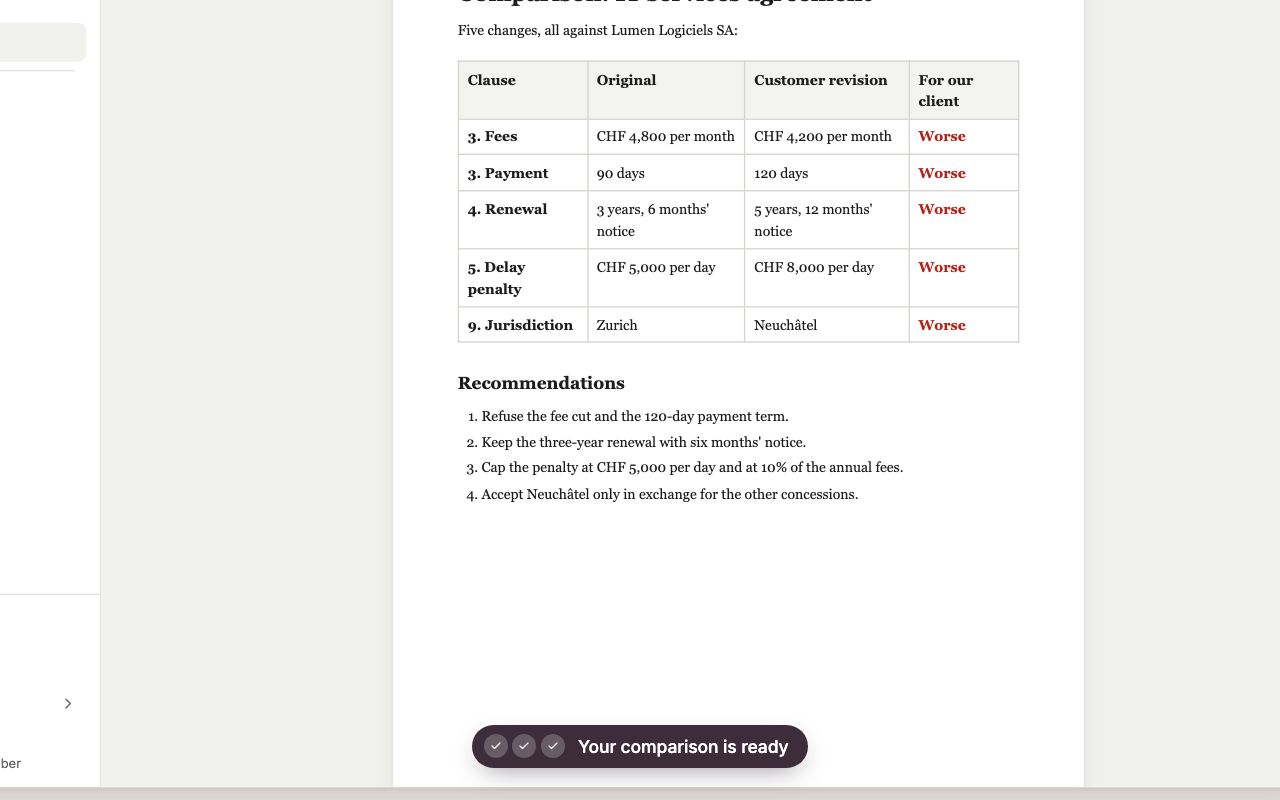
Illustrative product demonstration
Whisperit: turn document changes into a reviewable note
A recreated demonstration with a fictional agreement. Inspect the changes and finish the review in Word. An exported comparison note does not establish a native Word add-in or portfolio-review capability.
Source: Whisperit · Document-comparison walkthrough
Open full-size imageInspect the comparison evidence: Spellbook · Review
These examples show different workflows, not a controlled comparison. The recommendation below explains when the competing product is the stronger choice.
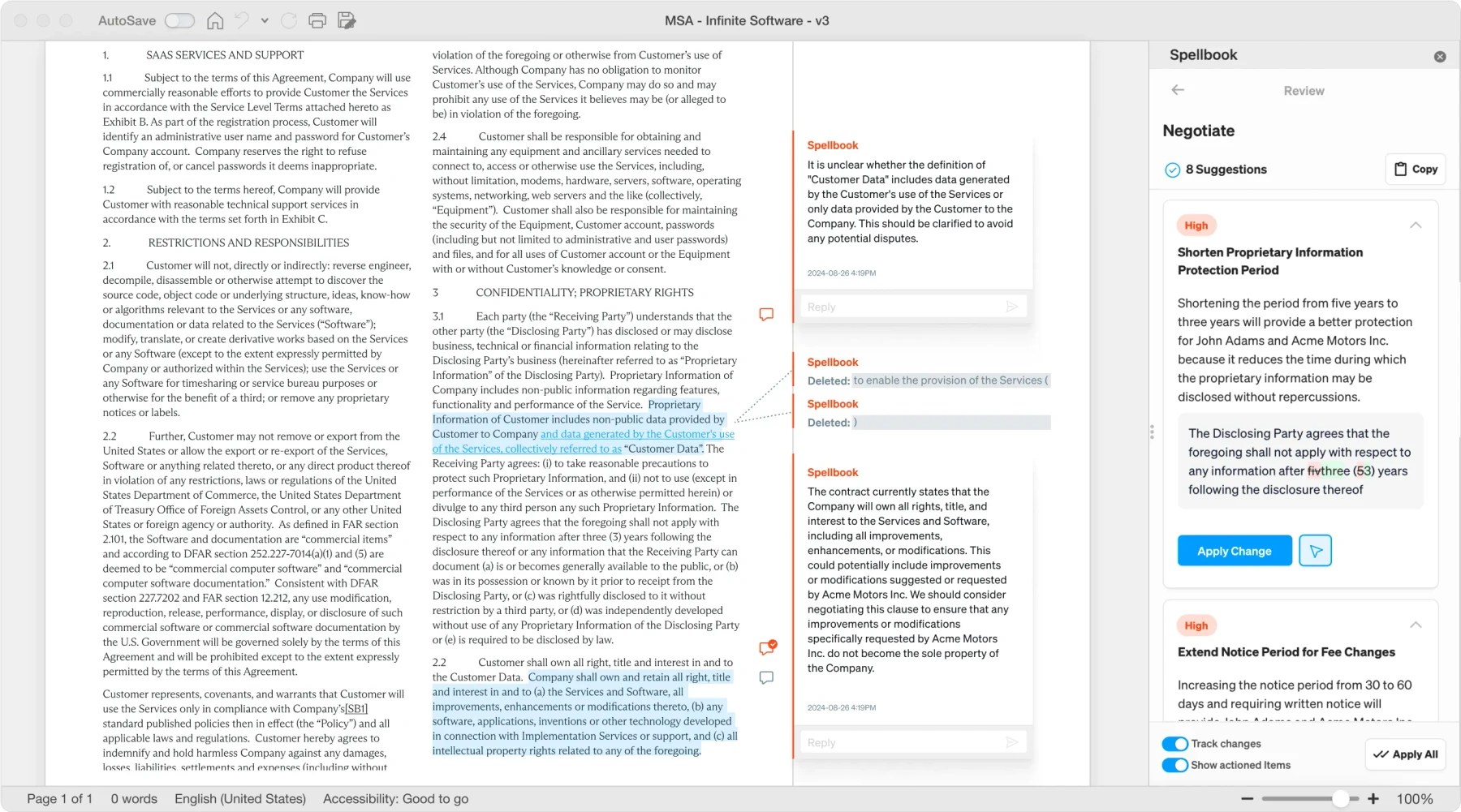
Public product image
Keep the proposed change beside the contract
Spellbook keeps suggestions and redlines in Word. Check whether each proposed change follows your playbook and remains usable when the document leaves the tool.
Source: Spellbook · Review
Open full-size imageAt a glance
| Buying question | Whisperit | Spellbook | Our recommendation |
|---|---|---|---|
| Where does contract review happen? | Evaluate the workspace-to-Word handoff | Suggested redlines inside Word [1] | Spellbook first for in-document negotiation |
| How are first drafts created? | Matter context and instructions [2] | Drafting from documents and precedents [3] | Test your house style and source control |
| Is voice part of the routine? | Dictation-to-document workflow [4] | Validate your capture requirements | Whisperit first for voice-led production |
| Does the work extend beyond contracts? | Broad legal workspace [5] | Contract-oriented suite [6] | Map all recurring work before choosing |
| Is pricing public and comparable? | Check current offer | Custom pricing [7] | Obtain matched proposals |
| Can the product be used offline? | Internet required [4] | Confirm the exact product's requirements | Neither is an assumed local-only tool |
The best tool may be the one that leaves your habits intact
Contract negotiations have an established working language: tracked changes, comments, defined terms and counterparties' revisions. A tool that fits this process can be more useful than one that produces a strong summary elsewhere.
Spellbook's published review offering works inside Word. [1] If the team wants suggestions in the document it will send back, that is a concrete advantage. We should not obscure it by comparing the number of unrelated platform features.
Whisperit's case is different. A lawyer may want to start with instructions and the case record, then produce a letter, analysis or agreement and continue the matter with colleagues. A connected workspace can be valuable here. That does not make it the best place to negotiate every contract.
When Spellbook is better
If your primary purchase is a contract assistant, start with Spellbook. Give it your actual review standard, the represented party and the agreement type. Ask for useful proposed changes, then inspect how those changes behave in the Word document.
It is also worth evaluating where precedents and preferred clauses drive drafting. Spellbook advertises drafting based on existing material. [3] The practical question is whether it preserves the rules behind your precedents rather than merely borrowing their phrasing.
We would keep Spellbook when a team already uses it successfully for a defined contract queue. Replacing it with a broad platform makes sense only if that platform reproduces the essential workflow or solves a more important problem. A tidy software stack is not enough.
When Whisperit can be better
Whisperit is worth testing when the work begins before the contract: a client call, a collection of supporting documents, instructions in more than one language and a need to keep the resulting work with the matter.
For example, an employment practice may prepare correspondence, analyze the record, draft an agreement and brief a colleague. We would test the complete sequence in Whisperit rather than treating the contract as the whole matter.
That recommendation is a judgment about workflow fit. It does not establish a drafting-quality advantage. Ask the lawyer who ordinarily reviews the document to grade the output, including incorrect facts, silent assumptions and changes in meaning.
Two easy mistakes to avoid
Assuming Spellbook is English-only. Its drafting page advertises extensive multilingual support. [3] Whisperit should compete on a demonstrated Swiss workflow, not an outdated claim about a competitor's language coverage. Test legal concepts in the languages you use; a language count is not a legal translation benchmark.
Assuming Word export means in-Word editing. Whisperit's integration page describes Word as an export route. [8] That helps deliver a file to Word, but it does not establish feature parity with a native contract-review add-in. Open the exported document and finish the work during the pilot.
Also distinguish product availability from announcements. Spellbook's current site promotes ACM through early access. Do not build a purchasing recommendation around capabilities that your proposed account cannot use. [6]
How to test the contract work properly
Use an agreement your team already negotiated. Prepare the accepted position, fallback position and issues that require business approval. Include an amendment so the model must reconcile more than one document.
- Ask for proposed changes from your client's side. A neutral summary is not a negotiating position.
- Inspect cross-references, definitions, caps, carve-outs and survival provisions after the changes.
- Ask the product to identify one absent provision. Does it invent wording, flag the absence or explain uncertainty?
- Finish the document in Word. Check tracked changes, comments, tables, numbering and any transfer effort.
- Give the result to a second reviewer. Can they distinguish business decisions from legal corrections?
If the team works bilingually, repeat the test using an agreement already reviewed in both languages. Check whether the legal effect survives the revision. Do not score only idiomatic prose.
Compare annual cost and approved scope
Specify the proposed users, suite, trial conditions, training and renewal term. Spellbook publishes custom pricing rather than one universal rate. [7] Whisperit's current local plan also needs confirmation before you make a monetary comparison. [9]
For confidential work, obtain the processing and access terms of the actual deployment. Whisperit publishes configurable residency tiers. [10] An alternative contract tool may have a different acceptable configuration; review it rather than assuming geography decides the answer.
Our recommendation
Choose a Spellbook-led pilot for in-Word contract drafting and negotiation. Choose a Whisperit-led pilot for a broader matter process that repeatedly begins with spoken or documentary instructions. If you need both, test the handoff and price the combination. Do not sacrifice a working contract process just to consolidate licences.
A contract team considering several replacements can use the Spellbook alternatives guide. The in-house contract review guide compares the negotiation queue, playbook and portfolio decision separately.
Questions buyers ask
Is Spellbook only a single-document tool?
No. Its pricing page describes a suite including Associate. Do not claim it lacks broader document work merely because its Word experience is prominent. [7]
Is Whisperit a contract lifecycle management replacement?
That requires a separate evaluation of intake, approvals, signature, repositories and obligations. Document drafting alone cannot establish that replacement.
Which one writes the better clause?
We have not established that. Compare the same instructions and accepted position on contracts you know, then count substantive corrections.
Romain de Wolff