
Organize Legal Case Files, Without Losing Hours to Search.
Poor case file organization costs lawyers 60+ billable hours per year searching for documents they know exist. Whisperit structures, indexes, and makes your matter files searchable with AI, automatically.
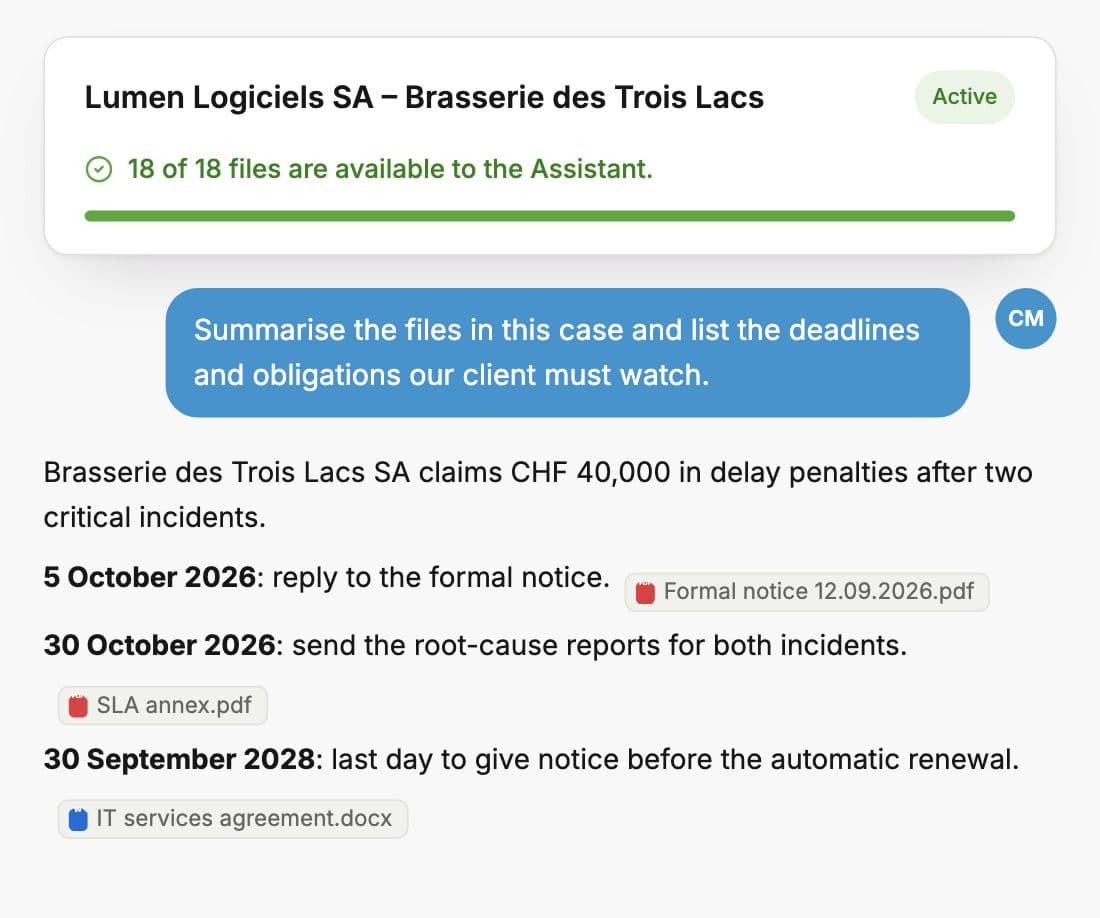
Why case file organization matters
Time lost searching
Studies of legal workflow consistently find lawyers spend 15–25 minutes per day searching for documents. That is 60–100 hours per year, hours that are not billed and cannot be recovered.
Risk of missing deadlines or evidence
A disorganized file makes it easy to miss a key document, a procedural deadline, or a piece of evidence that contradicts the other side's position.
Client expectations on file access
Clients increasingly expect their lawyers to locate and produce documents quickly. File disorganization is visible to clients in a way that other workflow failures are not.
Digital case file structure
Recommended folder structure
Matter_ClientName_Reference/
├── 01_Instructions/
├── 02_Facts_Evidence/
├── 03_Legal_Research/
├── 04_Drafts_Documents/
│   ├── v1/
│   └── v2/
├── 05_Correspondence/
│   ├── Inbound/
│   └── Outbound/
└── 06_Administration/
    ├── Time_Records/
    └── Billing/
Naming conventions
Use date-first naming so files sort chronologically by default:
YYYY-MM-DD_Description_v1.docx2026-07-01_Draft_Claim_v2.docxVersion control basics
Never overwrite a working document. Increment the version number (v1, v2, v3) and keep all prior versions. The final executed or filed version should be clearly marked FINAL.
How Whisperit organizes case files
Create a case
Open a new matter in Whisperit and name it. All documents, dictations, meeting notes, and AI drafts live in one place, no folders to manage manually.
Attach documents
Drag and drop files from any source. Whisperit reads and indexes every document automatically, extracting key facts, parties, dates, and issues.
Search across the case with AI
Ask in plain language: 'What did the client instruct on the limitation period?' or 'Find the clause about governing law.' No keyword matching required.
Paper vs Digital vs Whisperit
| Paper | Digital (unstructured) | Whisperit | |
|---|---|---|---|
| Search | Manual | Filename only | Full-text AI search |
| Version control | Manual | Manual | Automatic |
| Remote access | Not possible | Depends on VPN | Anywhere, encrypted |
| Collaboration | Physical copy | Email attachments | Shared workspace |
| Backup | Physical | Manual or IT | Automatic, Swiss-hosted |
Frequently asked questions
How should a lawyer organize case files?
Digitally, with a consistent folder structure applied to every matter from day one, and standardized file naming conventions (date-first, version-last). Every matter should follow the same template so any team member can navigate any file.
What is the best folder structure for legal cases?
A proven structure: Instructions, Facts & Evidence, Legal Research, Drafts & Documents, Correspondence, Administration. Litigation firms typically add Pleadings and Court Orders; transactional teams add Signing and Closing.
How do law firms manage digital documents?
Larger firms use dedicated document management systems (iManage, NetDocuments). Smaller and mid-size firms increasingly use matter-centric tools like Whisperit that combine document management with AI drafting and search.
Can AI help organize existing case files?
Yes, upload your existing documents to a Whisperit matter and the AI indexes and summarizes them, making the existing record searchable by plain-language question.
What is matter management in law firms?
Matter management means organizing all work, documents, correspondence, time, and billing for a single client engagement in one place, so nothing falls through the cracks and any team member can pick up the file.
Stop searching. Start finding.
7 days for free, no credit card. Swiss-hosted from day one.