
Unlocking Efficiency with Legal Collaboration Software
Legal collaboration software is a secure, digital command center built specifically for the high-stakes, confidential world of legal work. Unlike the generic tools most offices use, it creates a unified space for every case file, client conversation, and team task, giving your entire firm a crucial single source of truth.
Moving Beyond Disorganized Workflows
Picture a typical law firm's daily grind without a central hub. Important documents are buried in a dozen different email inboxes. Files are scattered across personal cloud storage accounts and local hard drives. Partners, associates, and paralegals burn through non-billable hours just trying to find the latest version of a contract or piece together a client's communication history from a messy trail of emails. This isn't just inefficient—it's a major security risk.
Legal collaboration software tackles these problems head-on. Think of it as a fortified digital office, engineered from the ground up for the legal profession. It goes far beyond simple file sharing, providing a structured environment where every action is secure, tracked, and neatly organized by matter. This keeps teams perfectly aligned, working from the most current information, and maintaining a complete, auditable record of their work.
From Scattered Emails to a Unified Workspace
The real magic of this software is its ability to pull all your workflows into one place. Instead of juggling a patchwork of apps that weren't designed for legal needs, firms get a platform that understands concepts like client confidentiality, version control for complex agreements, and secure client portals.

It’s a fundamental shift in how legal teams operate. The legal technology market, valued at $31.59 billion in 2024**, is projected to hit **$33.97 billion in 2025, largely because firms are investing heavily to improve their internal processes. In fact, according to one report on Fortunebusinessinsights.com, the adoption of these collaboration tools jumped by 25% between 2023 and 2024 alone, showing just how vital they've become for team productivity.
At its core, legal collaboration software transforms chaos into clarity. It replaces the anxious, "I think this is the latest version," with the confidence of a single, authoritative document, accessible to the right people at the right time.
While these platforms share some features with broader case management systems, their main job is to make teamwork seamless and secure. You can dive deeper into the distinctions in our guide to legal case management software. Ultimately, this technology is a strategic asset that empowers firms to handle complex legal matters with more precision, better security, and greater speed.
Legal vs. General Collaboration Tools: A Quick Comparison
It's easy to wonder, "Can't I just use Google Drive or Slack?" While those tools are great for general office work, they lack the specialized security and compliance features that are non-negotiable in the legal field. The table below breaks down the key differences.
| Feature | Legal Collaboration Software | General Collaboration Tools (e.g., Slack, Google Drive) |
|---|---|---|
| Security & Compliance | Built-in features for client confidentiality, data encryption, and GDPR/HIPAA compliance. | Generic security protocols; often lack specific legal compliance certifications. |
| Document Management | Advanced version control, document tagging by matter, and audit trails. | Basic version history; lacks matter-centric organization. |
| Client Communication | Secure client portals for sharing sensitive information and communication. | Communication happens over standard, less secure channels like email or direct messages. |
| Workflow Integration | Designed to integrate with legal billing, e-discovery, and case management software. | Integrates with a broad range of general business apps, not legal-specific tools. |
| Ethical Walls | Functionality to restrict access to case information to prevent conflicts of interest. | No built-in mechanisms for creating ethical walls or managing access at a granular level. |
As you can see, while general tools offer basic collaboration, they simply weren't built to handle the unique demands and ethical obligations of a legal practice. Legal-specific software provides the purpose-built functionality needed to work efficiently without compromising on security or compliance.
Core Features That Power Modern Legal Teams
To really understand what makes legal collaboration software so effective, you have to look past the buzzwords and see how specific features solve real-world problems for lawyers. These aren't just fancy add-ons; they're thoughtfully designed tools that tackle the unique headaches legal professionals deal with every day.
Think of it less as a single piece of software and more like a connected digital workspace. Every function—from drafting documents to managing tasks—is built to work together seamlessly. This integration is what really sets a dedicated legal platform apart from just stringing together a bunch of general office apps.

Secure Document Co-Authoring and Version Control
Every legal professional knows the nightmare of version control. Endless email chains with attachments like Agreement_Final_v4_ClientEdits_FINAL.docx are a recipe for disaster, creating confusion and a very real risk of someone working from the wrong draft.
Secure co-authoring cuts through that chaos. It lets multiple people—partners, associates, paralegals, even clients—work on the exact same document at the same time. Every change, comment, and redline is tracked automatically, creating a clean, transparent history of the document's evolution.
This approach establishes a single source of truth. It stops the guessing game and ensures everyone is, quite literally, on the same page.
Reliable version control is the bedrock of these platforms. For a closer look at this crucial area, check out our guide on document management for law firms. It’s what gives you a clean, defensible audit trail for any document.
Centralized Case Communication
How often do crucial case details get buried in a messy email thread? Digging through multiple inboxes to find one key piece of information is a frustrating waste of billable hours.
Legal collaboration software fixes this by pulling those conversations out of email and into organized, matter-specific channels. Now, every discussion and decision related to a case is logged right where it belongs, providing instant context for anyone who needs it.
Integrated Task and Project Management
Legal cases are essentially complex projects, full of deadlines, dependencies, and moving parts. It's a constant struggle to keep track of who’s doing what and when it’s due.
Integrated task management features bring much-needed order and accountability. Right inside a case file, you can:
- Assign tasks to specific team members with clear due dates.
- Build checklists for repeatable processes like discovery or client intake.
- Monitor progress at a glance, spotting potential delays before they become problems.
This simple structure ensures nothing gets missed and gives the whole team a clear, shared view of the case's momentum.
Secure Client Portals
Today's clients expect more than just a monthly invoice. They want transparency and easy access to updates on their case. Fielding constant phone calls and emails for a quick status check is a major drain on your firm's time and focus.
A secure client portal gives them a professional, branded hub where they can log in 24/7 to see progress, review documents, and send secure messages. This drastically improves the client experience while cutting down on administrative busywork for your team, fostering a more modern and collaborative relationship.
What This Means for Your Firm
Bringing in a legal-specific collaboration platform isn't just another software subscription; it's a fundamental shift in how your firm operates. The payoff goes well beyond simple convenience, delivering real, measurable gains in efficiency, security, and the quality of your client service. It acts as the operational hub for your practice, pulling scattered workflows into a single, cohesive system.
The first thing you'll notice is a major jump in efficiency. Just think about all the non-billable hours your team loses searching for an email attachment, hunting down the latest contract draft, or manually pulling together status reports for clients. That administrative drag chips away at your firm's profitability and steals focus from what matters.
A central software hub puts an end to the chaos. By organizing every document, conversation, and task by matter, the constant scavenger hunts disappear. Information is right there when authorized team members need it, freeing them up to focus on high-value legal work instead of administrative busywork. This clarity is how firms grow—they can take on more work without piling on more overhead.
Bolstering Security and Nailing Compliance
In the legal world, data security isn't just a good idea—it's a core ethical and professional obligation. When you rely on a patchwork of generic tools, you’re creating security gaps that expose sensitive client data and risk falling short of strict regulatory standards.
Legal collaboration software is built from the ground up with security in mind. It comes packed with protective features:
- End-to-End Encryption: Your data is locked down, both when it's moving across networks and when it's stored on servers.
- Granular Access Controls: You decide exactly who can see, edit, or share specific documents or entire case files. Confidentiality is baked in.
- Complete Audit Trails: Every click, edit, and share is logged, giving you a detailed record for compliance checks and internal reviews.
This built-in security architecture is how you protect your firm's most important asset: your clients' trust. It's also how you prove you're meeting regulations like GDPR and CCPA.
Creating a Better Client Experience
Today's clients expect to be kept in the loop. But a constant stream of "just checking in" phone calls and emails can grind your team's productivity to a halt and make the client feel like they're always chasing you for information. These platforms completely flip that dynamic.
By offering a secure, branded client portal, you give clients 24/7 access to case progress, key documents, and a direct line for communication. This self-service approach doesn't just cut down on your administrative load; it builds stronger, more trusting relationships through proactive transparency.
You're no longer just reacting to requests for updates; you're creating a collaborative partnership. The global market for collaboration software is booming, valued at $18.2 billion in 2024, largely because of the tangible results firms are seeing. Businesses using these tools report that projects move 30% faster—a game-changer in time-sensitive legal cases. You can read more about this growing market on 360researchreports.com.
Making Remote and Hybrid Work Actually Work
The way we work has changed for good. To stay competitive and attract the best people, law firms have to adapt. A cloud-based collaboration platform is the linchpin for a truly functional remote or hybrid setup.
It guarantees that every member of your team—whether they're in the office, at home, or in a courthouse—has the exact same secure access to case files, communication channels, and workflow tools. This consistency gets rid of the productivity gaps and information silos that plague so many distributed teams. Your firm can run at full steam from anywhere, which fosters a more flexible and resilient culture. This improved workflow also paves the way for even bigger operational wins, which we cover in our guide to legal workflow automation.
Navigating Security and Compliance Demands
In the legal world, security isn't just a feature—it's the very foundation of client trust and your ethical duty. When you're looking at legal collaboration software, you have to go way beyond a simple feature checklist and really dig into its security architecture. A data breach doesn't just cost money; it can shatter a firm's reputation and lead to serious professional consequences.
This is exactly why platforms built specifically for legal teams are different. They don't just tack on security features as an afterthought; it's woven into their DNA. These systems are designed from the ground up to handle the intense confidentiality needs of legal work, offering protections that general-purpose tools just can't touch.
Two concepts you'll hear a lot about are encryption at-rest and in-transit. Think of it like this: data "in-transit" is like an armored truck moving cash between banks—it's protected while moving across the internet. Data "at-rest" is that same cash locked away in the bank's vault. Any software worth its salt must provide rock-solid encryption for both states, making sure client information is unreadable to prying eyes whether it's being sent, received, or just sitting on a server.
Mastering Access and Regulatory Adherence
Beyond just locking data down, you need absolute control over who sees what. A partner working on a sensitive M&A deal shouldn't have their files visible to a junior associate in a completely different practice area. This is where granular access controls become so critical.
These controls let you build digital "ethical walls," defining exactly who can view, edit, or share specific documents, folders, or even entire case files. It's the key to preventing conflicts of interest and safeguarding your most sensitive information inside the firm. You get a level of precision that’s simply impossible with basic file-sharing platforms.
The goal here is to enforce the principle of least privilege—meaning users only get access to the specific information they need to do their jobs, and nothing more. It’s a simple but powerful idea that drastically reduces your risk from both internal and external threats.
On top of all this, law firms today have to navigate a minefield of data privacy regulations. Staying on the right side of laws like GDPR in Europe, CCPA in California, or HIPAA for healthcare-related cases takes more than just good intentions. The right legal collaboration software helps you meet these obligations head-on with specific, built-in capabilities:
- Data Residency Options: For many regulations, it matters where your data is physically stored. The ability to choose the geographic location (like a server within the EU or Switzerland) is essential for complying with data sovereignty laws.
- Detailed Audit Trails: These features create a permanent, unchangeable record of every single action taken on the platform. Every file view, edit, download, and share is logged, giving you a defensible compliance record if regulators come knocking.
- Vendor Security Certifications: Reputable vendors don't just say they're secure; they prove it. They undergo tough third-party audits to earn certifications that validate their security practices. You can learn more about these critical evaluations by reading about SOC 2 compliance requirements and see why they are so important for protecting your firm's data.
For a deeper dive into protecting your firm's most valuable asset—its data—this law firm data security guide is a fantastic resource. At the end of the day, choosing a platform with a proven commitment to security and compliance isn't just a technical decision. It’s a strategic one that protects your clients, your reputation, and your entire practice.
How to Choose the Right Legal Collaboration Software
Picking the right legal collaboration software isn't just another IT purchase; it's a strategic move that will define your firm's efficiency and security for years to come. Think of it as investing in your operational backbone. The ideal platform for a high-volume transactional practice won't necessarily fit a complex litigation firm, which is why the whole process must start with a frank assessment of your specific needs.
Before you even glance at a product demo, take stock of your current workflows. Where are the real bottlenecks? Are your lawyers losing precious hours digging through email chains for the latest document version? Is keeping clients in the loop on case progress a constant struggle? Answering these questions first gives you a clear scorecard for evaluating any potential solution.
Start With Your Core Needs
Every law firm has its own unique rhythm, and your software choice needs to match it. A solo practitioner likely needs a simple, all-in-one solution, whereas a large firm will prioritize deep integration with its existing tech stack.
Start by mapping out your must-haves versus your nice-to-haves. A litigation team, for example, might put robust eDiscovery integrations and strict permission controls at the top of its list. On the other hand, a corporate law team handling M&A deals would probably focus more on real-time co-authoring and secure client portals.
The goal is to find a platform that solves your biggest daily frustrations, not one that just adds a long list of features you'll never use. A focused, practical approach ensures you invest in a solution that delivers immediate value and encourages high adoption rates among your team.
Once you’ve completed this internal audit, you can build a formal evaluation checklist to compare vendors on a level playing field. This structured approach stops you from getting sidetracked by flashy presentations and keeps the focus squarely on what your practice truly needs to thrive.
Create a Vendor Evaluation Checklist
A detailed checklist is your most valuable tool during the selection process. It guarantees you’re comparing every option against the same set of criteria, which makes the final decision much clearer and easier to justify.
When you're building out your checklist, make sure to cover these key areas:
- Core Functionality: Does the software nail the features you identified as critical? Put its document management, task delegation, and communication tools to the test with your real-world scenarios.
- Integration Capabilities: How well does it play with your existing practice management or billing software? For a deeper dive into what these systems can do, check out our guide on legal practice management software.
- User Experience (UX): Is the platform intuitive? A clunky, hard-to-navigate interface will crush adoption, no matter how powerful its features are.
- Security and Compliance: Does the vendor provide end-to-end encryption, data residency options, and recognized security certifications like SOC 2 Type II or ISO 27001?
This diagram shows how a solid security strategy protects your firm's sensitive data, both when it's stored on a server and when it's being sent between systems.
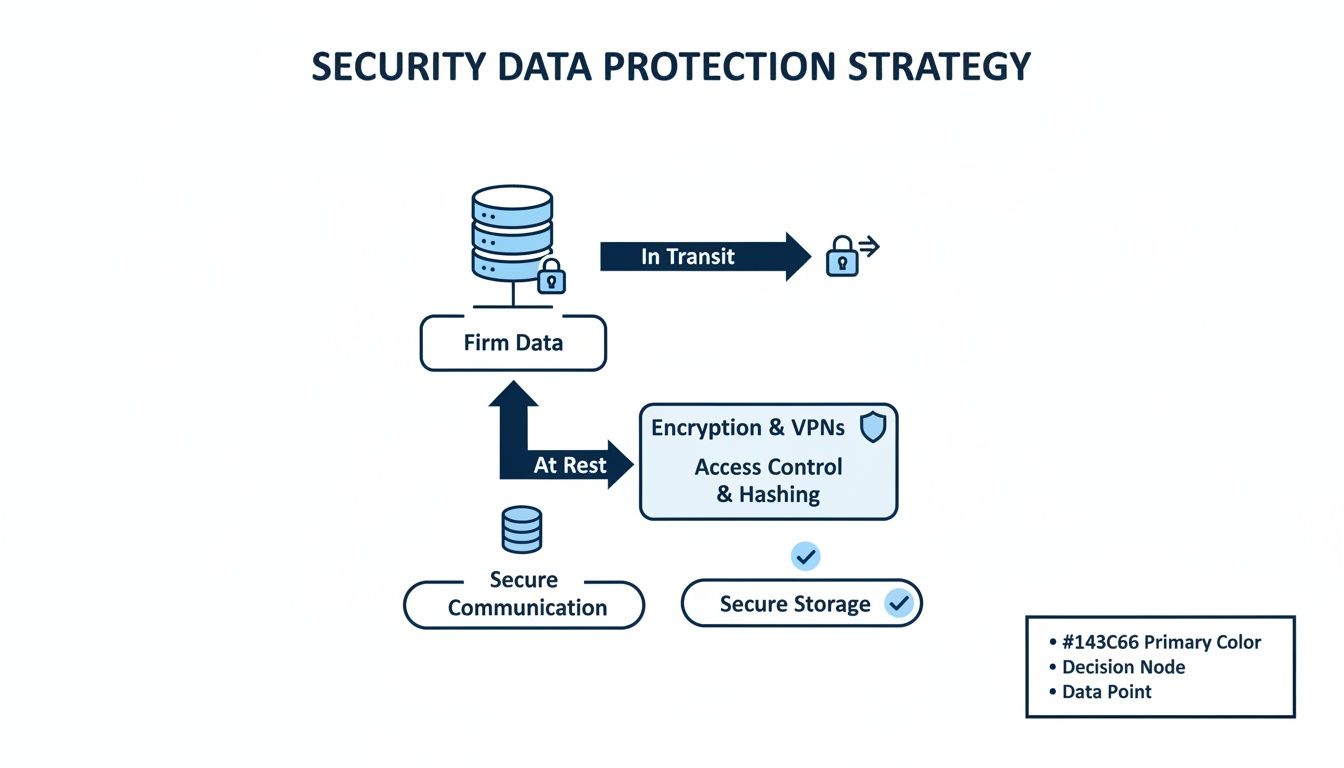
The decision tree illustrates that protecting data 'at rest' (on servers) and 'in transit' (during communications) are equally vital pieces of a complete security plan.
To make this process more concrete, use a structured scoring sheet to keep your evaluations organized and objective.
Vendor Evaluation Checklist
A structured checklist helps guide law firms and legal departments in comparing and selecting the most suitable legal collaboration software.
| Evaluation Criterion | Key Questions to Ask | Vendor A Score (1-5) | Vendor B Score (1-5) |
|---|---|---|---|
| Document Management | Does it offer real-time co-authoring? How granular is the version control? Is the search function powerful? | ||
| Task & Project Management | Can we create custom workflows? Are there automated reminders and deadlines? How clear is the dashboard? | ||
| Security & Compliance | What certifications does it hold (e.g., SOC 2, ISO 27001)? Where is data hosted? What are the encryption protocols? | ||
| Integration Capabilities | Does it offer native integrations with our DMS, billing, and email systems? Is there a public API? | ||
| User Experience (UX) | How many clicks does it take to complete a common task? Is the interface clean and intuitive? Is it mobile-friendly? | ||
| Vendor Support & Training | What are the support hours? Is training included in the price? What do customer reviews say about their support team? | ||
| Pricing & Scalability | Is the pricing model transparent (per user, per case)? Are there hidden fees? Can it grow with our firm? |
By scoring each vendor on these practical points, you can move beyond the sales pitch and make a data-driven decision that aligns perfectly with your firm's operational needs.
Look Beyond the Features
Finally, remember to evaluate the vendor, not just the product. Look for a company with a proven track record in the legal tech space, strong customer reviews, and a transparent pricing model that can scale with you. The legal AI software market, which heavily overlaps with collaboration tools, is projected to reach $5.76 billion by 2029. This massive investment shows how critical these technologies have become. With 75% of Am Law 100 firms now using cloud-based AI solutions, vendor stability and expertise are more important than ever.
As you build out your firm's technology stack, it's also worth looking into specialized legal transcription software solutions. These tools can perfectly complement your collaboration platform by quickly converting audio and video from depositions or meetings into searchable text. Ultimately, choosing the right legal collaboration software is about finding a true partner—one that understands your firm’s goals and is committed to helping you achieve them.
Real World Success with Collaboration Platforms
It's one thing to talk about features and theory, but what really matters is how this technology performs in the real world. For law firms, bringing in legal collaboration software is all about getting tangible results—the kind that boost the bottom line and deliver better outcomes for clients. Looking at how other firms have made this leap takes the conversation from abstract ideas to concrete, proven success.
These stories aren't just about minor tweaks. They show a fundamental shift away from disjointed, chaotic workflows toward a unified, strategic way of practicing law. When you centralize case information and team communication, you're not just moving faster. You're working smarter, more securely, and more collaboratively than ever before.

A Litigation Boutique Conquers Complex Discovery
Let’s start with a mid-sized litigation boutique drowning in a complex, multi-jurisdictional discovery process. Their team was scattered across three states, and the sheer volume of documents, deadlines, and moving parts was becoming a nightmare. Endless email chains were causing confusion, and tracking who was doing what relied on outdated spreadsheets, which led to missed deadlines and people unknowingly redoing the same work.
Once they implemented a legal collaboration platform, they instantly had a central command center for the entire discovery phase. Using the built-in task management tools, the firm could:
- Assign specific batches of documents for review to individual paralegals, complete with clear due dates.
- Set up automated reminders for critical deadlines like productions and depositions.
- Monitor the progress of every task in real-time, giving partners a bird's-eye view of the entire case without needing constant check-in meetings.
The outcome? A staggering 40% reduction in time spent on administrative coordination. But even more critically, the organized workflow caught potential errors before they happened, ensuring every deadline was hit and the entire discovery process was rock-solid.
Streamlining a High-Stakes M&A Deal
Now, picture a transactional firm navigating a high-stakes Merger & Acquisition (M&A) deal. The deal involved the buyer, the seller, their respective legal teams, accountants, and investment bankers. Every one of them needed secure access to a constantly changing set of closing documents. Their old method—emailing password-protected zip files back and forth—was a recipe for version control chaos and was quickly frustrating everyone involved.
The firm used its collaboration software to build a secure client portal, giving all parties a single, controlled space to access, review, and comment on documents. It completely changed the game for the closing process.
This secure portal became the single source of truth for every document, from the first letter of intent to the final purchase agreement. With granular permission settings, the firm could control exactly who saw which files, ensuring confidential information stayed that way. Stakeholders could redline and leave comments directly in the platform, and everyone was automatically notified when a new version was ready for review.
The client couldn't stop talking about how transparent and efficient the whole deal was, calling it the smoothest transaction they had ever experienced. That kind of feedback became a powerful selling point for the firm, helping them land new clients in a fiercely competitive market. These examples make it clear: the right legal collaboration software isn’t just an internal tool for efficiency. It’s a powerful engine for delivering exceptional client service and fueling a firm's growth.
Frequently Asked Questions
When it comes to adopting new technology, it's natural to have questions. Let's tackle some of the most common ones that come up when legal professionals consider moving to a dedicated collaboration platform.
How Is This Different from Microsoft Teams or Slack?
The key difference boils down to one word: purpose. General communication tools like Microsoft Teams or Slack are fantastic for broad, company-wide chat and file sharing. Legal collaboration software, on the other hand, is built from the ground up to handle the specific security, compliance, and workflow demands of practicing law.
Think of it like this: you could use a family minivan to move furniture, but a moving truck is designed for the job. Legal platforms have critical features that general tools simply don't offer:
- Ethical Walls: These are built-in controls that automatically restrict access to sensitive case files to prevent conflicts of interest.
- Matter-Centric Organization: Instead of messy, sprawling folders, every single file, conversation, and task is neatly tied to a specific client matter.
- Granular Audit Trails: You get a detailed, unchangeable record of every action taken on a document—who viewed it, who edited it, and when. This is essential for compliance and defensibility.
- Secure Client Portals: A professional, encrypted space for sharing documents and messages with clients, which is vastly more secure and organized than relying on email.
These aren't just nice-to-have features; they are fundamental to running a modern, secure, and efficient legal practice.
Is This Software Only for Large Law Firms?
Not at all. In fact, small firms and solo practitioners often see the biggest benefits from modern, cloud-based legal collaboration software. Without the luxury of a large IT department, smaller practices need tools that are simple to set up, easy to manage, and can grow with them.
Modern platforms truly level the playing field. They give smaller firms access to the same powerful efficiency and security tools that were once the exclusive domain of large, well-funded enterprises.
Cloud-based systems do away with the need for costly on-site servers and offer a predictable, monthly subscription. This makes top-tier technology accessible without a huge upfront investment, empowering smaller firms to compete more effectively and deliver an exceptional client experience.
How Does Advanced Version Control Actually Work?
Advanced version control is the cure for the chaos of document drafting. It eliminates the risk of sending the wrong draft or overwriting crucial edits by getting rid of confusing file names like Contract_Final_v2_FINAL_JSEdits.docx.
Instead, the software manages every change within a single, authoritative document.
Each time someone saves an edit, the system logs it as a new version, creating a complete timeline of the document's life. This lets you:
- See a full revision history showing precisely who changed what and when.
- Compare any two versions side-by-side to instantly highlight the differences.
- Roll back to any previous version with a single click if an error was made.
This structured approach creates a "single source of truth," ensuring everyone is always working from the correct file and you have a clear, defensible record of the entire drafting journey.
Ready to unify your legal workflows? With Whisperit, you can move from dictation to final draft faster than ever. Our voice-first AI workspace integrates drafting, research, and collaboration into one calm, organized hub. Discover how Whisperit transforms legal work.