
Mastering Incident Management Procedures
Incident management procedures are your organization's detailed playbook for handling any unplanned disruption. Think of it as a step-by-step guide for everything from a minor server hiccup to a major data breach. This isn't just an IT document; it's a critical business continuity strategy that's all about minimizing damage and getting things back to normal—fast.
Why Effective Incident Management Is Non-Negotiable
Let's be real: incidents are going to happen. It’s a matter of 'when,' not 'if.' Without a solid plan, a small technical glitch can quickly spiral into a full-blown crisis, costing you money, customer trust, and your hard-earned reputation. A good set of incident management procedures turns your team from a group of reactive firefighters into a coordinated, effective response unit.
Picture an e-commerce store in the middle of a massive holiday sale. Out of nowhere, the payment gateway goes down. Without a plan, it's pure chaos. The support team is swamped with calls, developers are scrambling just to figure out what's wrong, and management has no idea what to tell anyone. Every single minute of downtime means lost sales and angry customers who might never come back.
The Real Cost of Being Unprepared
That e-commerce nightmare is exactly why you need a plan. The costs of an incident go way beyond the immediate financial hit. A well-thought-out procedure ensures everyone knows their role, communication stays clear, and you take methodical steps to contain the damage. It’s all about controlling the chaos.
This need for a structured response is a big deal globally. The incident and emergency management market was valued at a massive USD 131.92 billion in 2024 and is expected to reach USD 218.04 billion by 2033. This growth is being driven by companies realizing they need resilient frameworks to survive.
Think of your incident management plan as an insurance policy for your operations. It won't stop bad things from happening, but it will dramatically reduce the fallout when they do.
At the end of the day, these procedures are fundamental to your company's resilience. This goes beyond just IT. For instance, strong workplace safety procedures that work in New Zealand are essential for handling physical risks. In the same way, a documented process for digital events is non-negotiable for protecting your assets. It’s also a huge part of passing compliance checks, something we cover in our https://www.whisperit.ai/blog/security-audit-checklist.
Designing Your Incident Response Framework
Trying to build your incident management procedures from scratch can feel overwhelming. The trick is to start with a solid framework, outlining the big pieces before you get bogged down in the weeds. A good framework ensures everyone knows exactly what to do when things go sideways.
The first, most fundamental question you have to answer is this: what actually is an incident for your organization? If your definition is fuzzy, your response will be chaotic and inconsistent. You need to be crystal clear about what triggers these procedures.
For a B2B SaaS company, for example, an incident is much more than a complete system outage. It could be a single critical API endpoint failing, a database bogged down with unusually high latency, or a core feature that’s suddenly unresponsive for a specific group of customers.
Establishing Clear Severity Levels
Once you know what an incident is, you have to classify its potential impact. The most common and effective way to do this is with a severity level system, usually ranging from P1 (most critical) down to P4 (least critical). This system is your team’s cheat sheet for how urgently they need to act.
Here’s a practical breakdown:
- P1 (Critical): This is the worst-case scenario. A catastrophic event hitting all customers, like a total platform outage or a major data breach. The response is all-hands-on-deck, immediately. No questions asked.
- P2 (High): A major function is down, affecting a significant number of customers. Maybe the billing system has failed, or a core feature is completely unusable. The response needs to be fast, but you probably don’t need to wake the CEO at 3 AM.
- P3 (Medium): A smaller feature is broken, or performance is sluggish for some users. It's a genuine problem, but maybe there's a workaround. This can typically wait for regular business hours.
- P4 (Low): This is for cosmetic issues or minor bugs that don't really impact functionality. These can be funneled into your standard ticketing queue.
These definitions will drive the entire response, dictating everything from who gets paged to your target resolution time. While this is a great starting point, we go much deeper into the nuances in our ultimate guide to building an effective security incident response plan.
Assembling Your Core Response Team
With your severity levels defined, the next step is figuring out who does what. Defining roles before a crisis hits is the only way to avoid confusion and wasted time when every second counts. Your response team can't just be a random group of engineers thrown at a problem; it needs structure.
I’ve seen this mistake made countless times: assuming the most senior engineer is automatically the best person to lead an incident response. Technical expertise and crisis leadership are two very different skills.
Assigning clear roles is non-negotiable for smooth coordination.
Key Incident Response Roles
| Role | Primary Responsibility | Example Task |
|---|---|---|
| Incident Commander | Owns the incident from start to finish. They manage the overall response, delegate tasks, and keep the team focused on resolution. | Making the final call on whether to roll back a deployment or push a hotfix. |
| Communications Lead | Manages all internal and external messaging. They keep stakeholders in the loop and ensure the company speaks with one voice. | Drafting updates for the public status page and briefing the customer support team. |
| Technical Lead | The deep subject matter expert who leads the technical investigation and fixes the problem. | Digging through logs to find the root cause of a database failure and then executing the recovery plan. |
Navigating an Incident From Alert to Resolution
Theory is one thing, but the real test of your incident management procedures is when the pagers go off at 3 AM. So, let’s walk through the lifecycle of an incident as it actually happens, from the moment an automated alert fires to the final post-mortem. Think of this as your playbook for when things inevitably go wrong.
It all starts with detection. This isn't usually a frantic customer support ticket. In a mature organization, it’s an automated monitoring tool that first notices something is off. Maybe a server’s CPU usage suddenly redlines, or API error rates jump from a comfortable 0.1% to a terrifying 15%. The second that threshold is breached, an alert is triggered, and the clock officially starts ticking.
Next up is the most critical first step: classification. The on-call engineer's immediate job isn’t to start fixing things—it's to figure out what's happening. How bad is this? Who's affected? Is this a full-blown outage impacting every single user, or a minor performance dip for a small customer cohort? This initial triage is what assigns the incident's severity level, which then dictates the urgency and who gets pulled in to help.
Triage and Prioritization in Action
Answering these questions quickly is what separates a controlled, methodical response from an all-out chaotic scramble. You need to move from a vague "something is broken" to a specific, actionable statement like, "This is a P2 incident: checkout API latency is impacting 30% of users."
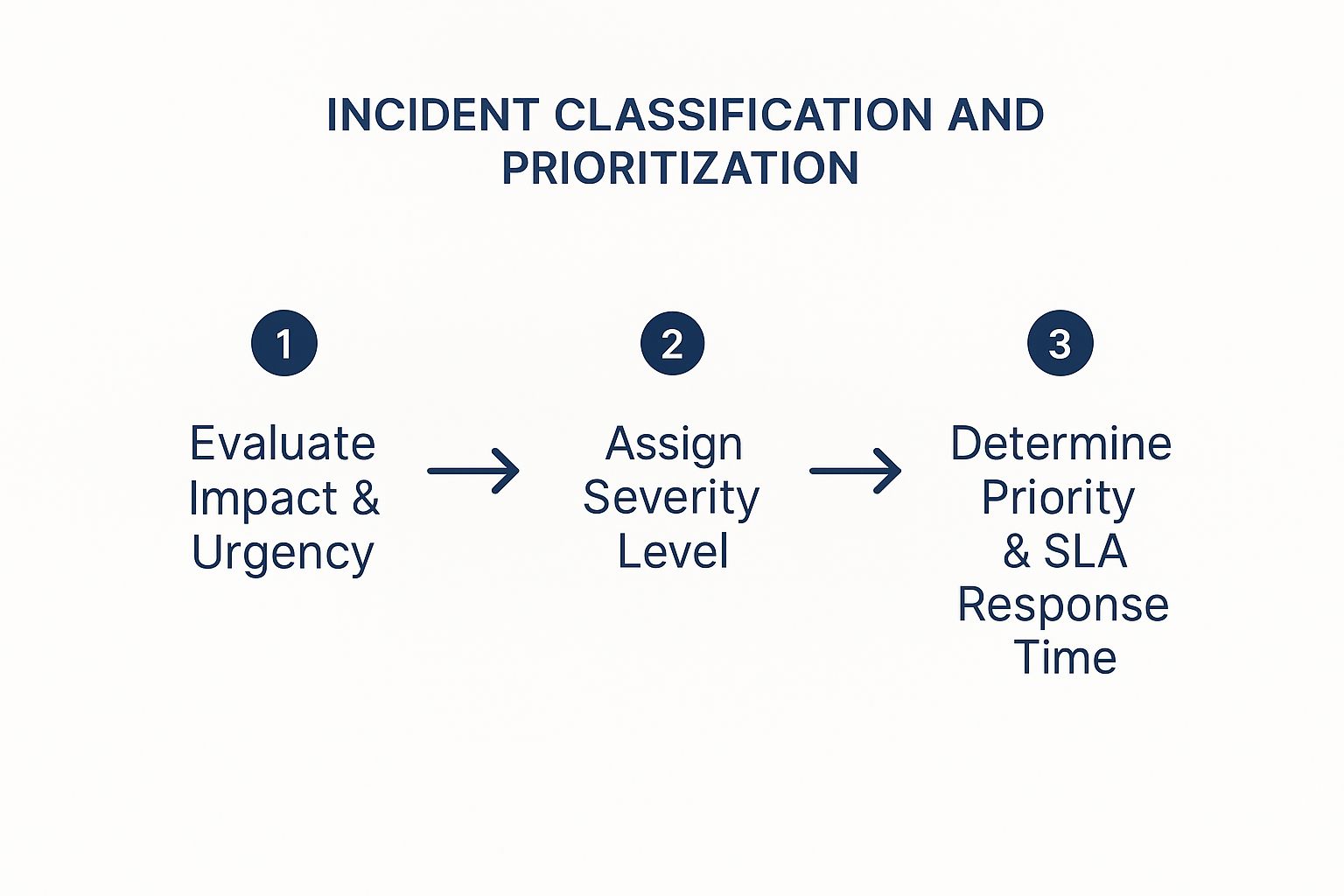
As you can see, this isn't guesswork. It’s a structured evaluation of impact and urgency that maps directly to a severity level and a required response time.
To make this crystal clear, organizations define severity levels. While the exact definitions vary, they usually follow a similar pattern.
Incident Severity Level Breakdown
Here's a look at how you might break down incident severity levels to ensure everyone is on the same page.
| Severity Level | Business Impact Example | Target Initial Response Time |
|---|---|---|
| SEV 1 | A full site-down event, data loss, or a critical security breach impacting all customers. | < 5 minutes |
| SEV 2 | A major feature is broken for many users (e.g., checkout fails), or significant performance degradation. | < 15 minutes |
| SEV 3 | A non-critical feature is impaired for some users, or a minor performance issue with a workaround. | < 1 hour |
| SEV 4 | A minor cosmetic bug or an issue with a clear, easy workaround impacting a single user. | < 24 hours |
Having a table like this removes ambiguity and ensures the response is proportional to the problem at hand.
Once the incident is classified, the team immediately shifts into containment. The priority here is to stop the bleeding. This might not be the final, elegant fix, but it's all about mitigating the impact as quickly as possible.
Some common containment strategies I've seen work well include:
- Rolling back a recent deployment that's the likely culprit.
- Shifting traffic away from a failing data center or server cluster.
- Flipping a feature flag to temporarily disable a non-essential service that’s causing instability.
The goal here is speed, not perfection. A permanent solution can wait; stopping the customer pain can't.
From Containment to Full Resolution
With the immediate fire put out, the focus pivots to resolution. This is where the team digs in to deploy a permanent fix. That could mean patching a software bug, scaling up infrastructure to handle the load, or correcting a faulty configuration file. You can't declare victory until the system is fully restored and you’ve verified it's operating normally again.
But don’t close the ticket just yet. The most important part of the entire process is the Post-Incident Review. This is a blameless meeting where the team dissects what happened, why it happened, and how the response went.
The point of a post-mortem isn't to find someone to blame; it’s to understand how our systems and processes failed us. Real resilience is built by learning from mistakes, not by pointing fingers.
The meeting should produce a list of concrete, actionable follow-up items designed to prevent this exact problem from happening again. That might involve improving monitoring, beefing up documentation, or fixing the underlying root cause for good. If you want to see how these documents are put together, you can explore a complete incident response plan example here.
Sadly, many organizations skip this step. It's shocking, but data shows that only about 55% of companies even maintain a fully documented incident response plan. Even worse, of those that do, 42% admit they don't update it regularly, leaving it to gather dust. This is a huge mistake. The teams that consistently practice and refine their plans are the ones who come out ahead.
Choosing the Right Tools for Your Tech Stack

Let's be honest, your incident management plan is only as good as the tools you use to execute it. You can have the best-written procedures in the world, but if your team is scrambling through email chains and messy Slack threads during a crisis, things will fall apart. Fast.
The right tech stack is the engine that drives a fast, coordinated response. It’s not about buying the most expensive, feature-packed platform out there. It's about strategically choosing a set of tools that automate tedious work, clarify responsibilities, and simplify communication when every second counts.
Core Components of an Incident Management Stack
I've seen teams build incredibly effective stacks by focusing on three fundamental areas: logging the incident, alerting the right people, and keeping everyone else in the loop. Each piece of this puzzle is crucial for maintaining a single source of truth and preventing chaos.
At a minimum, your stack needs these key players:
- A Ticketing or Service Desk System: This is your command center, the official record for every incident. Think of tools like Jira Service Management or Zendesk. They track an issue from its first report all the way to resolution, ensuring nothing gets lost and giving you a clear timeline for post-mortems.
- An On-Call Alerting Platform: An email alert for a critical system failure at 2 AM is basically useless. You need a tool like PagerDuty or Opsgenie that integrates with your monitoring systems. It will intelligently escalate alerts via phone call, SMS, and push notification until the right on-call engineer acknowledges the problem.
- A Public Status Page: When an incident impacts your customers, transparency is your best friend. A dedicated status page from a provider like Statuspage gives users one place to go for real-time updates. This single action can slash the volume of incoming support tickets, freeing up your team to actually fix the problem.
The biggest mistake I see teams make is trying to manage incidents over a scattered mess of emails, Slack messages, and spreadsheets. A dedicated tech stack isn't a luxury; it's the foundation for a repeatable and scalable process.
The Rise of Proactive Tooling with AIOps
The tools we just covered are fantastic for reacting to incidents. But the real game-changer is shifting from a reactive stance to a proactive one—spotting trouble before it happens. This is exactly what AIOps (AI for IT Operations) is all about.
AIOps platforms like Datadog or Splunk connect to all your systems and use machine learning to analyze the noise, spotting subtle anomalies and dangerous patterns a human could never catch.
For example, instead of just getting an alert when a server’s CPU hits 95%, an AIOps tool might flag that a subtle memory leak is on track to cause a full-blown crash in six hours. This gives you a chance to intervene and fix the root cause before any customers are ever impacted.
This proactive approach doesn’t eliminate the need for a solid response plan, but it dramatically reduces how often you'll have to use it. And preventing an incident altogether is always the best possible outcome.
Keeping Your Incident Response Plan Effective
An incident management plan gathering dust on a shelf is worse than useless—it creates a false sense of security. The most perfectly crafted procedures in the world mean nothing if your team hasn't actually put them to the test. The goal is to make your plan a living, breathing part of your operational culture, not just another document.
This is where drills and simulations come in. Running regular, low-stakes exercises builds the team's confidence and muscle memory without the crushing pressure of a real crisis. And these aren't just for your engineers; they're vital for everyone involved, from customer support to communications.
Practice Through Realistic Drills
A fantastic starting point is the tabletop exercise. Think of it as a guided conversation where your response team talks through a simulated incident. You might pose a scenario like a critical third-party API going down, then have the team walk through exactly how they would communicate, contain the problem, and execute a rollback.
Once you’ve mastered those, you can move on to more hands-on drills:
- Walk-throughs: This involves a step-by-step review of a specific procedure. For example, you could trace the exact process for escalating an issue from a support ticket to the on-call engineer.
- Simulations: These are more involved. You might actually disable a service in a non-production environment to test your team's real ability to detect, diagnose, and recover from the failure.
A plan that hasn't been tested is just a theory. Regular drills are what turn theory into reflex, and that’s exactly what you need when the pressure is on.
Cultivating a Blameless Culture
Just as important is what happens after an incident is over. The blameless post-mortem is your single most powerful tool for getting better. The goal here isn't to point fingers at who made a mistake; it's to uncover the systemic gaps in your processes and technology that allowed the mistake to happen. When people feel safe to share what really went down, you get to the root of the problem and can make changes that stick.
Every review should produce concrete, assigned action items to improve your tools, monitoring, or documentation. This mindset of constant learning is absolutely critical. After all, the threats you face are always evolving. In fact, the 2025 Unit 42 Global Incident Response Report found that of over 500 major cyberattacks they handled in 2024, a staggering 86% had a direct business impact. You can dive deeper into their findings in the full Unit 42 report.
Finally, your incident management procedures and all the runbooks that go with them have to stay current. This means committing to regular updates and having a rock-solid system for organizing your documentation. We actually have detailed guidance on this in our guide to document management best practices.
By embedding this cycle of practice, review, and refinement into your culture, every incident—big or small—becomes an opportunity to make your organization stronger and more resilient.
Answering Your Top Incident Management Questions

As teams start to formalize their incident management, a few key questions always seem to surface. Getting the answers right from the beginning helps build a plan your team can actually use when the pressure is on. Let's tackle some of the most common ones I hear.
One of the biggest hurdles is understanding the difference between an incident and a problem. It sounds simple, but the distinction is critical.
An incident is the fire you need to put out right now. It's the immediate, disruptive event—your website is down, an API is failing, or customers can't check out. The goal here is speed. You need to restore service as quickly as possible, even if it's just a temporary workaround.
A problem, however, is the faulty wiring that caused the fire in the first place. It's the underlying root cause, like a buggy code deployment or a database that keeps running out of memory. Problem management is about digging deep to fix the core issue so the same incident doesn't happen again next week.
What Does a Good Post-Incident Review Look Like?
This is another big one. How do you make sure a post-mortem is a valuable learning exercise and not just a meeting everyone dreads? The most important ingredient, hands down, is a blameless culture.
The entire point of the review is to dissect what happened to your systems and processes, not to point fingers at who messed up. When your team feels safe enough to be completely honest without fear of blame, you get to the real root cause instead of just scratching the surface.
A successful review doesn't end when the meeting is over. It ends with clear, assigned action items. The whole process is pointless if you don't walk away with tangible tasks to improve tools, update documentation, or fix broken processes.
This accountability is what prevents history from repeating itself. It’s also a cornerstone of many compliance standards. For instance, having a well-documented review process is essential for building a strong data privacy compliance framework that will hold up under audit.
How Often Should We Be Practicing This?
Finally, everyone wants to know the right cadence for testing their incident response plan. While there's no single magic number, a good rule of thumb is to run a tabletop exercise for your most critical services at least quarterly.
Think of it as a fire drill. You walk through a simulated incident to find the gaps in your plan before a real one hits.
On top of that, aim for a more in-depth, hands-on simulation at least annually. And here’s the most important tip: always run a drill after any major change—whether it’s a new team member, a new piece of technology, or a major service update. Constant practice is what turns a document on a shelf into muscle memory for your team.
Ready to cut down the time you spend on documentation and reports? Whisperit uses advanced AI to help you create accurate, professional documents up to two times faster. Find out how Whisperit can transform your workflow today.