
How to Transcribe an Audio File: Easy & Quick Guide
Remember the old way of transcribing audio? Hitting pause, rewinding, typing, and repeating that cycle until your fingers cramped. It was tedious, time-consuming, and a massive drain on productivity. Thankfully, those days are over.
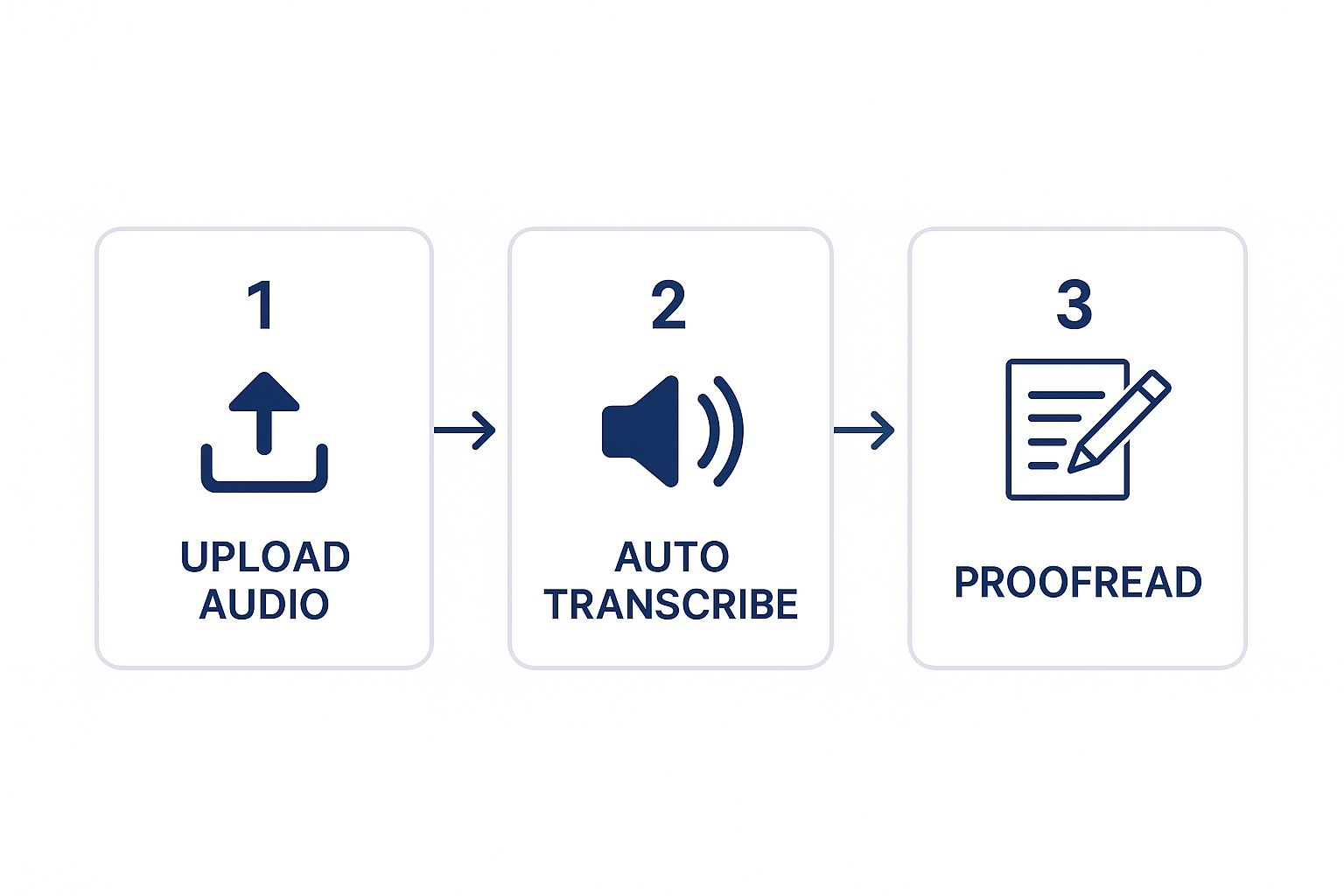
Today, the answer to "how do I transcribe this audio file?" is a simple, three-part flow: upload the file, let the AI work its magic, and then give the text a quick polish. What used to take hours of manual labor now takes just a few minutes.
The Modern Approach to Audio Transcription
Let's be honest: manually transcribing is a grind. Whether you're a journalist on a tight deadline, a researcher sifting through hours of interview footage, or a podcaster creating show notes, that time is a serious bottleneck. This is where AI-powered tools like Whisperit completely change the game.
Instead of getting stuck in the pause-and-play loop, you can now simply drop an audio file into the tool and get a full text transcript back almost instantly. This isn't just a minor time-saver; it’s a fundamental shift that lets you get back to the work that actually matters.
Why AI Is the New Standard
The biggest reason for this shift? The incredible gains in both speed and accuracy. Modern AI models are sophisticated enough to understand various accents, handle a decent amount of background noise, and even distinguish between different speakers—tasks that used to demand a highly trained human ear.
This isn't just a niche trend; it's a massive industry-wide movement. The global AI transcription market was valued at $4.5 billion in 2024** and is expected to skyrocket to **$19.2 billion by 2034. That kind of growth shows just how much professionals are relying on automated solutions to get the job done faster and more accurately.
By automating the most grueling part of transcription, you can finally shift your energy from just typing to actually analyzing, editing, and using the valuable content you’ve recorded.
Before we dive into the "how-to," it helps to see a direct comparison of the old way versus the new.
AI Transcription vs Manual Transcription At a Glance
This table breaks down the core differences between using an AI service and sticking with traditional manual transcription.
| Feature | AI Transcription (e.g., Whisperit) | Manual Transcription |
|---|---|---|
| Speed | Minutes for a 1-hour file | 4-6 hours for a 1-hour file |
| Cost | Significantly lower, often cents per minute | Higher, typically priced per audio minute |
| Accuracy | Up to 99%, improves with clear audio | High, but prone to human error and fatigue |
| Turnaround | Nearly instant | Hours or even days |
| Scalability | Easily handles large volumes of audio | Limited by human capacity |
As you can see, for most day-to-day needs, AI is the clear winner, freeing up your time and budget.
What This Means for Your Workflow
Bringing an AI tool into your process makes everything smoother. It removes the friction between a spoken idea and a written document, letting you capture and organize information with less effort. Think about it: a scattered voice memo can become a structured blog post draft, or a two-hour podcast can be turned into a searchable, scannable document.
This is especially true for anyone who needs to regularly convert voice to text AI. A lawyer can transcribe a deposition in minutes to pinpoint key statements. A marketing team can get accurate, shareable meeting notes without assigning someone to be a scribe. The tech does the heavy lifting, so you can work smarter.
Preparing Your Audio for Flawless AI Transcription
The accuracy of your final transcript is pretty much decided before you even hit the "upload" button. It really boils down to that old saying: "garbage in, garbage out." When an AI has to fight through messy audio to figure out what’s being said, it starts guessing. And that’s when you get stuck with a transcript full of errors that take forever to fix.
Taking just a few minutes to prep your audio file can honestly save you hours of cleanup work on the back end. The idea is simple: give the AI the cleanest, clearest source material possible. This little bit of foresight is the secret weapon for getting a nearly perfect transcript right from the start.
Minimize Background Distractions
If there's one thing that trips up AI transcription, it's background noise. Everyday sounds like cafe chatter, passing cars, or even the low hum of an air conditioner can really muddy the waters, making it tough for the software to lock onto the actual voices.
Just think about the difference between recording a client interview in a noisy coffee shop versus a quiet office. The coffee shop recording is going to be a mess of clanking dishes and other people’s conversations, forcing the AI to work overtime. The recording from the quiet office, on the other hand, gives it a clean signal to work with, resulting in a much more accurate transcript.
Learning how to remove background noise is a game-changer. If you can't find a perfectly silent spot to record, using some simple software to clean up the file before you send it to Whisperit will make a huge difference in your results.
Pro Tip: Never underestimate what a decent microphone can do. Even a budget-friendly external mic will capture your voice way more clearly than the one built into your laptop, cutting down on a ton of ambient noise from the get-go.
Manage Speaker Clarity and File Formats
It’s not just about background noise; the way people speak matters, too. When speakers constantly talk over each other, their words get tangled into a single audio stream that’s nearly impossible to decipher. It’s a good practice to encourage everyone in the recording to speak one at a time, leaving just a little space between turns.
This simple bit of discipline helps the AI separate one voice from another, which is absolutely critical for transcribing multi-speaker interviews or team meetings. On top of that, the technical quality of the audio file itself plays a big role.
- File Format: Whenever you can, stick with lossless formats like WAV or FLAC. They keep all the original audio detail. If you have to use a compressed format, go for a high-quality MP3 or M4A.
- Recording Levels: Make sure your audio isn’t too quiet or so loud that it’s "peaking" and distorting. You're aiming for a strong, consistent volume all the way through.
Nailing these basics is fundamental. If you want to get more technical with your setup, we have a complete guide on https://www.whisperit.ai/blog/how-to-set-up-microphone for capturing crystal-clear sound. By focusing on these prep steps, you're putting your transcription project on the fast track to success.
Putting AI Transcription into Practice: A Walkthrough
Alright, your audio is prepped and ready to go. Now for the exciting part—letting the AI work its magic. We’ll walk through the process using Whisperit as our example to show you just how simple it is to get a great transcript. Think of this less as a technical manual and more as the core workflow you’ll come back to again and again.
The whole process flows naturally, moving you from the raw audio file to a clean, polished transcript without any guesswork. You’ll start by getting your file into the system, giving the AI a few quick pointers, and then letting it take over.
Getting Your Project Started
First thing’s first: you need to upload your audio. Most modern tools, Whisperit included, make this incredibly easy with a drag-and-drop interface. Just grab your audio file—whether it’s an MP3, WAV, or M4A—and pull it right into the dashboard.
This is what you'll see when you kick things off in Whisperit. The layout is clean and gets straight to the point.
Before you hit "go," you'll give the AI a little bit of context. This is where you set it up for success by tweaking a few key settings.
- Language Selection: This is the most crucial step. Tell the AI the primary language spoken in the recording so it loads the correct model.
- Number of Speakers: Got a multi-person interview? Let the AI know how many speakers to expect. This helps immensely with speaker labeling (also called diarization).
- Custom Vocabulary: This feature is a lifesaver. If your audio contains niche jargon, unique company names, or specific acronyms, add them here. It teaches the AI to recognize and spell them correctly from the get-go.
I can't stress this enough: spending 30 seconds on these settings will save you a ton of editing time later. I once transcribed a technical interview where I forgot to add a few key acronyms to the custom vocabulary. The AI did its best, but I spent an extra 15 minutes just finding and fixing those terms. Lesson learned.
Kicking Off the Transcription
Once your settings are dialed in, it’s time to launch. Whisperit gets to work, converting all that spoken audio into written text. You'll see a progress bar, so you’re never left wondering how much longer it will take.
For a typical one-hour recording, you're usually looking at just a few minutes of processing time. This is where modern speech-to-text really shines. Today's AI can hit accuracy rates up to 99%, which is a world away from the clunky, error-prone software of the past.
When the job is done, you'll get a notification. Your first-pass transcript will be waiting for you in an interactive editor, all set for the final, human touch: your review.
If you want to dive deeper into the nuts and bolts, our complete guide on how to handle the process of transcribing audio files has even more tips. With this initial AI draft in hand, you’re perfectly positioned for the final editing stage.
Refining Your AI-Generated Transcript
The first pass from the AI gets you incredibly close—often 95% of the way there. But that last 5% is where the real magic happens, and it requires a human touch. Let's be honest, no AI is perfect. It’s bound to trip over unique names, company-specific jargon, or a speaker with a thick accent.
Think of the AI's output as a fantastic rough draft. Your job is to take that draft and polish it until it shines. This is the step that guarantees your final document is professional and accurate, whether you're creating legal records, formal meeting minutes, or content for your next big project.
Getting Comfortable in the Interactive Editor
This is where tools like Whisperit really stand out. You’re not just staring at a wall of text; you’re using an interactive editor that syncs the audio playback directly with the words on the screen. It's a game-changer compared to the old days of juggling a separate audio player and a Word doc.
As the audio plays, you'll see the corresponding words highlight in real-time. This makes spotting a mistake as simple as hearing it.
The best part? You can jump to any point in the recording just by clicking on a word in the transcript. This feature alone saves you from the tedious task of scrubbing back and forth through the audio timeline to find that one specific phrase you need to fix.
Your goal here isn't to re-transcribe from scratch. It's about spotting the subtle errors the AI missed. Keep an eye out for names, technical terms, and any of those classic sound-alike words, like "their" versus "they're."
Common AI Slip-Ups and How to Fix Them Fast
After you've done a few of these, you'll start to notice the same types of errors pop up. Knowing what to look for makes the whole editing process much quicker.
Here are the usual suspects:
- Proper Nouns: AI often takes a creative guess at spelling unique names of people, companies, or places. For instance, it might hear "Jordi Bruin" and type out "Jordan Brune."
- Industry Jargon: If your audio is full of specialized terms or acronyms, the AI can get confused. A medical term like "pharmacokinetics" might come out as complete nonsense.
- Homophones: Words that sound the same but have different meanings and spellings (like "to," "too," and "two") are common mix-ups.
- Speaker Labels: In a conversation with multiple speakers, the AI might occasionally get confused and attribute a line to the wrong person.
Most editors have keyboard shortcuts that make fixing these mistakes a breeze. You can typically hit Tab to play or pause the audio and use Shift+Tab to rewind a few seconds without ever taking your hands off the keyboard. Getting these down makes the whole process feel much smoother.
If you're new to this, we've put together some great transcription tips for beginners to help you build good habits from the start.
The Final Read-Through
Once you've corrected all the word-level mistakes, it’s time for one last pass. This final proofread is less about the individual words and more about the big picture: readability and formatting.
This is your chance to clean up punctuation, add paragraph breaks to make the text easier to read, and just make sure the entire document makes sense. It’s this last touch that turns a raw transcript into a polished, professional document you can be proud of.
Getting Your Final Transcript Out and Keeping It Safe
Once you’ve fine-tuned your transcript, the last piece of the puzzle is getting it out of Whisperit and into the world. After all, a transcript is meant to be used, whether it's for a blog post, video subtitles, or meeting notes.
The format you choose really depends on what you're doing with it. Think of it as picking the right tool for the job. A simple text file is great for quickly grabbing the content, but a formatted document is much better for a formal report. Whisperit gives you a few solid options to match whatever your workflow looks like.
Choosing the Right Export Format
Making the right choice here saves a ton of headaches later. You want to avoid having to manually reformat everything. Each file type is designed for a specific purpose, helping you move your text from Whisperit to its final destination without a fuss.
- .TXT (Plain Text): This is your no-frills, universal option. It’s perfect when you just need the raw text to copy and paste into another program, like your content management system or a project tool.
- .DOCX (Word Document): If you need to keep things like paragraphs and speaker labels intact, this is the way to go. It’s the best choice for creating polished documents, reports, or minutes that you can share with your team or clients right away.
- .SRT (SubRip Subtitle File): This one's a lifesaver for anyone working with video. An SRT file isn't just text; it includes the exact timestamps needed to sync subtitles with your video. It’s absolutely essential for accessibility and making your video content searchable on platforms like YouTube.
Pro Tip: I’ve learned that aligning my export format with my end goal saves me a surprising amount of time. Exporting meeting notes to .DOCX means I don't have to rebuild the structure, and grabbing an .SRT file means it's ready to upload straight to Vimeo.
Don't Forget About Security
Exporting is one thing, but we also need to talk about keeping your data safe. This is especially true if your transcripts contain sensitive material. Think about it—confidential client info, internal business strategies, or private interviews all demand a high level of security.
This is where your choice of transcription service really makes a difference. You need to trust that the platform is built with security at its core.
I always make sure any tool I use has strong encryption for data both at rest (when it's sitting on their servers) and in transit (during upload and download). When I'm handling something really sensitive, I dig into the provider's privacy policies. It's not optional. Platforms hosted in places with strict data protection laws, like Switzerland, give me an extra layer of confidence.
For a much deeper look into this, our guide on the importance of encrypted file transfer is a great resource. Making these security practices a habit means your transcription process is not just fast, but also responsible. It's about protecting yourself, your clients, and your sources from any potential leaks.
Got Questions About Audio Transcription? We've Got Answers.
When you're first figuring out how to transcribe an audio file, a few questions always seem to pop up. It's a field that's moving incredibly fast, so it's totally normal to wonder about things like accuracy, cost, and what really makes a difference in the final transcript. Let’s tackle some of the most common ones I hear.
One of the first things people ask is, "Just how accurate is AI transcription, really?" The short answer is: surprisingly accurate, but there’s a small catch. If you give it a high-quality audio file—think clear speakers, minimal background fuzz—the best AI models can hit up to 99% accuracy. That's a huge improvement from where this tech was just a few years back.
Of course, that accuracy can take a hit if the audio quality is messy. Things like heavy accents, people talking over each other, or a noisy café in the background can trip up the AI and lead to errors. This is exactly why spending a little time on audio prep, like we talked about earlier, pays off big time.
How Long Does It Take to Transcribe an Audio File?
This is where AI is a complete game-changer. A professional human transcriber usually needs about four hours to get through one hour of audio. With a tool like Whisperit, that same one-hour file is often done in just a few minutes.
That kind of speed completely changes your workflow. A task that used to eat up half a day is now finished before you’re done with your coffee. It frees you up to actually use the content instead of just spending hours typing it out.
The real win isn't just the time you save on the first pass. It’s the ripple effect it has on your entire project. Quicker transcripts mean faster content creation, speedier research, and more nimble decisions.
Is AI Transcription Expensive?
It’s easy to assume that powerful technology comes with a hefty price tag, but that’s one of the biggest myths about AI transcription. In almost every scenario, it's far more cost-effective than hiring a person to do it, especially when you're dealing with a lot of audio.
Manual services typically charge by the audio minute, and those costs can pile up fast. AI services, on the other hand, usually have flexible pricing plans or pay-as-you-go options that are significantly more affordable. This shift has made transcription a tool for everyone, from podcasters and students to major corporations.
You can see this trend in the market itself. The U.S. transcription market was valued at about $32.58 billion in 2025** and is expected to climb to **$41.93 billion by 2030, largely because it's being adopted everywhere—legal, media, education, you name it. For a deeper dive into these numbers, you can check out the industry growth data from Grand View Research.
Can AI Handle Different Accents and Languages?
Absolutely, and it's getting better all the time. Today's AI models are trained on massive, global datasets that include a huge variety of accents, dialects, and languages. While a particularly thick or uncommon accent might still cause a few hiccups, the technology is generally very good at understanding speakers from all over the world.
Whisperit, for example, supports dozens of languages. You just have to tell it which language is being spoken in the file before you start, and the AI will use the right model to give you the most accurate transcript possible.
Ready to turn your audio into accurate, editable text in minutes? Give Whisperit a try today and see just how easy transcription can be. You can get started for free over at whisperit.ai.