
How to Create Workflows that Actually Work
Building a solid workflow really comes down to three key steps: figuring out what you do over and over again, mapping out how those actions should flow logically, and then using a tool to automate the whole thing. It’s a strategy that pays off big time by cutting costs, making operations run smoother, and helping teams work together more effectively.
Why Mastering Workflows Is a Game-Changer for Your Business
Knowing how to build a good workflow isn't just for the IT department anymore. It's become a fundamental part of running a smart business. In a world where everything is digital, your ability to create and refine your processes directly impacts how quickly your company can adapt and grow. We're not just talking about getting things done faster—we're talking about creating a more intelligent, resilient foundation for your entire operation.
This isn't just a passing trend. It's a real shift in how successful companies operate. The numbers back it up, too. The workflow automation market was valued at around USD 15 billion and is expected to explode to USD 71 billion by 2031. This isn't just random growth; it's fueled by a universal push to get rid of tedious, manual tasks that are prone to human error.
The Tangible Wins of Workflow Automation
At its core, creating a workflow is about eliminating friction. Just think about the daily headaches that slow everyone down—chasing down approvals, manually copying information from one app to another, or trying to figure out where a project stands. Each one of those is a bottleneck that drains time and energy.
A well-designed workflow tackles these problems head-on by creating a clear, automated path for work to follow. This is so important for a few reasons:
- Serious Cost Savings: When you automate routine tasks, your team is free to stop doing busy work and start focusing on the stuff that actually requires a human brain—like strategy and creative problem-solving.
- Smoother Operations: Workflows make sure tasks get done the right way, every time. This cuts down on delays and speeds up the pace of your entire business.
- Better Teamwork: Collaboration becomes second nature when everyone knows the process and their part in it. Automated alerts and clean handoffs mean fewer things fall through the cracks.
The table below breaks down the immediate strategic benefits that businesses gain when they implement well-designed automated workflows.
Core Business Gains from Automated Workflows
| Benefit Area | Description | Impact on Business |
|---|---|---|
| Cost Savings | Automating routine tasks frees up employee time and reduces the need for manual oversight. | Lower operational costs and improved resource allocation to high-value activities. |
| Operational Speed | Processes are executed consistently and without delay, moving work from start to finish faster. | Faster project delivery, quicker response to customer needs, and improved productivity. |
| Accuracy & Quality | Automation removes the risk of human error in repetitive tasks like data entry or report generation. | Higher quality output, fewer mistakes to fix, and greater reliability in business data. |
| Collaboration | Clear, automated handoffs and notifications ensure everyone is on the same page. | Reduced miscommunication, seamless teamwork, and improved accountability across departments. |
Ultimately, these benefits add up to a more resilient and competitive business.
From Efficiency to a Real Strategic Edge
The payoff goes way beyond just being more productive. To get the full picture, you have to look at how strong workflows contribute to overall business efficiency. When your essential processes are automated and reliable, your business is simply more agile and better prepared to pivot when market conditions change.
A well-structured workflow isn't just a to-do list; it's a competitive advantage. It's the engine that powers consistency, scalability, and excellence in your daily operations, turning chaos into predictable, high-quality outcomes.
What’s more, getting good at this empowers your teams to solve their own problems. When the marketing team can build its own workflow for campaign approvals or the finance team can automate invoice processing, they become more self-reliant and innovative. If you want to explore this further, we've got a great resource on improving workflow efficiency that dives into these ideas. This kind of strategic empowerment is the ultimate goal.
Laying the Groundwork for Workflow Success

Before you even think about building an automated workflow, you have to get your hands dirty with the manual one. I've seen it time and again: people jump straight into an automation tool without a clear plan, and they end up with a process that’s just a faster, more complicated version of their old mess.
The most successful projects start with something far more fundamental: mapping what you currently do. This isn't just about drawing boxes and arrows. It’s about a deep, honest look at your daily operations to find the real bottlenecks—the hidden snags that slow your team down and let errors creep in. Get this right, and your new workflow will solve actual problems instead of just digitizing a flawed process.
Define What Success Looks Like
First things first: set clear, measurable goals. Vague ambitions like "improve efficiency" are useless. You need specific targets that address a real pain point. This clarity will be your north star for every decision you make down the line.
Think in concrete terms. A weak goal is "process invoices faster." A great goal is "cut invoice approval time by 50% within three months." Now that's a target you can measure and celebrate.
Here are a few more examples of strong, actionable goals:
- Achieve zero manual data entry errors in our quarterly financial reports.
- Get new client onboarding down from an average of five days to just two.
- Slash document review cycles from three rounds of painful back-and-forth to just one.
Setting these benchmarks gives you a clear definition of what "done" looks like. It's the only way you’ll know if your automation efforts are actually paying off.
Visualize Your Current Process
With your goals in hand, it's time to map your existing process from start to finish. This is where you lay all your cards on the table. To truly master process mapping techniques, you need to detail every single step, no matter how small.
Here’s a tip I can't stress enough: involve the people who actually do the work every day. Their input is non-negotiable. They know where things get stuck, what takes forever, and which steps are completely redundant. They'll tell you about all the "unwritten rules" and workarounds that never show up on an official process chart.
A process map built without input from the frontline team is just a work of fiction. The real insights come from the people who live the workflow daily and understand its nuances and frustrations.
This collaborative approach does more than just produce an accurate map—it builds buy-in from the very beginning. When your team feels heard and involved in creating the solution, they’re far more likely to embrace the new, automated workflow when it goes live. This is especially true for tedious tasks involving tons of paperwork, a common focus for automation. If that's you, our guide on document workflow management has more detailed strategies.
Identify the Automation Sweet Spots
Once your process is mapped out and you've gathered your team's feedback, you can start pinpointing the best opportunities for automation. You're looking for tasks that are:
- Highly Repetitive: Think copying and pasting data between spreadsheets or reports.
- Rule-Based: Steps that follow a simple "if this, then that" logic.
- Prone to Human Error: Any task where one tiny slip-up can cause major headaches later.
The demand for this kind of optimization is exploding. The workflow automation market recently hit over USD 25 billion and is expected to climb to around USD 30.61 billion. A huge driver of this growth is the 32 million small businesses in the U.S. alone, many of whom are automating to cut costs and better support the nearly 35 million people working from home.
Getting this groundwork right ensures you aren't just automating for the sake of it. You’re making a strategic investment in your business’s future.
Building Your First AI-Powered Workflow
Alright, enough with the theory. The best way to understand how this works is to get your hands dirty and build something. Let's walk through creating your first AI-powered workflow, using a process every business knows well: client onboarding.
This is a perfect starting point because it's a mix of simple, repeatable tasks and moments that can be made much smarter with a bit of AI.
Think about what happens right after a new client signs a contract. Usually, it’s a scramble of emails, manual data entry, and crossed wires. Instead, we can create an automated workflow that kicks off the second that signature hits the page. It's not just about speed; it's about delivering a polished, professional experience right from the start. We'll use Whisperit to show how this is done without needing to write a single line of code.
Nailing Down the Initial Trigger
Every automated workflow needs a starting pistol—a specific event that gets the whole thing moving. This is your trigger. For our client onboarding flow, the trigger is crystal clear: a newly signed contract.
In a tool like Whisperit, you’d connect your digital signature app (like DocuSign or PandaDoc) and set the trigger to "New Document Signed." The moment that happens, your workflow springs to life. This simple step completely removes that awkward lag where a project manager is waiting to see the signature before getting started.
Of course, triggers come in all shapes and sizes. Here are a few other common ones I see people use:
- A new lead fills out a form on your website.
- An invoice lands in a specific inbox, like
invoices@yourcompany.com. - A sales rep moves a deal to "Closed-Won" in your CRM.
- A new asset is uploaded to a shared cloud folder.
The trick is to anchor your workflow to a reliable, digital-first event. That creates a solid foundation for every action that follows.
Mapping Out Your Sequence of Actions
Once the trigger fires, you need to define the chain of actions—the individual tasks the workflow will perform on your behalf. For our client onboarding process, a solid, predictable sequence might look something like this:
- Create a New Client Folder: The workflow instantly creates a new, standardized folder for the client in your shared drive (like Google Drive or OneDrive). No more messy, inconsistent folder structures.
- Send a Welcome Email: A personalized welcome email goes out to the client. It can pull their name and project details right from the contract, so it feels human, not robotic.
- Assign Internal Tasks: The workflow then jumps into your project management tool (Asana, Trello, etc.). It can assign "Schedule Kick-off Call" to the account manager and "Set Up Project Board" to the project lead.
- Schedule the Kick-off Call: An action sends a Calendly link to the client, letting them pick a time for the kick-off meeting that works for them. Zero back-and-forth emails required.
This simple sequence turns a chaotic, manual headache into a smooth, professional system. This image really captures the core logic of planning out your workflow's structure.
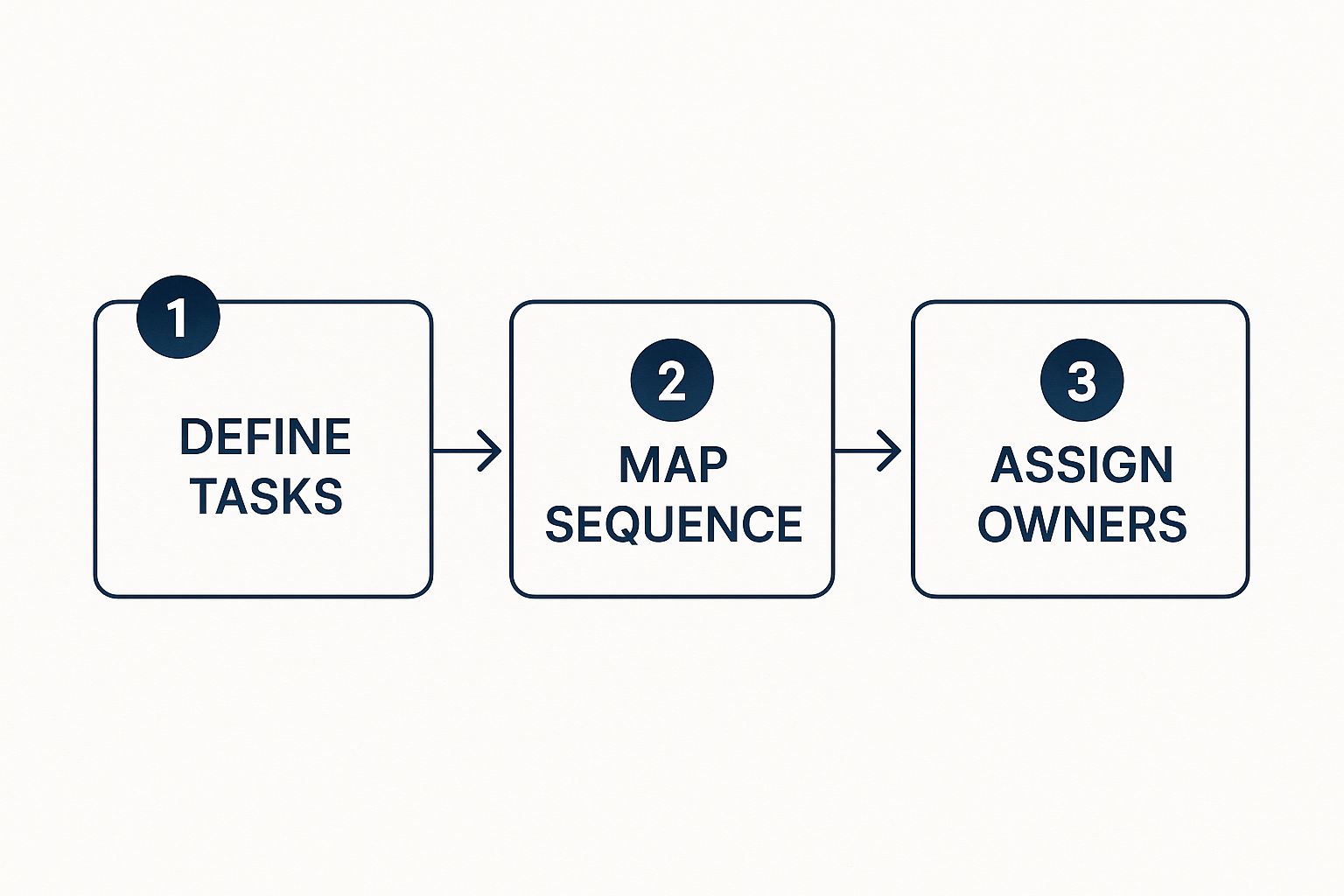
As it shows, defining what needs to happen, in what order, and who owns it are the absolute fundamentals of an effective workflow.
Weaving in AI for Smarter Actions
Now for the fun part. This is where your workflow goes from being just a helpful time-saver to something truly intelligent. Instead of just following a script, we can inject AI to handle the more complex, thinking-based tasks.
AI isn't just another step in the process; it's a layer of intelligence that elevates the entire workflow. It allows your automation to make decisions, understand context, and handle variability in a way that basic automation simply can't.
Let's upgrade our client onboarding workflow with a few AI-powered actions you can build right inside a platform like Whisperit:
- Intelligent Document Processing: Instead of a person manually scanning the contract for the project start date, key contacts, or billing address, an AI action can automatically extract this data. The workflow then uses this clean, accurate information to populate your CRM and project management tools, killing data entry errors for good.
- Sentiment-Based Routing: What happens when the client replies to your welcome email? An AI action can analyze the sentiment of their message. If it’s positive and happy, it might just get routed to the account manager. But if the AI detects frustration or confusion, the workflow can immediately flag the message and escalate it to a senior manager for a swift response.
- AI-Powered Summarization: Let's say the client sends over a massive project brief. The workflow can use AI to generate a quick, scannable summary. That summary then gets posted in the project's Slack channel, giving the entire team the gist in seconds.
These AI-driven steps add a powerful layer of sophistication. They take on the nuanced, analytical work that used to require a human, freeing up your team for the work that really matters. The results are undeniable—to see just how valuable this can be, check out the game-changing workflow automation benefits for business success we’ve broken down. Building your first workflow is a journey of turning manual drudgery into automated brilliance.
How To Optimize and Scale Your Automation Efforts

Getting your first automated workflow live is a great feeling, but it’s really just the beginning. The true value comes to light in the days, weeks, and months that follow. This is where you pivot from simply building to actively refining—transforming a good workflow into a core part of your operations.
Continuous improvement is the name of the game here. It’s all about being intentional, using real data to see what’s actually happening, and having the confidence to adjust your initial design. Your goal should be to move beyond doing tasks faster and start doing them smarter, more efficiently, and at a much bigger scale.
Keep a Close Eye on Your Workflow's Health
You can't fix what you can't see. Once your workflow is up and running, your first job is to become a dedicated observer. Modern platforms like Whisperit come with built-in analytics that are essentially a health monitor for your automation, giving you a clear window into its performance.
Start by tracking a few key metrics that tell the story of your workflow's impact. Think of them as its vital signs.
- Completion Times: How long does the workflow take from start to finish? Are you actually seeing the time savings you hoped for?
- Error Rates: How often does the workflow hit a snag or need someone to step in? A high error rate is a red flag, often pointing to a flaw in your logic or an unexpected variable you didn't account for.
- Cost Savings: It's time to quantify the value. Calculate the hours saved and multiply that by the relevant labor cost to see the direct financial benefit.
- Throughput: How many items—invoices, support tickets, onboarding packets—is your workflow successfully handling per day or week?
Watching these numbers helps you set a baseline. From there, you can spot trends, identify new bottlenecks, and make data-backed decisions about where to focus your attention next.
The most successful teams I've seen treat their workflows like living systems, not "set it and forget it" projects. They are constantly monitoring performance, gathering feedback, and iterating to squeeze every last drop of efficiency out of the process.
This ongoing feedback loop is what separates a basic automation from a truly optimized one.
Iterate and Refine Your Workflow Design
With performance data in hand, you can get to the fun part: iteration. This is where you hunt for opportunities to make your workflow even better. Maybe one step is taking way longer than you thought, or a specific condition is causing errors to pop up repeatedly.
For example, let's say you automated an invoice approval process. You might notice that invoices over a certain dollar amount are constantly getting stuck. That's a clear signal to refine your design. You could add a conditional step that automatically flags these larger invoices and sends them straight to a senior manager, skipping the initial review and speeding things up. To see a great application of this kind of thinking, look into how HR process automation to transform your workplace can streamline administrative tasks.
Sector-Specific Workflow Automation Examples
To give you a better idea of how this looks in the real world, here’s a quick comparison of how different industries are using AI-powered workflows to solve their unique problems.
| Industry | Common Use Case | Key AI Integration |
|---|---|---|
| Healthcare | Patient Onboarding & Data Entry | OCR for digitizing patient forms and NLP for extracting key medical history details. |
| Finance | Loan Application Processing | AI-driven risk assessment models to analyze applicant data and NLP to verify documents. |
| E-commerce | Order Fulfillment & Inventory | Predictive analytics for demand forecasting and AI for optimizing shipping routes. |
| Legal | Contract Review & Analysis | NLP to identify clauses, risks, and obligations in legal documents, flagging them for attorney review. |
These examples just scratch the surface, but they show how tailored AI integrations are the key to unlocking major efficiencies, no matter your field.
Scaling Automation Across Your Organization
Once you’ve perfected a few key workflows, the next frontier is scaling that success. How do you take these pockets of efficiency and roll them out across the entire organization? This is a strategic move that needs both smart technology and smart rules.
A powerful strategy is creating reusable templates. If you’ve built a fantastic project intake workflow for the marketing team, turn it into a template. This lets the product or design team adapt it for their own use with very little effort, which encourages consistency and speeds up adoption across the board.
This kind of growth reflects a much larger market trend. The global workflow automation market, valued at USD 19.76 billion, is projected to more than double, reaching USD 45.49 billion. With over 31% of businesses worldwide having already automated at least one function, the shift toward organization-wide adoption is undeniable.
As you expand, establishing clear governance becomes absolutely critical. This means setting standards for security, data handling, and documentation. It ensures that as more people create workflows, they do so safely and consistently. Strong governance prevents a "wild west" of disjointed automations and is fundamental for managing sensitive information, a topic we explore in our guide to document management best practices.
Advanced Workflow Strategies from the Experts
Once you've got the hang of basic triggers and actions, you're ready to move into the really interesting stuff. This is where you graduate from simply connecting apps to architecting intelligent systems that are efficient, resilient, and ready for whatever you throw at them.
We're going to break down the techniques seasoned pros use to build truly robust automations. This means adding layers of logic to handle complexity, planning for when things inevitably go wrong, and locking down your data every step of the way. This is how you build a workflow you can actually trust to run critical business processes without needing to babysit it.
Weaving in Conditional Logic
The most powerful workflows aren't rigid, one-way streets. They're dynamic, able to adapt to different situations on the fly. This is where conditional logic—those simple but powerful "if/then" rules—makes all the difference.
Instead of your workflow doing the exact same thing every single time, conditional logic lets it make decisions. Think about an invoice approval process. You could set a rule: IF an invoice is over $5,000, THEN route it to a department head for a second look. If not, it just goes to the standard finance queue. This one simple rule prevents bottlenecks for small invoices while adding crucial oversight for larger ones.
You can chain these conditions together to navigate some pretty complex scenarios. Here are a few real-world examples:
- IF a support ticket gets tagged "Urgent," THEN instantly ping the senior support team's Slack channel.
- IF a new lead comes from a "Fortune 500" company, THEN assign it directly to a top sales executive and create a high-priority task in your CRM.
- IF an employee's leave request is for more than 10 days, THEN automatically add an extra approval step from HR.
Thinking in "if/then" terms is what allows you to build a level of nuance into your automations that mirrors human decision-making, making the whole system smarter and far more effective.
Designing for Failure with Smart Error Handling
Let me give you a hard truth about automation: things will break. It's not a matter of if, but when. An API you connect to will have downtime, a file will be in the wrong format, or some data will be missing. An amateur hopes for the best. An expert plans for the worst.
This is why error handling is so critical. It’s about building a safety net directly into your workflow. Instead of the whole process crashing to a halt because one step failed, an error-handling routine kicks in to manage the problem gracefully.
A workflow without error handling is a liability waiting to happen. Building routines that anticipate and manage failures is what transforms a fragile script into a reliable business process that can operate independently.
So, what happens if your workflow is supposed to save an email attachment to a cloud folder, but your storage service connection times out? A basic workflow just dies, leaving the task unfinished. A resilient one would:
- Catch the error, recognizing that the "Save File" action failed.
- Try again, maybe waiting a few minutes before making another attempt.
- Notify a human if the retry fails, sending a specific alert with the error details.
- Create a fallback, like adding a task in your project management tool for someone to upload the file manually.
This proactive approach ensures that a temporary glitch doesn't derail your entire operation.
Securing and Integrating Your Workflows
As your automations become more sophisticated, you'll inevitably be handling sensitive information. Protecting this data isn't optional—it has to be woven into the very fabric of your workflow design from day one.
Start by building on a platform like Whisperit that puts security first with features like end-to-end encryption and compliance with standards like GDPR and SOC 2. When you connect to other systems through their APIs, always use secure authentication methods and grant only the bare-minimum permissions needed for the workflow to do its job. A pro tip: never store sensitive data like API keys directly in your workflow steps; use a dedicated secrets manager or a secure vault.
Integrating different tools is what gives automation its power, but every connection point is a potential vulnerability. Treat each one with care. This focus on building secure, sturdy systems is a cornerstone of any successful automation strategy. To dig even deeper, check out our guide on essential process improvement techniques, which explores how to create more reliable systems from the ground up.
Common Questions About Creating Workflows
When you first dive into building workflows, a few key questions always seem to surface. Getting good answers to these early on can clear up a lot of confusion and give you the confidence to jump in and start building. Let's walk through some of the most common ones I hear.
What Is the Difference Between Workflow and Task Automation?
This is a big one, and it's easy to mix them up. The simplest way I explain it is to think of task automation as a single domino falling. It handles one specific, isolated action. A great example is setting up an auto-responder that sends a generic "We got your message!" email. It's a simple, one-off trigger.
Workflow automation, however, is the entire domino rally. It’s the full process, connecting a whole chain of tasks that might involve different people, departments, and even multiple software tools. Think about hiring someone. A workflow doesn't just send one email; it manages the entire journey—from the moment an application is submitted to scheduling interviews, collecting feedback, and finally sending out the offer letter. It's the complete, end-to-end system.
How Do I Pick Which Process to Automate First?
My advice is always the same: go where the pain is. Find the process that makes your team groan. Look for the bottlenecks—the tedious, repetitive tasks that are magnets for human error. Those are your low-hanging fruit.
You'll often find these hiding in plain sight in departments like Finance or HR. Things like processing invoice approvals, chasing down expense reports, or onboarding new employees are perfect candidates. They're usually high-volume, packed with manual steps, and follow a clear set of rules.
Picking a process that everyone on the team dislikes and delivering an early win is the single best way to build momentum. It proves the value of automation and gets people excited about what's next, making future projects much easier to launch.
Do I Need to Know How to Code to Create a Workflow?
Thankfully, not anymore. While that might have been true a few years back, the game has completely changed. Modern platforms like Whisperit are designed with visual, drag-and-drop builders that let just about anyone create surprisingly sophisticated automations.
This is a massive shift. It puts the power to design and improve processes directly into the hands of the people who actually run them day-to-day. You don't need a background in software development. If you can map out your process on a whiteboard, you have all the skills you need to build it in a tool like Whisperit.
How Can I Measure the ROI of My Automated Workflow?
Tracking the return on your investment is non-negotiable—it's how you prove your work is making a real difference. The good news is that it’s pretty straightforward. It all comes down to a simple before-and-after comparison.
Before you automate anything, get a baseline of your current manual process. You'll want to measure:
- Time: How many total person-hours does this take from start to finish?
- Cost: What's the labor cost associated with those hours?
- Errors: How often do mistakes happen, and what does it cost to fix them?
Once your new workflow is live, track those same numbers again. The difference is your ROI—the hard savings in time and money, plus the bonus of catching costly errors before they happen. And don't forget the softer benefits, like higher employee morale (no more boring tasks!) and happier customers.
Ready to stop asking questions and start building? With Whisperit, you can design powerful, AI-driven workflows without writing a single line of code. Transform your tedious document processes into efficient, automated systems. Start creating your first workflow with Whisperit today.