
A Guide to the CMS Integrated Data Repository
So, what exactly is a CMS integrated data repository? Think of it as a central command center for all your organization's most important information. Instead of having client records, emails, and compliance documents scattered across different systems, a Content Management System (CMS) pulls everything together into one intelligent, secure digital library. This breaks down the walls between data silos, creating a single, searchable, and reliable source of truth.
Unifying Your Digital World
Imagine trying to piece together a complex legal case or patient history when the critical documents are spread all over the place. A key email is buried in one person's inbox, the client records are in a separate database, and compliance paperwork is tucked away in a shared drive somewhere else. It’s a frustrating and inefficient scavenger hunt.
A CMS integrated data repository solves this by bringing all those scattered pieces into one organized space. It's more than just a simple database; it’s a smart ecosystem where the CMS acts like a master librarian. It doesn't just store your data—it understands the relationships between different pieces of information.
This approach connects all your disparate information, giving you one go-to place for everything. For busy legal and healthcare teams, this means no more wasting precious time hunting for files across disconnected applications and folders.
The Power of a Single Source of Truth
When you move away from fragmented data, every piece of information is securely stored, contextually linked, and immediately accessible. The operational benefits are huge.
- Find Anything, Instantly: Locate any document, email, or record in seconds. The system can automatically link a patient's medical chart with their billing information or connect a legal contract to all related correspondence.
- Lock-Tight Security: Centralized control means you can implement powerful security measures like detailed access permissions and end-to-end encryption—absolutely critical for protecting sensitive client and patient data. You can see this principle in action across many modern healthcare technology solutions.
- Simplified Compliance: With comprehensive audit trails and unified data retention policies all in one place, meeting strict regulations like HIPAA or GDPR becomes a far more manageable process.
- A Foundation for AI: This clean, structured data environment is the perfect fuel for advanced AI. It allows these tools to provide accurate insights, automate document drafting, and perform complex research with confidence.
This move from scattered files to a unified repository is what turns data from a storage headache into a real strategic advantage. It’s the difference between a messy pile of books and a fully indexed library with an expert librarian on hand.
To really get a handle on what a CMS integrated data repository can do, it helps to understand some of the bigger ideas behind it, like diving into what is a data cloud. Seeing the bigger picture helps clarify how these modern systems work. Ultimately, making this foundational shift unlocks greater efficiency, stronger security, and the power to make faster, better decisions based on the complete story.
Understanding The Core Architecture And Integration
To really get what a CMS integrated data repository can do, you have to look under the hood at its basic design. Think of it less like a simple storage folder and more like a sophisticated logistics hub for all your firm's critical information. The whole structure is built on three pillars working together to bring your data into one unified, accessible place.
The first pillar is the central repository itself—the secure vault where every piece of information lives. The second is the CMS layer, which is like having an expert librarian who catalogs and organizes every single file. Finally, the third pillar is a set of integration APIs, the messengers that connect this central hub to all the other software you rely on.
This image really helps to visualize how all that scattered data gets pulled together into one managed source.
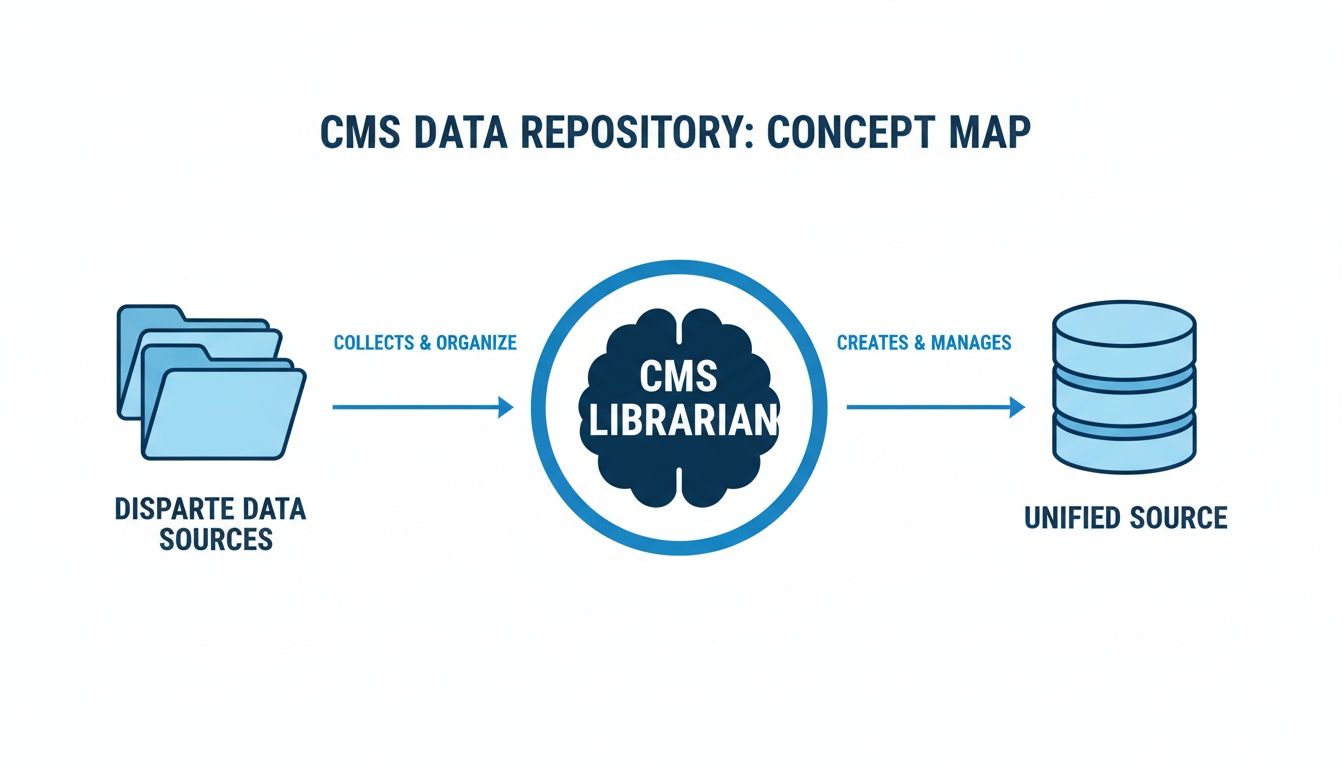
As you can see, the CMS is the brain of the operation. It takes all that disconnected information and turns it into a single source of truth you can actually count on.
How Data Enters The System
So, how does all this information get into the repository in the first place? It generally follows one of two main paths, and each one handles a different, but equally critical, job. Getting a handle on these two integration patterns is essential for planning a smooth rollout.
The first method is called ETL (Extract, Transform, Load). This is the heavy lifter, built for moving massive amounts of existing files. When you first set up the system, you'll use ETL to pull documents from old servers or disparate systems, standardize their format, and then load them neatly into the new repository.
The second path uses real-time API gateways. These are the express lanes for new, incoming data. They sync information instantly from the tools you use every day, like your email client or case management software. For instance, a new email from a client can be automatically captured, filed under the right case, and have its attachments tagged—all without anyone lifting a finger.
A well-designed system doesn't make you choose. It seamlessly blends both ETL for the initial big move and real-time APIs for all the day-to-day work. This dual approach ensures your repository is comprehensive from day one and stays perfectly up-to-date.
For a great real-world example of how these integrations work, you might want to look into the specifics of integrating Microsoft SharePoint, which is often used as a powerful data repository.
The Critical Role Of Metadata And Integration Patterns
Now, here's where the real magic happens. As data flows into the system, that CMS layer gets to work enriching it with metadata—think of it as descriptive labeling that provides vital context. By tagging documents with case numbers, client names, or important dates, the system builds a rich, interconnected web of information. It’s this contextual data that gives AI-powered search tools the ability to find exactly what you need, right when you need it.
The quality of your metadata has a direct impact on how well you can search, analyze, and retrieve information. It’s what separates a simple digital filing cabinet from a truly intelligent data asset.
To make this clearer, let's compare the two primary data integration patterns side-by-side.
Comparison Of Data Integration Patterns
This table breaks down the two main ways data gets into the repository, helping you see which approach fits different operational needs.
| Integration Pattern | Best For | How It Works | Example Use Case |
|---|---|---|---|
| ETL Processes | Initial data migration and bulk archiving of old files. | Extracts data from multiple sources, transforms it into a consistent format, and loads it into the repository in batches. | Moving 10 years of closed case files from an old on-premise server into the new cloud-based repository. |
| Real-Time APIs | Capturing new information as it's created every day. | Creates a direct, always-on connection between apps, allowing data to sync instantly when something happens. | Automatically saving and categorizing an incoming patient referral email from Outlook into the correct patient file. |
Ultimately, choosing the right mix of these patterns is key to a successful implementation.
The sheer volume of data managed in these systems can be staggering. Take healthcare, for example. The CMS Integrated Data Repository (IDR) is a cornerstone of modern analytics, pulling together Medicare claims and beneficiary data. This system processes billions of claims each year, and its program integrity efforts helped identify and recover $4.7 billion in fraud and abuse in fiscal year 2023 alone.
This kind of robust integration is a game-changer, especially in regulated fields. In healthcare, a well-implemented healthcare document management system can significantly improve both patient outcomes and operational efficiency. At its core, the architecture of a CMS integrated data repository is designed to create order from chaos, turning your scattered files into a secure, searchable, and truly strategic asset.
Navigating Security and Compliance Mandates
If you work in legal or healthcare, you know that handling sensitive data isn't just good practice—it's a non-negotiable legal and ethical duty. A CMS integrated data repository is built from the ground up to strengthen your security, transforming compliance from a headache into a built-in feature. It accomplishes this through several layers of protection that secure data at every single touchpoint.
The first line of defense is rock-solid end-to-end encryption. This scrambles your data so it’s completely unreadable, both while it's traveling across a network (in transit) and when it’s sitting on a server (at rest). It’s like sending a priceless artifact in an armored truck and then locking it away in a bank vault—both the journey and the final destination are secure.

This dual-layer protection is absolutely essential for safeguarding information under attorney-client privilege or HIPAA rules.
Fortifying Access with Granular Controls
Encryption is just the start. Controlling who can see what is just as critical. That’s where granular access controls come in. Instead of a one-size-fits-all approach, you can set incredibly specific permissions for every user and every file.
A paralegal, for instance, might only have access to the specific case files they’re working on. A healthcare administrator could see billing records but be locked out of clinical notes. These controls enforce the principle of least privilege—a cornerstone of modern data security—ensuring people only see the information they absolutely need to do their jobs.
You can configure the system to:
- Restrict document viewing to certain team members or roles.
- Limit editing or deletion rights to senior partners or department heads.
- Grant temporary access to external auditors or expert witnesses, with permissions that automatically expire after a set time.
This precision dramatically cuts down the risk of both accidental data leaks and internal security threats.
Maintaining an Immutable Record with Audit Logs
To stand up to any compliance audit, you need to prove exactly who did what, and when. A CMS integrated data repository makes this possible through detailed audit logs. Every single action—from viewing a file to editing a document or sharing a link—is automatically logged with an unchangeable timestamp.
These logs create a clear, defensible record for any security investigation or compliance check. If you ever suspect a data breach, you can trace the activity straight to the source. For a deeper dive into healthcare data security, our guide on a HIPAA compliant document management system covers this in more detail.
An audit log is your system’s black box recorder. It provides an unchangeable history of every interaction with sensitive data, transforming compliance from a matter of trust to a matter of verifiable proof.
This level of tracking isn't just about security. It's also crucial for meeting reporting standards under regulations like the No Surprises Act, where precise data handling is mandatory.
Meeting Data Residency and Sovereignty Rules
It really matters where your data physically lives. Regulations like GDPR in Europe have strict rules about data residency, requiring that citizens' data stay within specific geographic borders. A properly set-up CMS integrated data repository solves this by letting you choose where your data is hosted.
For example, a law firm with clients in Europe can choose to store their data in secure centers located within the EU or Switzerland. This ensures full compliance with GDPR's data sovereignty rules and helps avoid massive regulatory fines. This flexibility allows global organizations to work with confidence, knowing their data practices align with local laws.
This kind of centralized security and compliance turns risk management from a reactive, fire-fighting exercise into a proactive strategy built right into your workflow.
Real-World Benefits for Your Legal or Healthcare Team
The technical architecture is one thing, but the real measure of a CMS integrated data repository is how it actually changes your team’s daily work. These aren't just abstract benefits; they show up as saved hours, lower risks, and better outcomes for your clients and patients.
Think about a busy law firm gearing up for a case. An associate needs to pull every piece of communication about a specific contract dispute. Instead of digging through disconnected email inboxes, local files, and chaotic shared drives, they run one search. In seconds, every related document, email, and note is right there.
That kind of immediate, contextual access completely changes the game.
How It Changes Daily Workflows
The impact goes well beyond simple search. Having a single source of truth fundamentally improves how your team works together, especially when multiple people need to access the same sensitive files.
One of the biggest headaches it solves is version control. We’ve all been there—wasting time and making mistakes because nobody is sure which document is the final final version. A central repository gets rid of that guesswork. Everyone works from the same, most up-to-date file, period.
The benefits for healthcare providers are just as significant. A primary care doctor can see a patient's entire medical story in one place—notes from specialists, lab results, and records from hospital stays. This holistic view leads to smarter clinical decisions, helps avoid conflicting treatments, and makes the nightmare of compliance reporting much easier to handle.
Moving to a CMS integrated data repository is more than a tech upgrade—it's a cultural one. It shifts your team from working in silos to a model where good information is at the heart of everything you do.
Making that leap from scattered data to a single source of truth is a big deal. For a deeper dive into how this looks at a law firm, check out our guide on document management for law firms. The initial effort to train staff and migrate data is real, but the payoff in operational speed and security is enormous.
Driving Compliance and Strategic Analysis
In fields choked with regulations, making compliance easier is a massive win. For example, in healthcare, these systems are central to large-scale data initiatives like the Transformed Medicaid Statistical Information System (T-MSIS). T-MSIS uses an Integrated Data Repository (IDR) to hold raw data for analyzing Medicaid and CHIP services nationwide. The results speak for themselves: as of January 2026, 41 state Medicaid agencies were hitting key data submission goals, which is an 82% compliance rate. You can find more on these T-MSIS compliance efforts on Medicaid.gov.
The same logic applies on the legal side. When you're hit with a discovery request or a regulatory audit, having all your documents tagged and organized in one spot turns a multi-week fire drill into a straightforward task. The system’s audit logs create an ironclad record of who touched what data and when, which is invaluable for proving you've followed the rules.
In the end, a unified repository turns your data from a sprawling, chaotic liability into a secure, strategic asset that makes your organization more efficient and keeps it protected.
Your Data Migration and Implementation Checklist
Moving to a CMS integrated data repository is a serious undertaking. But with a clear, step-by-step plan, it doesn't have to be overwhelming. This is more than just a file transfer; it's a fundamental shift in how your firm handles its most critical asset: information. Getting it right comes down to careful planning, clean data, and bringing your team along for the ride.
The real work begins long before any data gets moved. The first order of business is to establish solid data governance policies. You need to decide who owns the data, who can touch it, and how long you're required to keep it. At the same time, pull together a project team with key people from legal, IT, and administration. Their input is crucial to make sure the new system works for everyone.
Once your governance rules are set, it's time to take a hard look at your existing data. You’ll need to map out every source, file format, and quality problem. This “data cleansing” step is non-negotiable. Shifting messy, duplicated, or obsolete files into your shiny new repository will only sabotage its effectiveness from the start.
Mapping Your Phased Migration Plan
After you’ve got a handle on your data landscape, you can map out a realistic migration. Trying to move everything at once—a "big bang" approach—is a recipe for chaos and disruption. Instead, a phased rollout gives your team time to adjust and keeps daily operations running smoothly.
A typical phased plan looks something like this:
- Select a Compliant Hosting Environment: First, choose where your data will live. This has to align with your security needs, especially if you need secure Swiss or EU-based servers for GDPR compliance.
- Run a Pilot Project: Don’t go all-in at once. Start small with a single department or a specific dataset, like closed case files. This small-scale test lets you find and fix problems before they become firm-wide headaches.
- Execute the Phased Rollout: Once the pilot is a success, you can start migrating other departments in planned waves. Keep everyone in the loop with a clear timeline to manage expectations and prevent surprises.
- Validate and Decommission: After each wave, double-check that all the data made it over accurately. Only when you’re 100% sure should you securely decommission the old systems.
A phased migration is your safety net. It lets you learn and tweak your process as you go, ensuring each step builds on a successful foundation and dramatically reduces the risk of major disruptions.
Prioritizing People and Processes
The technology is just one piece of the puzzle. The final, and arguably most critical, step is focusing on user training and change management. Your team needs to see the new system as a tool that empowers them, not a hurdle they have to overcome. A well-designed repository can manage incredible analytical demands. For context, in 2022, Medicare Part B processed over 1.1 billion services with costs exceeding $100 billion, all managed within a massive repository that drives essential analytics. You can explore the summary statistics on CMS data usage to see the scale.
Training should be tailored to specific roles and highlight how the new repository simplifies day-to-day work. Show your legal team how they can now find documents in seconds, or how compliance officers can generate audit reports with a few clicks. For any organization facing strict security audits, meticulous documentation of this process is key. Our guide on preparing for SOC 2 compliance offers some great insights on building auditable processes. By balancing the technical lift with the human element, you’ll ensure your new CMS integrated data repository starts delivering real value right away.
Frequently Asked Questions
When you're considering a big shift in how you manage your firm's data, questions are a good thing. They’re a sign you’re thinking critically. For professionals in fields like law and healthcare, the stakes are incredibly high, so you need straight answers on how any new system will handle compliance, security, and your team's day-to-day work.
Let’s tackle some of the most common questions we hear about moving to a CMS integrated data repository, from making AI actually work to connecting it with the tools you already have.
How Does a Unified Repository Improve AI Performance?
An AI tool is only as smart as the data you feed it. You can have the most advanced algorithm in the world, but if it's trying to learn from a messy, disorganized library of files, you’re going to get garbage results. It’s that simple.
A unified repository gives your AI a clean, structured, and context-rich dataset to work with. Think of it as the ultimate cheat sheet. Instead of sifting through thousands of disconnected files spread across different drives and inboxes, the AI is working from a "single source of truth" where every document is already tied to the right case, client, and timeline with clear metadata.
This is what makes a query like, "find the expert witness report for the Miller case," an instant, no-fuss task. The system already knows what that document is and where it belongs.
This organized environment is the secret to getting AI to do more than just basic keyword searches. It's how an AI can accurately understand context, reliably summarize a complex 100-page deposition, or even draft client communications based on pre-approved templates. It can do this because it's working with data it can actually trust.
Without that clean data foundation, AI tools are far more likely to miss crucial information or hallucinate facts, making them too unreliable for critical legal or medical work.
What Are the Biggest Data Migration Challenges?
Let's be honest: moving years' worth of data is a major project, and it pays to know where the landmines are. From our experience, nearly every migration headache falls into one of three buckets: data quality, operational downtime, and getting your people on board.
The single biggest roadblock is almost always "dirty data." We're talking about the inconsistent, duplicate, or poorly labeled files that naturally build up over the years. Just lifting and shifting that mess into a new CMS integrated data repository defeats the whole purpose. You absolutely must start with a thorough data audit and cleanup process before you move a single file.
Next up is keeping the lights on. A "big bang" migration—where you try to move everything over one weekend—is incredibly risky and often leads to painful downtime. A much smarter approach is a phased rollout. You could start with one department or one specific type of data, which lets you learn and adjust as you go without bringing daily operations to a halt.
Finally, don't underestimate the human element. Your team has established habits, and any new system can feel like a burden at first. A successful migration hinges on a solid change management plan that includes:
- Clear Communication: Don't just tell them what's changing; explain why it's changing and how it will make their jobs easier.
- Comprehensive Training: Offer hands-on, role-specific training so everyone feels confident from day one.
- Show, Don't Just Tell: Point out the quick wins. Show your team how much faster they can find a document or generate a report.
Tackling these three areas head-on will make the entire process smoother and help your team see the new system as a tool, not a chore.
Can This System Integrate with Our Existing Software?
Yes, absolutely. A modern CMS integrated data repository isn't meant to be another data silo; it's designed to be the central hub of your entire tech stack. The magic that makes this happen is its Application Programming Interfaces, or APIs.
Think of an API as a universal translator that lets different software programs talk to each other securely and share information automatically. A well-built repository will have a robust set of APIs, allowing it to connect seamlessly with the tools you already rely on every day, including:
- Email clients like Outlook or Gmail
- Practice or case management systems
- Billing and invoicing software
- Electronic health record (EHR) systems
This creates a truly connected ecosystem where information flows freely. For example, when a new client is added to your practice management software, a new case file—with all the right permissions—can be created in the repository automatically. No more double data entry, and far fewer chances for human error.
Before committing to any platform, it’s critical to have your technical team review its API capabilities to ensure it can actually talk to your existing software. This step confirms the repository will enhance your current workflow, not complicate it.
At Whisperit, we've built a voice-first AI workspace that acts as the central, secure hub for all your legal work. It unifies your files, dictation, drafting, and collaboration in one place, with Swiss/EU hosting and GDPR-aligned controls to protect your most sensitive data. See how you can move from intake to export in fewer steps at https://whisperit.ai.