
A Guide to Cloud Security Assessment
Think of a cloud security assessment as a deep, systematic health check for everything you run in the cloud. It goes way beyond a simple scan. We’re talking about a comprehensive review of your infrastructure, applications, and data to find—and fix—the security gaps before attackers do. It’s a meticulous look at your configurations, who has access to what, and whether you're meeting compliance rules.
Why Cloud Security Assessments Are No Longer Optional

Let's be blunt: "winging it" with cloud security is a recipe for disaster. As companies rush to adopt powerful platforms like AWS, Azure, and Google Cloud, they often create sprawling, complex environments. The problem is, this rapid expansion almost always outpaces security. The result? A minefield of unseen vulnerabilities.
The numbers are pretty sobering. The 2025 State of Cloud Security Report found that the average cloud asset has about 115 vulnerabilities. Even worse, a staggering 32% of all cloud assets are just sitting there, completely neglected without proper patching or security oversight. This is the classic disconnect—moving fast to the cloud without bringing security along for the ride.
To put this into perspective, here's a quick look at what that means for your business.
The Modern Cloud Threat Landscape at a Glance
| Statistic | Implication for Your Business |
|---|---|
| ~115 vulnerabilities per cloud asset, on average. | Each asset, from a VM to a storage bucket, is a potential entry point for attackers. |
| 32% of cloud assets are in a neglected state. | A third of your environment could be an open door due to a lack of patching and oversight. |
| Rapid cloud migration often outpaces security implementation. | Your team's speed to deploy new services could be creating blind spots you can't see. |
These aren't just abstract numbers; they represent real, tangible risks to your data, reputation, and bottom line.
Figuring Out Your True Attack Surface
A real cloud security assessment isn't just about running a tool and getting a report. It’s about deeply understanding your unique attack surface—the sum of every possible way an attacker could get in. This includes everything from misconfigured S3 buckets and overly permissive IAM roles to insecure APIs connecting your services.
The entire process is designed to answer the tough but essential questions:
- Where is our crown jewel data actually stored? You can't protect what you don't know you have. Pinpointing PII, financial records, and intellectual property is step one.
- Who really has access to it? The principle of least privilege is crucial but often overlooked. An assessment validates that your access controls are as tight as they should be.
- Are we actually compliant? If you're in an industry governed by regulations like HIPAA or PCI DSS, compliance isn't a "nice-to-have."
- What happens when we get hit? A good assessment stress-tests your ability to detect and respond to a real breach.
"A cloud security assessment is the foundational process for building a proactive defense. It shifts your mindset from reacting to breaches to preventing them by systematically identifying and closing security holes before they can be exploited."
Shifting from Firefighting to Fortifying
Without regular assessments, your security team is stuck in a reactive loop, constantly putting out fires instead of building a stronger fortress. That's not just exhausting; it's an expensive and ineffective way to operate.
A proactive security posture, guided by the findings of a thorough assessment, lets you prioritize what truly matters. You can focus your resources on the risks that pose the biggest threat to your business.
This guide is all about giving you the "how-to" for that process. By understanding where you're vulnerable, you can implement smarter controls and bake security into your development from the start. Speaking of which, integrating security into your DevOps pipeline is a huge part of this proactive philosophy. For a deeper dive, checking out these 10 Actionable DevOps Security Best Practices can offer some fantastic, real-world guidance. It also ties directly into modern security frameworks; you can learn more about one of the most important concepts in our article on https://www.whisperit.ai/blog/what-is-zero-trust-security.
Scoping Your Assessment for Maximum Impact

A vague, undefined cloud security assessment is a recipe for wasted time and money. If you want to get real value out of this process, you need a laser-focused scope that shines a light on what actually matters. Success hinges on deciding precisely what to assess and, just as crucially, why.
Without a solid scope, you’re just going through the motions. You risk a shallow, "check-the-box" exercise that completely misses the hidden dangers lurking in your environment. I’ve seen teams spend weeks analyzing low-risk dev environments while their production database sat wide open. The goal is to set clear boundaries for your assessment to get the biggest impact for your effort.
Start with Your Crown Jewels
First things first: you have to identify your most critical assets. These are the parts of your infrastructure that, if compromised, would cause the most significant damage to your business. And don't just think about servers and databases; look at the entire ecosystem.
Every organization's list of "crown jewels" will be different, but some usual suspects almost always make the cut:
- Production Databases: This is a big one, especially if they hold sensitive customer data, financial records, or your company's intellectual property. A breach here is often catastrophic.
- Identity and Access Management (IAM) Systems: Pay close attention to IAM roles and users with admin-level permissions. A single compromised super-user account can hand an attacker the keys to the entire kingdom.
- Customer-Facing Applications: These are your digital front doors. Any weak spot in your public APIs, web servers, or load balancers is a direct invitation for an attack.
- Data Storage Solutions: This covers everything from AWS S3 buckets to Azure Blob Storage, where critical backups, logs, or sensitive documents are stored.
The most effective assessments I've been a part of always started with one simple question: "What can we absolutely not afford to lose?" Your answer is the foundation of your entire assessment scope.
Map the Flow of Sensitive Data
Once you’ve got a handle on your critical assets, the next step is to figure out how they all talk to each other. Mapping data flows is an incredibly powerful way to see how sensitive information moves through your cloud. In my experience, this process almost always uncovers unexpected dependencies and hidden risks.
For instance, a customer-facing web app might talk to a backend API, which then queries a production database. A good data flow map shows every connection point, what kind of data is moving, and the security controls at each stop. This visual clarity is essential for a thorough cloud security assessment.
Tailoring Your Scope to Your Architecture
Your cloud architecture dictates the focus of your assessment. A one-size-fits-all approach is doomed to fail. You have to tailor your scope based on the specific technologies you’re using.
Scoping for Different Architectures
| Architecture Type | Key Scoping Considerations | Example Focus Area |
|---|---|---|
| Serverless (e.g., AWS Lambda) | Look at function permissions, API Gateway security, and how event sources are configured. | Reviewing IAM roles to ensure functions have only the bare-minimum permissions they need to run. |
| Containerized (e.g., Kubernetes) | Assess container image vulnerabilities, pod security policies, and network policies between services. | Scanning container images in your registry for known vulnerabilities before they ever get deployed. |
| Traditional IaaS (e.g., EC2, VMs) | Concentrate on network security groups, OS hardening, and patch management processes. | Auditing firewall rules to make sure no unnecessary ports are exposed to the public internet. |
Trying to assess a serverless environment with an IaaS mindset is like using a map of New York to navigate London. You’re moving, but you’re definitely not getting where you need to go.
Aligning Scope with Compliance and Risk
Finally, your assessment scope has to connect back to your business goals, which almost always involves compliance and risk management. If you handle healthcare data, your scope absolutely must include controls related to HIPAA. If you process payments, PCI DSS requirements become a central theme.
This alignment is what turns technical findings into meaningful business insights. It’s also a vital piece of a larger security strategy. The very act of defining critical assets and understanding their potential impact is a core part of any formal risk evaluation. If you want to dig into that foundational process, our guide on how to conduct a risk assessment offers a detailed framework that perfectly complements this scoping exercise.
By taking the time to define a clear, targeted scope, you turn your cloud security assessment from a generic audit into a strategic tool that gives you actionable intelligence to protect what matters most.
Picking the Right Tools for Your Cloud Security Assessment
Let's be honest: the security tool market is a jungle. It's crowded, noisy, and full of confusing acronyms that all seem to promise the world. Your first real challenge is cutting through that hype to find what actually works.
A truly effective cloud security assessment isn't about running just any tool; it’s about choosing the right one for your specific cloud environment and what you’re trying to achieve. This is more than a feature-for-feature comparison. You need tech that slots into your team's workflow, understands your architecture, and gives you clear, actionable insights—not just another mountain of alerts.
Understanding the Big Three: CSPM, CWPP, and CNAPP
To make sense of the market, it helps to group the tools into three main categories. They each play a different, vital role. Think of them less as competitors and more as specialists you need on your security team.
- Cloud Security Posture Management (CSPM): These are your configuration watchdogs. A CSPM constantly scans your cloud accounts (think AWS, Azure, GCP) for misconfigurations. Did someone leave an S3 bucket open to the public? Is an IAM role far too permissive? A CSPM finds these issues by comparing your setup against established security benchmarks from places like CIS or NIST.
- Cloud Workload Protection Platform (CWPP): While a CSPM looks at the infrastructure, a CWPP dives deeper to protect the actual workloads running on it. We're talking about your virtual machines, containers, and serverless functions. CWPPs handle things like vulnerability scanning, malware detection, and runtime protection, securing the code and processes that power your applications.
- Cloud-Native Application Protection Platform (CNAPP): This is the newer, all-in-one approach. A CNAPP essentially bundles the capabilities of CSPM and CWPP (and often other tools) into a single, cohesive platform. The idea is to give you a complete picture of risk, from a misconfigured network setting all the way up to a vulnerability in the application code running inside a container.
To help you decide which type of tool best fits your needs, here's a quick breakdown of their core functions and ideal use cases.
Comparison of Cloud Security Tool Categories
| Tool Category | Primary Focus | Best For | Example Use Case |
|---|---|---|---|
| CSPM | Cloud infrastructure configuration and compliance | Teams needing to enforce security policies and find misconfigurations across their cloud accounts. | Detecting a publicly exposed database or an S3 bucket without encryption enabled. |
| CWPP | Securing active workloads (VMs, containers, serverless) | DevOps and security teams focused on protecting applications from vulnerabilities and runtime threats. | Identifying a known vulnerability in a container image before it gets deployed to production. |
| CNAPP | Unified visibility from code to cloud | Organizations looking for a single platform to manage risk across the entire application lifecycle. | Tracing a runtime alert on a container back to the original misconfiguration in the IaC code. |
Ultimately, having the best tool in a category doesn't mean much if it doesn't align with your specific operational needs and goals.
How to Make the Right Choice for Your Team
Simply knowing the definitions isn't enough. The best tool for a small startup running a single serverless app on AWS is worlds apart from what a large enterprise managing a complex, multi-cloud Kubernetes environment requires.
As you evaluate your options, keep these practical factors in mind:
- CI/CD Integration: How well does the tool plug into your development pipeline? Top-tier tools can scan Infrastructure-as-Code (IaC) templates and container images for problems before they ever hit production. This "shift-left" security model is no longer a luxury; it's essential.
- Multi-Cloud Support: If your operations span AWS, Azure, and GCP, you need a tool that gives you a single pane of glass. Trying to juggle three different security dashboards is a recipe for disaster and makes it far too easy to miss a critical alert.
- Real Automation: A good cloud security assessment doesn't just find problems—it helps you fix them. Look for tools that offer automated remediation playbooks or, at a minimum, provide clear, step-by-step guidance that your team can actually follow.
A common mistake I see is teams buying a powerful, expensive tool without a clear strategy for using it. A CSPM is fantastic for spotting configuration drift, but it won’t catch a critical vulnerability in your application code. Understanding these distinct roles is the key to building a defense without dangerous blind spots.
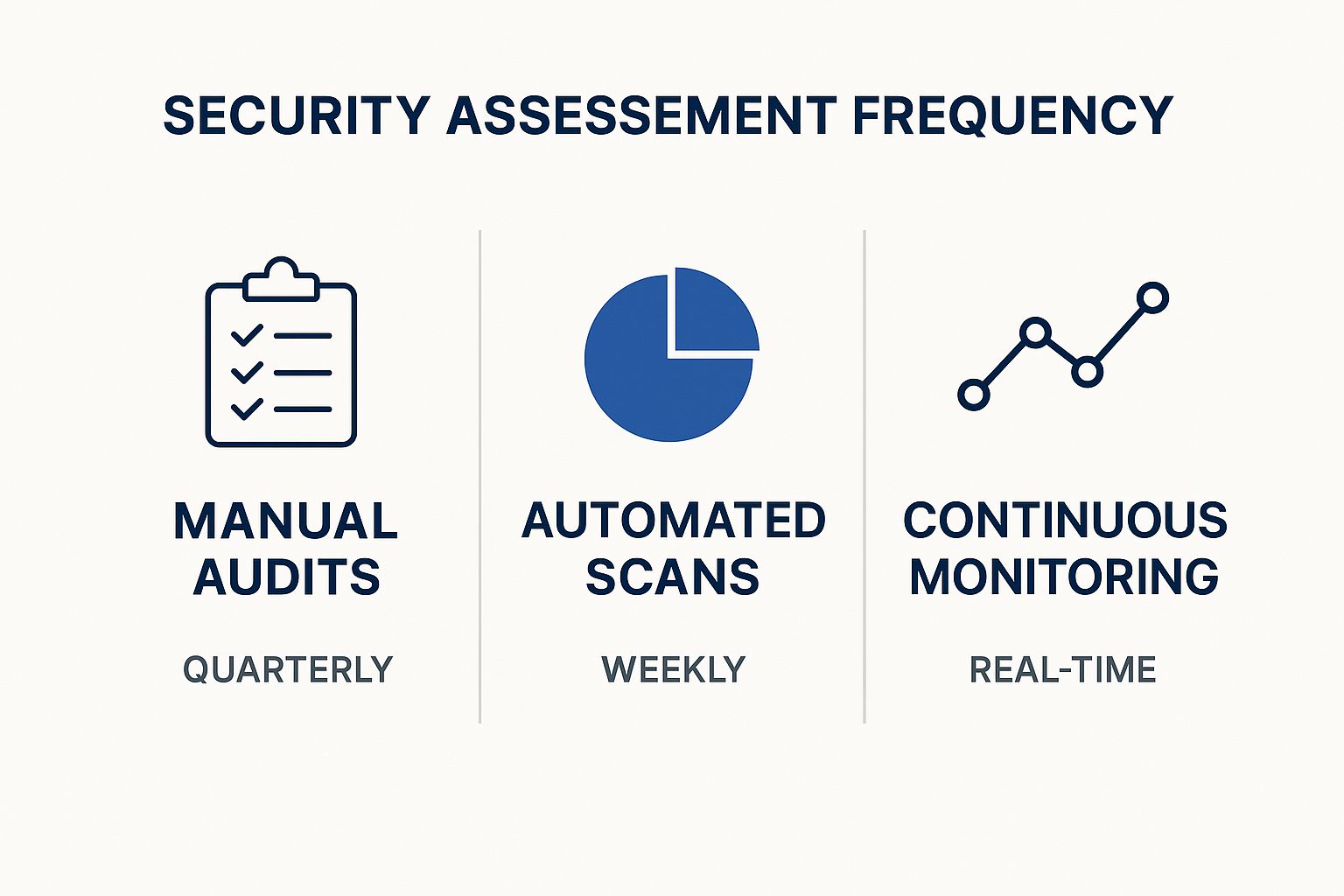
The image above really drives home how the frequency of your assessments—from a manual audit once a quarter to continuous, real-time monitoring—drastically changes your security posture.
The stakes are getting higher every year. Organizations are now facing roughly 1,925 cyberattacks weekly, which marks a staggering 47% increase from the previous year. If you're in the public cloud, the risk is even greater—27% of companies report security incidents there, compared to 19% for those in private clouds. You can dig into more of these trends in this insightful report on cloud security statistics.
At the end of the day, your choice of tooling directly shapes the quality of your entire security process. To see how these tools fit into a broader strategy, check out our guide on how to conduct a complete security risk assessment. Remember, the right tools give you the data, but a solid process is what turns that data into meaningful action.
Putting the Plan into Action: Running the Assessment and Analyzing the Results
Alright, you've got your scope defined and your tools picked out. Now it's time to get your hands dirty. This is where the real work of a cloud security assessment begins, as your carefully laid plans meet the reality of your live environment. The execution phase is always a mix of automated scanning and good old-fashioned manual investigation—because you'd be surprised what a curious human can find that a tool might miss.
Essentially, you'll be attacking the problem from multiple angles. We're talking vulnerability scans against workloads, deep dives into the configuration of your cloud services, and maybe even some targeted penetration testing. The main goal here is to sniff out those common but critical misconfigurations that attackers just love to find.
Hunting for the Usual Suspects
In all my years doing this, I can tell you that most major breaches don't start with some complex, zero-day exploit. They usually start with a simple, entirely preventable mistake. Your first pass during the assessment should focus on finding this low-hanging, high-risk fruit.
Here’s a quick list of the common culprits I always look for first:
- Publicly Accessible Storage: The infamous public S3 bucket. It's a classic for a reason, and it still happens all the time. Your assessment has to be ruthless in checking all object storage (S3, Azure Blob, you name it) for any public read/write permissions.
- Overly Permissive IAM Roles: The principle of least privilege often gets tossed out the window when teams are in a rush to get things working. You need to hunt for IAM roles with wildcard permissions (that dreaded
*:*) or admin access handed out to services that absolutely do not need it. - Exposed Network Ports: Think of security groups and network ACLs as your cloud firewalls. A rookie mistake is leaving sensitive ports like RDP (3389) or SSH (22) wide open to the internet (
0.0.0.0/0) instead of locking them down to specific, known IP addresses. - Missing Encryption: Is your data encrypted at rest (in databases and storage) and in transit (using TLS)? This is security 101, but it's amazing how often it gets missed.
Nailing these issues is the first big win of your assessment. They represent immediate, actionable risks you can fix to instantly harden your security posture.
Turning a Flood of Data into Actionable Intelligence
Once your scans and manual checks are done, you’re going to be staring at a mountain of data. Seriously. Your tools will probably flag hundreds, maybe thousands, of potential issues. This is a critical juncture where many security teams get bogged down, completely overwhelmed by the sheer volume of alerts.
The real skill in a cloud security assessment isn't just about finding problems; it's about figuring out which ones actually matter.
"The goal of analysis isn't to create a laundry list of every single finding. It's to tell a story about risk. You need to connect the dots between a technical vulnerability and its real-world impact on the business."
To pull this off, you need a smart, structured way to triage and prioritize. Not all vulnerabilities are created equal. A "critical" vulnerability on a dev server with no real data is far less concerning than a "medium" one on your production database.
A Practical Framework for Triage
Context is king. To cut through the noise, you have to evaluate each finding against criteria that make sense for your business, not just rely on a generic CVSS score.
- Assess Exploitability: Can this vulnerability actually be exploited in your specific environment? A theoretical flaw that’s already mitigated by a web application firewall (WAF) or another control is way down the priority list compared to one that’s directly exposed.
- Determine Asset Criticality: How important is the thing that's affected? A vulnerability on a server holding your customer database is a five-alarm fire. One on a temporary test machine? Not so much.
- Evaluate Potential Impact: If an attacker did exploit this, what's the worst that could happen? Could they steal sensitive customer PII, shut down your operations, or pivot deeper into your network?
This kind of contextual analysis is what separates a great assessment from a mediocre one. It helps you focus your team's precious time and resources on fixing the things that pose a genuine, immediate threat. Grasping these details is a cornerstone of any solid security program, and you can dig deeper into these concepts in our article on essential data security best practices.
Lately, we're also seeing a huge spike in exposed secrets and credentials within cloud configurations. In fact, a recent report found that over half of organizations using AWS ECS task definitions have secrets like API keys or database credentials just sitting there in plain text. That's a massive attack vector waiting to be exploited. You can learn more about these "toxic cloud trilogies" in the Tenable Cloud Security Risk Report 2025.
By pairing automated discovery with this kind of intelligent, risk-based human analysis, you’ll transform your assessment from a simple checkbox exercise into a powerful, strategic tool for managing cloud security.
Crafting Actionable Reports and Remediation Plans
A security assessment is only as good as the action it inspires. Once the technical work is done, the real challenge begins: translating a mountain of data into a clear, compelling plan that people will actually follow. If your report just ends up collecting dust on a digital shelf, the whole exercise was a waste of time.
This isn't about dumping a 100-page PDF on someone's desk. It’s about smart communication and building a practical roadmap that guides your organization toward a stronger security posture.
Speaking the Right Language to the Right People
You're never writing for just one person. A C-suite executive and a cloud engineer care about wildly different things. The biggest mistake I see is trying to create a one-size-fits-all report; it inevitably fails to connect with anyone.
A truly effective report is really two documents rolled into one.
- For the Boardroom (The Executive Summary): Keep it short, sharp, and to the point—one or two pages, max. Ditch the technical jargon and speak in terms of business impact. Instead of saying "We found a public S3 bucket," frame it as "Sensitive customer data was exposed, putting us at risk of regulatory fines and significant brand damage." Visuals are your best friend here; simple charts showing risk distribution can tell a powerful story in seconds.
- For the Trenches (The Technical Deep Dive): This is where your engineers and DevOps teams live. Every finding needs to be crystal clear. Include a concise description, hard evidence like screenshots or log snippets, and a realistic assessment of its impact. Most importantly, provide specific, step-by-step instructions for fixing the problem. The more direct and helpful you are here, the faster things get resolved.
A great report closes the gap between a technical flaw and its business consequence. When leadership finally understands why an issue matters, getting the budget and headcount to fix it becomes a much smoother conversation.
Building a Remediation Roadmap That Actually Works
With your findings clearly documented, it's time to build a plan that doesn't completely overwhelm your technical teams. Handing them a flat list of 200 vulnerabilities is just creating noise. What they need is a prioritized, phased approach that tackles the biggest fires first.
This isn't a job for the security team alone. Prioritization has to be a collaborative discussion with engineering, building on the triage you did during the assessment. The end goal should be a backlog of security tasks that can be plugged directly into their existing workflows, whether that's a Jira board or an Azure DevOps sprint.
A tiered roadmap is a simple, proven way to make progress feel achievable.
| Priority Level | Timeframe | What It Means | Example |
|---|---|---|---|
| P1 - Critical | 0-7 Days | "The house is on fire." Actively exploitable flaws or major data leaks. | A production database containing customer PII is open to the world. |
| P2 - High | 7-30 Days | Serious misconfigurations that are one step away from a breach. | An IAM role with admin-level permissions assigned to a non-critical application. |
| P3 - Medium | 30-90 Days | Important security weaknesses to be fixed in the next dev cycle. | An application is running an outdated library with a known (but complex) vulnerability. |
| P4 - Low | 90+ Days | Minor issues or deviations from best practice with low immediate impact. | Missing security headers on an internal-only admin tool. |
This structure turns a daunting list into a series of manageable sprints. But for any of this to work, you need accountability. Every single ticket must have a clear owner and a deadline. Without it, nothing moves forward.
Finally, don’t forget that many of these fixes pull double duty by supporting compliance. Tying your remediation work to frameworks like SOC 2, ISO 27001, or HIPAA not only shores up your defenses but also makes your next audit much less painful. If you need a refresher, you can learn more about how to navigate various cloud security compliance standards in our detailed guide. This ensures your fixes aren't just temporary patches but are building blocks for a resilient, long-term security program.
Answering Your Top Cloud Security Assessment Questions
Even with a detailed plan, a few practical questions always seem to pop up once teams get into the rhythm of performing regular cloud security assessments. Let's dig into some of the most common ones I hear from the field to clear up any confusion and help you push forward.
How Often Should We Be Doing This?
This is easily the question I get asked the most, and the real answer is, "it depends." The old-school, once-a-year audit just doesn't cut it anymore for cloud environments that change by the minute. The right frequency really hinges on your specific situation, but I've found a tiered approach works best for most organizations.
- Always-On Monitoring: Think of this as your baseline. Your automated tools, like a good Cloud Security Posture Management (CSPM) platform, should be running 24/7. This is what catches the low-hanging fruit and common misconfigurations as they happen.
- Quarterly Reviews: At least once every quarter, it's time for a more focused, hands-on cloud security assessment. This is when your team steps back to look at trends, dig into more complex findings from the automated tools, and adjust your scope to account for any new services or changes you've rolled out.
- Annual Deep Dives: Plan for a major, comprehensive assessment once a year. This is often the perfect time to bring in a third-party expert for a fresh set of eyes. You should also trigger one of these after any significant architectural change, like a major migration or the launch of a new flagship product.
This layered strategy gives you the best of both worlds: constant, automated vigilance combined with periodic, strategic reviews to make sure you're seeing the forest, not just the trees.
What's the Real Difference Between an Assessment and a Pentest?
This one trips up a lot of people, but getting it right is crucial. While assessments and pentests are related, they have completely different goals. I've always found this analogy helps clarify things: an assessment is broad and defensive, while a pentest is narrow and offensive.
A cloud security assessment is like getting a complete physical at the doctor. They check everything systematically—your configurations, access controls, compliance posture—to identify a wide range of potential health risks. A penetration test is like hiring a specialist to see if they can actually break your arm. It's a focused, goal-driven simulation to test a specific defense against a real-world attack.
An assessment helps you answer the question, "Where are all our potential weaknesses?" A pentest, on the other hand, answers, "Can a determined attacker exploit a specific weakness to achieve their goal?" You absolutely need both in a mature security program, but you can't substitute one for the other.
How Do We Tackle This in a Multi-Cloud Environment?
Running a mix of AWS, Azure, and GCP definitely adds a layer of complexity, but the fundamental principles of a good assessment don't change. The real trick is getting consistent visibility and applying uniform controls when each platform has its own language and security model.
The most effective strategy here is to find tools that provide a "single pane of glass." Trying to manually correlate alerts from three different security dashboards is a surefire way to miss something important.
Look for solutions that can pull in and normalize data from all your cloud providers. This allows you to apply one set of security policies across your entire cloud footprint, regardless of who the vendor is. The objective is to manage security based on risk and policy, not by platform. This approach not only simplifies a complex cloud security assessment but also plugs the dangerous gaps that can form between different cloud environments.
At Whisperit, we know that protecting sensitive information is everything, whether it's in your confidential documents or your cloud infrastructure. Our AI-powered dictation and editing platform is built on a foundation of serious security and privacy, hosted in Switzerland and fully compliant with GDPR and SOC 2 standards. Streamline your workflow without ever having to compromise on security. Discover a smarter way to work at https://whisperit.ai.