
Client Letter Template Law: Essentials for Law Firms (client letter template law)
A good client letter template law firms can depend on is much more than a time-saver. Think of it as a vital risk management tool and a cornerstone of your firm's brand, ensuring every single piece of correspondence is consistent and professional. These templates lock in crucial legal language, firm policies, and the right tone, dramatically cutting down the risk of an expensive error or a simple miscommunication.
Why Your Firm Needs a Client Letter Strategy
Let's look past the obvious time savings for a moment. A structured, thoughtful approach to client letters is a real strategic asset for any law practice today. It's about creating a communication framework that is predictable, professional, and, most importantly, defensible. Without it, you're opening the door to inconsistent messaging, potential malpractice claims stemming from vague advice, and countless hours wasted reinventing the wheel for routine documents.

This simple shift transforms client correspondence from a reactive, piecemeal task into a proactive, well-oiled system. Every letter you send—from the initial engagement to the final case closing—becomes an opportunity to solidify the client relationship and protect your practice.
The Tangible Impact on Your Bottom Line
Switching to a template-based system brings some very real financial and operational wins. All the time you save on drafting routine letters can be reallocated to substantive legal work that actually moves cases forward and generates revenue. This isn't just a minor efficiency tweak; it's a significant operational upgrade.
In fact, studies on legal document automation reveal that firms using template-driven systems can slash the time spent creating routine documents by as much as 80%. That’s a huge productivity gain, freeing up your lawyers to concentrate on the high-value strategic work clients are paying for.
This move also polishes your firm's brand. Consistently professional and well-structured letters convey a sense of organization and competence, which is exactly what you want when building client trust. Every communication either builds up or chips away at your reputation—templates make sure it’s always the former.
A well-designed client letter template is more than a document; it's a policy. It codifies your firm's approach to client care, risk management, and professional standards, ensuring every paralegal, associate, and partner communicates with one unified voice.
Impact of Templated vs. Manual Client Letter Drafting
The difference between a manual, ad-hoc process and a systemized, template-driven one is stark. The table below breaks down the key distinctions across several critical metrics for a law firm.
| Metric | Manual Drafting (Ad-Hoc) | Template-Based System |
|---|---|---|
| Time per Letter | 30-60+ minutes | 5-10 minutes |
| Consistency | Highly variable; depends on the author | Standardized across the firm |
| Risk of Error | High (typos, omitted clauses) | Low (automated data, pre-approved text) |
| Training Time | High; requires individual training | Low; based on a standardized process |
| Brand Image | Inconsistent, potentially unprofessional | Consistent, professional, and polished |
| Scalability | Poor; bottlenecks as firm grows | Excellent; supports firm growth |
As you can see, implementing a template system isn't just about efficiency—it's a foundational element of a modern, scalable, and risk-averse legal practice.
From Manual Drudgery to Intelligent Workflow
The real magic happens when you stop thinking of templates as static Word documents. Modern tools like Whisperit can turn your template library into a dynamic, automated system. Instead of manually hunting for a file, copying it, and pasting in details, you can build your templates into a workflow that automatically populates client data, applies firm-wide style profiles, and guarantees perfect formatting every time.
This approach gives you several immediate advantages:
- Error Reduction: Automating data entry for names, case numbers, or critical dates all but eliminates costly typos.
- Accelerated Intake: New client engagement letters can be generated and sent in minutes, not hours.
- Enhanced Compliance: Standardized disclaimers and confidentiality notices are automatically included, so nothing gets missed.
By setting up a smart template strategy, you’re not just saving time. You’re building a foundation for scalable growth, better client satisfaction, and stronger risk management. For a deeper dive, check out our guide on client communication best practices to refine your firm's approach.
Building Your Perfect Legal Client Letter Template
A solid client letter template law firms can use over and over isn't just a fill-in-the-blanks Word doc. It's a strategic tool, and every single part of it has a job to do. When you really break down the anatomy of a professional letter, you see how each piece works together to inform your client, manage their expectations, and even protect your firm from risk.

Think of this structure as your foundation for clarity. When you standardize these components, every letter that leaves your office—whether from a senior partner or a brand-new associate—carries the same professional weight and speaks with one, unified firm voice.
The Essential Components of a Legal Letter
These are the non-negotiables, the absolute must-haves for any client letter template. Each one is critical to how your client receives and understands the information you're sending.
- Professional Letterhead: This is your firm's digital handshake. It needs your firm name, address, phone number, and website, displayed clearly and consistently. It's the first thing they see and it immediately reinforces your brand.
- Clear Subject Line: I’ve seen so many vague subject lines that just create confusion. Don’t do it. Always include the case name and number, plus a quick summary of the letter’s purpose. For example: "RE: Smith v. Jones, Case No. CV-2024-123; Update on Discovery Requests." This helps the client immediately, and makes it a breeze for everyone to file and find later.
- Formal Salutation and Introduction: Start strong with a simple, formal salutation like "Dear Mr. Smith,". The very next sentence should get right to the point. Something like, "This letter is to provide you with an update on the status of your case following the deposition on June 5, 2024." It respects your client's time and tells them exactly what they’re about to read.
Getting these initial sections right frames the entire conversation. It sets a professional tone and provides instant clarity before the client even dives into the details.
Crafting the Body and Conclusion
The body of the letter is where the real substance lives. The key here is to be relentlessly clear and client-focused. Ditch the dense legalese whenever you can.
Instead of writing, "Pursuant to the aforementioned discovery proceedings, interrogatories were propounded upon the opposing party," just say it plainly: "As part of the discovery process, we have sent a list of formal questions to the other side." This small shift makes a world of difference for a non-lawyer.
Your goal isn't to impress the client with your vocabulary; it's to make sure they actually understand what's happening. Clarity builds trust and cuts down on the kind of misunderstandings that can sour a relationship or, worse, lead to a malpractice claim.
The conclusion is just as vital because it tells the client what happens next. A vague ending leaves them hanging, wondering, "So... what now?"
A strong conclusion provides a clear roadmap. For instance: "We will notify you as soon as we receive their responses, which are due by July 15, 2024. In the meantime, please find and send us the financial statements we discussed. If you have any questions, please don't hesitate to call our office." This gives clear instructions and opens the door for them to reach out. Automating these structural parts is a huge time-saver, something we cover in our guide to legal document generation software.
Incorporating Disclaimers and Confidentiality Notices
Finally, every single client letter template law firms create needs to have the proper protective language built right in. This isn't just boilerplate text you can ignore—it’s a critical risk management tool.
Your template must have a dedicated spot for these notices, usually at the very end. Make sure you include:
- Attorney-Client Privilege Notice: A clear statement like, "This communication is confidential, intended only for the recipient, and may be protected by attorney-client privilege."
- Disclaimer on Legal Advice: A sentence clarifying that the letter's contents are about this specific matter only and shouldn't be taken as advice on unrelated issues.
- Tax Advice Disclaimer (if applicable): If you're touching on financial matters, a Circular 230 notice is essential to prevent the letter from being misused to avoid tax penalties.
By baking these components into your template, you guarantee they never get missed. It’s a simple practice that protects your firm and reinforces the professional boundaries of your attorney-client relationship every time you click "send."
Ready-to-Use Templates for Common Legal Scenarios
Theory is one thing, but seeing how a good client letter template works in practice is where the real value lies. Let's move beyond the basic structure and look at the strategic language behind the four most common—and most critical—types of client letters.
These aren't just Mad Libs-style templates. They are practical, annotated examples that show you why certain phrases are used and how they protect both your firm and your client relationship. Think of each one as a strategic playbook designed to bring clarity, manage expectations, and build a solid record of communication. You can easily adapt the core language here for almost any practice area, from family law to complex commercial litigation.
The Foundational Engagement Letter
Your engagement letter is arguably the most important document you'll ever send a client. It sets the tone for the entire relationship and serves as your primary defense against future scope creep or fee disputes. This isn't just a formality; it's the contract that defines the boundaries of your work.
Here’s a look at some key language and the strategy behind it:
- Defining the Scope of Work:
"Our representation will be limited to the matter of your divorce proceedings, specifically including the negotiation of a marital settlement agreement and related custody arrangements for _Minor Child's Name_. This engagement does **not** include representation in any related criminal matters, tax advice, or appeals from the final judgment."
- **The Why:** This language is intentionally precise. By clearly stating what’s included—and, more importantly, what’s _excluded_—you prevent massive headaches down the road. You avoid the classic scenario where a client assumes your fee also covers an unexpected appeal or a separate legal issue that pops up.
- Outlining Fees and Billing:
"Our services will be billed at the hourly rate of $XXX for partners and $YYY for associates. You will receive a detailed, itemized invoice around the first of each month, with payment due within 30 days. As we discussed, you have provided an initial retainer of **$5,000**, which will be held in our client trust account and applied to your monthly invoices."
- **The Why:** When it comes to fees, transparency is everything. This clause nails down rates, billing cycles, and payment terms. Explicitly mentioning the retainer amount and how it will be used helps the client understand exactly how their initial payment is being handled.
The Proactive Status Update Letter
Regular updates are the lifeblood of a healthy client relationship. They stop the anxious "what's going on with my case?" phone calls before they even happen and show you're on top of their matter. A great update is concise, clear, and forward-looking.
Take this example for a litigation file:
"Dear [Client Name],
I'm writing to update you on the status of your case, Case v. Opposing Party. Since we last spoke, we have successfully completed the depositions of the two key witnesses on June 10 and June 12, 2024. We also served our First Set of Interrogatories (written questions) on the opposing party.
Their responses are legally due by July 15, 2024. Our next major step will be to review those answers and prepare for the settlement conference scheduled for August 5, 2024. Once we have their discovery responses in hand and have analyzed them, we'll reach out to schedule a prep meeting with you."
- The Why: This template follows a simple but powerful structure: what just happened, what’s happening now, and what happens next. Giving specific dates and defining legal terms like "Interrogatories" demystifies the process for the client and provides a clear timeline. For more ideas, you can explore these legal letter template examples to build out your firm's library.
The Difficult "Bad News" Letter
Let's be honest, no lawyer enjoys delivering bad news—an unfavorable ruling, a denied claim, or a low-ball settlement offer. Handling this communication in writing requires a careful blend of empathy, clarity, and professionalism. The goal is to deliver the news without being defensive and immediately outline the available next steps.
Here’s how you might approach it:
"I am writing to inform you of the court's ruling on our Motion for Summary Judgment, which we received today. Unfortunately, the judge denied our motion, which means the case will now proceed toward trial. While this isn't the outcome we were hoping for at this stage, it is important to understand that this is not a final judgment on the merits of your case.
This ruling simply means the judge believes there are factual disputes that must be decided by a jury. Our focus now shifts to preparing our trial strategy. We need to discuss the potential costs and risks of a trial versus re-engaging in settlement discussions. Please let me know when you are available next week to go over our options."
- The Why: The tone here is direct but not alarming. It states the bad news clearly, explains what it actually means in practical terms ("the case will now proceed toward trial"), and immediately pivots to a forward-looking, actionable plan. This reframes the setback as a new phase of the case, not a dead end.
The Professional Case Closing Letter
A case closing letter provides a formal end to the engagement. It's a critical risk management tool that summarizes the outcome, handles final administrative tasks, and confirms that your duties on that specific matter are complete.
A solid closing letter template should always hit these four points:
- A Clear Statement of Conclusion: "This letter confirms that with the finalization of your settlement, our engagement and the attorney-client relationship on this matter are now concluded."
- Summary of the Outcome: "We were pleased to secure a settlement of $XXX on your behalf. Your final proceeds check is enclosed."
- File Retention and Destruction Policy: "Our firm's policy is to retain closed client files for seven (7) years, after which they are securely destroyed. If you would like any original documents from your file, please arrange to retrieve them within the next 30 days."
- An Invitation for Future Business: "We greatly appreciated the opportunity to represent you. Our firm also handles matters in [Practice Area 1] and [Practice Area 2], and we hope you will keep us in mind should you have any future legal needs."
Using Whisperit to Automate Your Letter Workflow
Having a solid library of templates is a great start, but the real magic happens when you automate the entire letter creation process. This is the leap from static Word documents to a dynamic system that actively cuts down on manual work and stamps out errors. This is exactly what a platform like Whisperit is built for—turning your client letter template law library into a powerhouse workflow.
The whole idea is to break the tedious cycle: find the right template, open it, save a new version, then painstakingly copy and paste client details. Instead, you can build a system where a simple voice command or a few clicks generates a perfectly formatted, client-specific letter in seconds.
Building Your Foundation with Drafting Templates
Your first move is to set up what Whisperit calls Drafting Templates. Think of these as more than just your standard letter formats; they are smart, structured outlines that become the backbone for different communications. You can create unique templates for engagement letters, status updates, fee agreements, and closing letters.
Each Drafting Template holds the core, non-negotiable text and smart placeholders for the details that change every time, like client names, case numbers, and important dates.
Let's say you're a personal injury firm. Here’s how that would look:
- Template Name: PI Engagement Letter
- Core Content: Standardized paragraphs covering the scope of representation, contingency fees, and communication policies.
- Placeholders:
[Client Name],[Date of Incident],[Case Number], and[Retainer Amount].
Setting these up from the get-go ensures every single engagement letter starts from the same compliant, professionally worded foundation. No more guesswork.
Ensuring Consistency with Style Profiles
One of the biggest headaches in a firm with multiple lawyers is keeping a consistent voice and format. A Style Profile in Whisperit is your answer. It applies a set of firm-wide rules to every single document you generate. It’s like having an automated proofreader on staff who enforces your firm's brand standards 24/7.
A Style Profile is your firm's brand guardian. It automatically adjusts the tone, formats citations to your jurisdiction's rules, and makes sure every letter reflects the same high standard of professionalism—no matter who drafted it.
This is where you nail the subtle but crucial details that shape your firm's professional image. For example, you can program a Style Profile to automatically:
- Enforce Tone: Shift the language to be more formal for court filings or more approachable for client updates.
- Standardize Citations: Guarantee all legal citations follow Bluebook or your local court's required format.
- Apply Numbering: Format numbered lists and paragraphs correctly without you having to touch a thing.
This layer of automation frees up your lawyers to focus on the substance of the letter, knowing all the stylistic details are already handled. To see all of these features in action, you can dig into the Whisperit feature guide.
Perfecting Presentation with Export Layouts
The final piece of this automation puzzle is the Export Layout. This feature ensures that every letter is perfectly buttoned up with your firm's official letterhead, margins, and signature blocks every single time.
You can even create different layouts for different needs—one for formal court filings and another for standard client correspondence. This completely gets rid of the frustrating, time-sucking task of fiddling with headers, footers, and margins in Word.
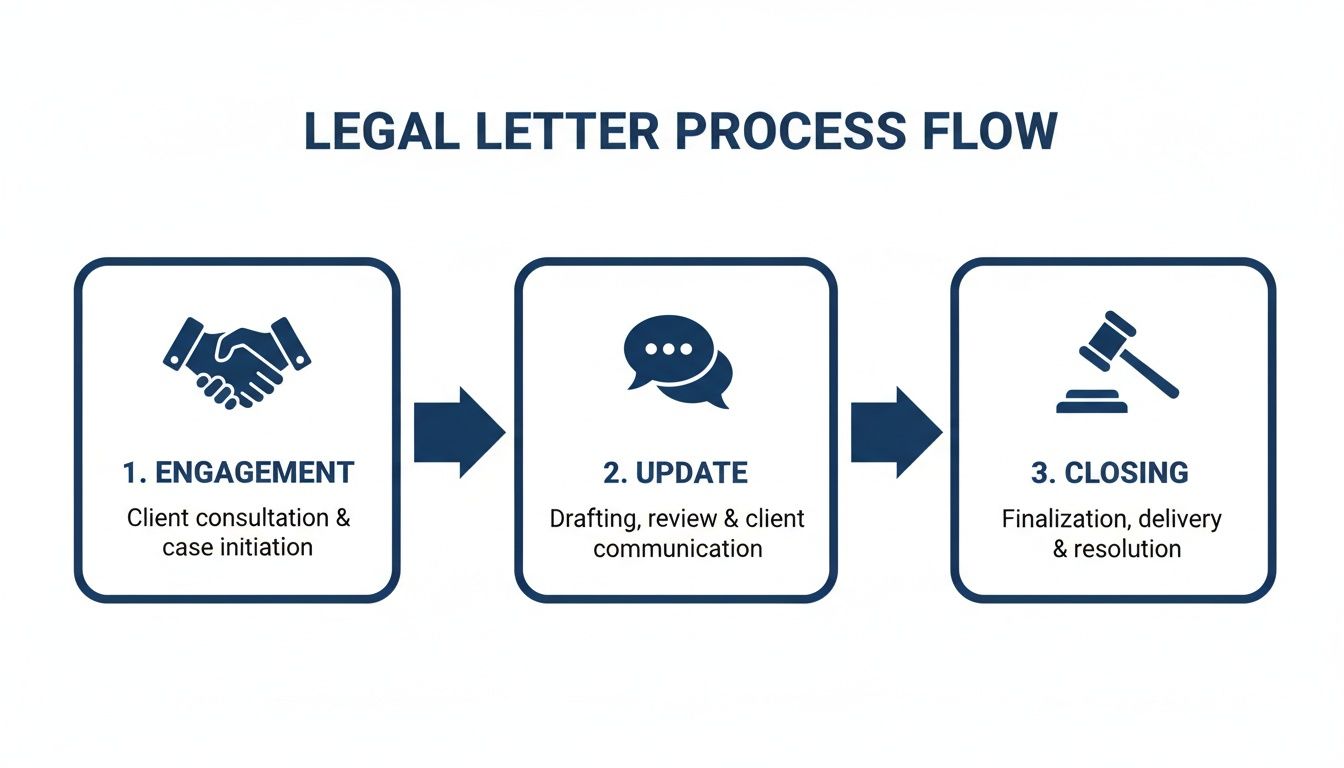
This diagram shows how a unified system can connect what used to be separate, manual tasks into one smooth, efficient process.
A Real-World Automation Scenario
So, how does this all come together in a real-world situation?
Imagine a partner needs to send a status update for the Smith v. Jones case. Instead of hunting for a file, they can just use a voice command in Whisperit: "Draft a client letter from the correspondence template for the Smith case."
Here’s what happens behind the scenes, almost instantly:
- Whisperit grabs the "Correspondence" Drafting Template.
- It pulls the client's name, address, and case number directly from the case file and plugs them in.
- The partner dictates the substantive update—the heart of the letter.
- The firm's default Style Profile kicks in, ensuring the tone and formatting are spot-on.
- When it's ready, the "Client Letter" Export Layout adds the official letterhead and signature block.
The entire process, from a spoken command to a ready-to-send PDF, takes a tiny fraction of the time it would manually. This is how you start reclaiming hours of non-billable administrative time. For a broader look at digitizing your firm’s operations, a good guide on workflow automation for small business can help you extend these efficiencies beyond just client letters.
This level of automation transforms client communication from a chore into a seamless, professional, and highly efficient part of your practice.
Keeping Your Template Library Safe and Sound
So, you’ve put in the work to create a fantastic library of client letter templates for your law firm. That's a huge step. But the real work starts now: how do you keep that library organized, up-to-date, and secure? Without a solid management plan, your pristine collection of templates can quickly devolve into a messy, outdated folder, creating real risks for your firm.

Think of it less as a one-time project and more as building a living system. It needs to evolve with new laws, shifting firm policies, and best practices. A static set of files is a set of files waiting to become obsolete.
Taming the Beast: Strong Version Control is Non-Negotiable
What's the biggest threat to your template library? An old version lurking on someone's local drive. Imagine a junior associate grabs an engagement letter from two years ago, completely unaware that a critical clause was updated last month. Just like that, you've got an avoidable liability on your hands. This is why strict version control is absolutely essential.
Your firm needs a single, central place for all approved templates. This is your sole source of truth, whether it’s a dedicated folder on the firm's server or a module within your practice management software.
Here’s a practical way to enforce this:
- Make Templates Read-Only: Set permissions so that most staff can open and copy templates but can't save changes to the master file. This simple step prevents accidental overwrites.
- Use a Smart Naming System: A clear naming convention makes everything easier. Something like
Engagement_Letter_v3.1_2024-08-15.docxinstantly tells everyone what they're looking at. No more guesswork. - Communicate Every Update: When a template changes, send out a firm-wide email. Briefly explain what changed and why, and remind everyone to always pull the latest version from the central library.
This kind of discipline ensures every letter that leaves your firm reflects your current standards and legal safeguards.
Who Holds the Keys? Access Controls and Review Processes
Not everyone needs the ability to edit or approve new templates. In fact, they shouldn't. Limiting modification rights to a small, designated group—a managing partner, a practice lead, or an operations manager—is a fundamental security measure.
You also need a formal process for reviewing any proposed changes. A seemingly small tweak to a fee structure, for example, needs to be carefully vetted before it's rolled out.
A simple checklist for template updates can be a lifesaver. It should mandate a review by at least two partners, confirm compliance with local bar rules, and log who approved the change and when.
This formalizes the workflow, creates a clear audit trail, and ensures every change is deliberate and well-considered. To dive deeper into securing your firm's documents, check out our comprehensive guide on document management security.
Locking It Down: Data Security and Compliance
Let's not forget the most important part: the sensitive client data you'll be adding to these templates. Protecting this information is paramount, and it goes way beyond just having strong passwords.
You have to think about the entire lifecycle of the document, from the moment it's created to when the client receives it. That means focusing on a few key pillars of security:
- Data Encryption: All your templates and client documents must be stored in an encrypted environment. This applies both "at rest" (sitting on your server) and "in transit" (when you send an email).
- Secure Client Delivery: Sending sensitive legal documents as a standard email attachment is a risky habit. Use a secure client portal or an encrypted email service to keep communications confidential.
- GDPR and Hosting: If you work with international clients, you need to be mindful of where their data lives. Storing data on servers in jurisdictions with robust privacy laws isn't just a good idea; it's often a legal requirement.
This is where a platform like Whisperit can make a world of difference. With built-in features like Swiss/EU hosting, it's designed from the ground up to meet these stringent, GDPR-aligned security demands. Using a system with baked-in security controls means you can confidently manage client communications without needing a PhD in cybersecurity. This proactive stance on security is no longer an option—it's a cornerstone of any modern law practice.
Common Questions About Legal Client Letters
As law firms start putting more structured communication systems in place, a few practical questions always pop up. It makes sense. When you're rolling out a new workflow that touches every single client file, you need clarity. Here are some straightforward answers to the questions I hear most often from legal pros building out their template strategy.
Think of this as the real-world advice that closes the gap between creating a template and actually using it effectively every day. Nailing these details can make a massive difference in whether your team adopts the new process and succeeds with it.
How Often Should I Send Client Updates?
There’s no magic number here. The right frequency for client updates really depends on the case and what you spelled out in your engagement letter.
A fast-paced litigation file with constant deadlines might demand a weekly or bi-weekly update just to keep the client in the loop. On the other hand, for a transactional matter that’s just waiting on a third party to act, a monthly check-in could be more than enough.
The real key is to set expectations from day one. Use your engagement letter to propose a communication schedule, and then—this is the important part—stick to it. Consistency builds more trust than frequency ever will. It shows the client you're on top of things and prevents them from feeling like they have to chase you down for information.
Can a Template Be Too Rigid?
I hear this concern a lot: "Will using templates make my letters feel impersonal or robotic?" It's a valid worry, but it comes from a slight misunderstanding of what a template is meant to do. A good template isn’t a script; it’s a scaffold.
A client letter template should handle the 80% of communication that is repetitive—things like the letterhead, standard disclaimers, and basic structure. This frees you up to focus your time and expertise on the 20% that is unique to that specific client and their situation.
Your templates provide the professional framework and ensure all the necessary legal language is there. The personalization comes from the unique details, advice, and tone you add to the body of the letter. It’s all about working smarter, not removing the human touch.
Should We Charge Clients for These Letters?
Billing for administrative letters is a tricky subject. The right call usually hinges on your fee agreement and the actual content of the letter.
Here’s a practical approach that many firms find works well:
- Substantive Updates: If a letter contains legal analysis, strategic advice, or a detailed report on case progress, it's generally billable. It represents real, substantive work done on the client's behalf.
- Purely Administrative Letters: Simple communications like a fee reminder or a notice that you've moved offices are typically not billed. Charging for these can feel like you're nickel-and-diming the client, which can erode goodwill fast.
Your engagement letter is the place to be crystal clear about your firm's policy on billing for correspondence. Transparency right from the start avoids billing disputes down the road and helps the client understand the value they're receiving. After all, when a well-crafted letter saves the client from needing a 30-minute phone call, billing for that time is often more than justified.
Ready to turn your client communication from a manual chore into an intelligent, efficient workflow? Whisperit gives you the tools you need—from Drafting Templates and Style Profiles to secure, automated Export Layouts. Stop wasting billable hours on repetitive drafting and make sure every letter that leaves your office is polished and professional. Explore how Whisperit can empower your practice at https://whisperit.ai.