
Unlocking Automation With AI Agent Workflows
Think of AI agent workflows as the difference between hiring a single skilled craftsman for one job and having a fully coordinated construction crew led by a sharp project manager. It's a fundamental shift from using isolated AI tools to deploying intelligent, multi-agent systems that can think, plan, and run complex projects on their own.
The New Era of Autonomous AI Workflows
For a long time, businesses have plugged AI into specific roles—one model to generate text over here, another tool to analyze sentiment over there. This is helpful, but it's also incredibly disjointed. Humans have to act as the go-between, manually connecting the output of one tool to the input of the next, which creates frustrating bottlenecks and loses critical context in the process.
AI agent workflows fix this fragmentation by building a connected ecosystem. In this setup, multiple AI agents—each with a unique skill or access to a specific tool—work together on a bigger objective. For instance, one agent could research legal precedents, another could draft a motion based on that research, and a third might review the draft for compliance, all under the direction of a central "manager" agent.
From Task Automation to Strategic Execution
This isn't just about speeding up individual tasks. It's about automating the entire chain of decisions from start to finish. The system can actually reason about what to do next based on new information, changing its plan on the fly without needing a human to step in at every turn.
This move goes way beyond simple automation, paving the way for what many see as the future of autonomous workflows for decision systems. The advantages are huge:
- Increased Efficiency: You can complete multi-step projects in a fraction of the time.
- Enhanced Consistency: Processes are followed to the letter, every single time.
- Strategic Focus: Your human experts are freed up to focus on the high-value strategic work they were hired to do.
This isn't some far-off concept anymore. A massive 88% of enterprises worldwide now report using AI regularly, graduating from small experiments to embedding it in their core operations. Looking ahead, Gartner predicts that by 2028, at least 15% of day-to-day work decisions will be made autonomously by agentic AI—a giant leap from virtually 0% today.
You can explore more data on AI agent adoption and its impact. Platforms like Whisperit are at the forefront, making this kind of advanced automation a reality and helping businesses move beyond simply completing tasks to achieving true strategic intelligence.
Understanding The Building Blocks of AI Agent Workflows
To get the most out of AI agent workflows, you first have to understand what makes them tick. Think of a legal team getting ready for a big case—everyone has a specific role, from the paralegal doing research to the senior partner shaping the strategy, but they all work together toward a single goal. An AI agent workflow runs on a very similar principle, bringing specialized digital components together to form a cohesive, intelligent system.
This isn't just about using one AI tool after another. It's a leap forward.
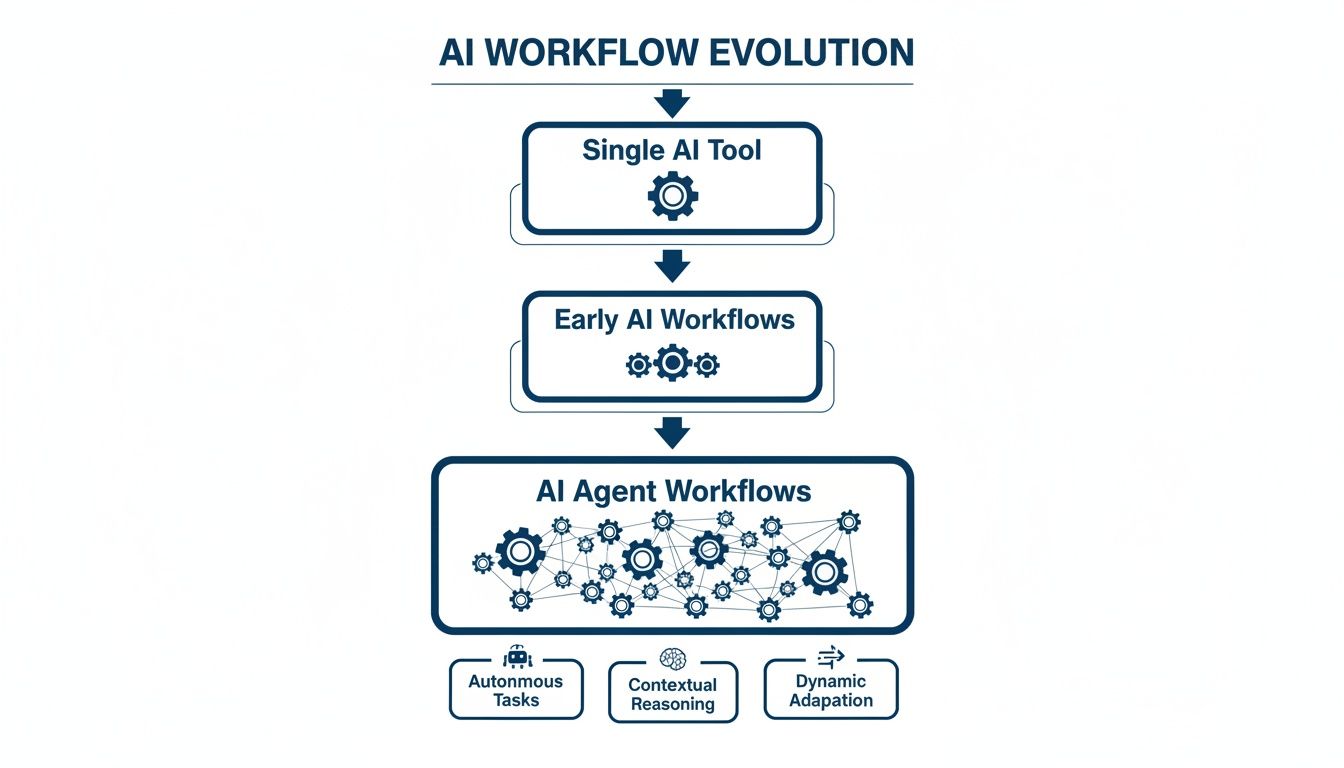
The real shift is from simple, linear tasks to a dynamic, orchestrated process that can tackle far more complex challenges. Let's break down the four pillars that make this all possible.
The Four Pillars of an AI Agent Workflow
Every solid AI agent workflow is built on four core components. If you're missing even one, it's like a legal team trying to function without its lead researcher or case manager—the whole operation grinds to a halt. Getting a handle on what each part does is the first step toward designing automation that actually works.
Here's a closer look at these essential building blocks and how they function in a real-world scenario.
The Four Pillars of an AI Agent Workflow
| Component | Role in the Workflow | Legal Workflow Example (Contract Review) |
|---|---|---|
| AI Agent | The "thinker" and "doer." This is the autonomous part of the system that processes information, makes decisions based on its instructions, and takes action. | An agent is assigned to scan a large batch of vendor agreements specifically to find any non-standard clauses. |
| Task | The specific, well-defined goal or objective given to the agent. This is what provides clear direction and purpose. | "Review all 50 vendor contracts and flag any liability clauses that don't match our company's standard template." |
| Tools | The resources and capabilities the agent uses to get the job done. This could include internal databases, external software (APIs), or other AI models. | A document analysis API to extract clauses, a connection to a legal database to check precedents, and an email client to send alerts. |
| Orchestrator | The "manager" or "brain" that defines the sequence of the workflow, coordinates different agents, and makes sure tasks are done in the right order. | The system that first assigns the "Clause Identification Agent" and then automatically passes any flagged clauses to a separate "Risk Assessment Agent." |
Without a clear Task, the agent is just spinning its wheels. Without the right Tools, it can't execute. And without an Orchestrator, you just have a bunch of powerful but uncoordinated agents creating chaos. Together, they create a powerful, automated team.
The Agent: The Intelligent Worker
At the very center of any workflow is the AI agent. This is much more than a simple script; it's a sophisticated program built to reason and act on its own. The best way to think of it is as a highly skilled digital paralegal who can understand your instructions, analyze documents, and decide what to do next without needing constant supervision.
These agents are typically powered by Large Language Models (LLMs), which give them impressive reasoning skills. They can understand complex requests, remember the context of a multi-step process, and even change their approach if they hit a snag. For example, if an agent reviewing a contract finds a clause it's never seen before, it can decide on its own to use a different tool to research the legal implications. This ability to make smart, on-the-fly decisions is what truly sets AI agents apart from basic automation bots.
The Task: A Clear Objective
An agent, no matter how powerful, is useless without a clear mission. The Task is the specific, measurable goal assigned to the workflow. It has to be well-defined to work. "Analyze contracts" is far too vague. A much better task would be: "Extract all termination clauses from Series A funding agreements signed in Q4." That's a precise and actionable instruction.
Getting the task definition right is absolutely critical. It establishes the boundaries for the agent's work and gives you a clear way to measure its success, ensuring the AI agent workflows you build are focused, efficient, and tied to real business goals.
The Tools: An Arsenal of Capabilities
Agents don't work in a vacuum; they perform tasks using Tools. These are the external resources and functions an agent can call upon to gather information or take action. An agent assigned to a legal document review might use several tools in sequence:
- A Document Parser to pull the raw text out of a PDF.
- An NLP Analyzer to identify key things like names, dates, and companies.
- A Legal Database API to search for legal precedents related to a specific clause.
Tools essentially give the agent its "senses" and "hands," letting it interact with the digital world. The power of any given workflow is often directly tied to the quality and variety of tools its agents can access. Many of these tools rely on advanced language models, and you can learn more about the technology behind them in our guide to what is natural language processing.
The Orchestrator: The Strategic Director
Finally, there's the Orchestrator. This is the conductor of the entire AI symphony. It’s the component that lays out the logic of the workflow, dictating the sequence of operations and managing how data flows between different agents and tools.
An Orchestrator transforms a collection of individual AI capabilities into a cohesive, goal-oriented process. It ensures that the right agent uses the right tool at the right time, turning fragmented actions into a seamless operational flow.
In a system with multiple agents, the orchestrator might first assign a "research agent" to gather all the relevant facts, then automatically pass those findings to a "drafting agent" to write up a summary. It's in charge of managing dependencies, handling errors, and making sure the final output achieves the original goal. Without orchestration, you have a group of powerful specialists who can't work together. With it, you have a fully autonomous team.
Why Modern Legal Teams Are Adopting AI Agents
In the legal world, time is everything. It’s the currency of justice, strategy, and ultimately, client success. Legal professionals are constantly under pressure to process huge volumes of information with absolute precision, and that pressure never lets up. This is exactly why AI agent workflows are quickly shifting from a nice-to-have to a core operational tool.
These systems represent a fundamental change in how work gets done. It’s not about just doing individual tasks a bit faster. Instead, they automate entire sequences of complex, high-stakes work. This frees legal experts from the manual grind, letting them focus on the strategic counsel and critical thinking that only a human can provide. The goal isn’t to replace lawyers; it's to supercharge their abilities.
The Power of Before and After Transformation
To really grasp the impact, let's look at a common scenario: e-discovery. Before AI agent workflows, a junior associate could easily spend an entire week—or even longer—sifting through thousands of documents by hand. They’re looking for relevant information, tagging privileged content, and redacting sensitive data. It’s a slow, tedious process that’s ripe for human error.
Now, let's see how that looks with an AI agent workflow in the mix.
After: The same set of documents is fed into the system. The first agent instantly sorts and categorizes everything. A second, trained specifically on legal privilege rules, flags all confidential communications. A third agent then applies the necessary redactions automatically. The whole thing is done in a matter of hours, not days, and it comes with a complete audit trail.
This shift allows the associate to spend their time analyzing the meaning of the evidence and building a stronger case strategy. The firm can now deliver results faster, slash the risk of costly mistakes, and take on bigger, more complex cases without needing a larger team. This is the real-world value that has modern legal teams so excited.
Accelerating Core Legal Functions
The benefits don't stop with e-discovery. AI agent workflows are being put to work across all kinds of legal operations, creating efficiencies that just weren't possible before.
- Supercharged Contract Lifecycle Management: Imagine an agent tasked with reviewing 100 vendor contracts. It can pull out key terms like renewal dates, liability caps, and indemnity clauses on its own, check them against the firm’s standard playbook, and flag any discrepancies for a senior lawyer to review.
- Automated Compliance Monitoring: Think of an agent that constantly scans for updates from regulatory bodies. When a new rule is published, the agent can analyze how it affects the firm's clients, draft a summary alert, and even schedule a meeting for the right practice group to discuss the changes.
- Streamlined Due Diligence: During a merger or acquisition, AI agents can dig through terabytes of data room documents. They can spot financial risks, IP issues, or change-of-control clauses, and present a prioritized summary to the human team for final review.
This move toward more intelligent systems is a clear trend. Agentic AI is getting a lot of attention, with 90% of IT executives believing it will completely reshape business processes. Data from Mindflow shows that 77% are already planning investments, and they’re seeing real results—like BDO Colombia’s ‘BeTic’ agent, which automates 78% of payroll steps with 99.9% accuracy.
Focusing on smarter automation is critical for any modern law practice. You can learn more about transforming your firm’s processes in our guide to legal workflow automation. By bringing in AI agents, legal teams aren't just keeping up with technology; they're building a more resilient, efficient, and strategically sharp practice ready for whatever comes next.
How to Design Your First AI Agent Workflow
Alright, so you understand the building blocks of an AI agent workflow. Now for the fun part: actually building one. The key here is to start simple and choose a design pattern that fits the problem you're trying to solve. Think of it like a chef picking a recipe—sometimes a simple, linear recipe is perfect, but other times you need a more complex, multi-stage plan for a gourmet meal.

Just like in the kitchen, there's no single "best" way to design a workflow. Instead, there are a few tried-and-true patterns that give you a fantastic starting point. Once you get a handle on these core structures, you can build systems that are not just smart, but also logical, efficient, and truly ready for the demands of legal work.
Let’s walk through two of the most common and effective design patterns you can use right away.
Pattern One: The Sequential Workflow
The easiest and most intuitive design is the Sequential Workflow. Picture a factory assembly line. A product moves from one station to the next in a fixed, predictable order. Each station does its one specific job before passing the item down the line. It's a clean, step-by-step process that works perfectly for tasks with a clear beginning, middle, and end.
In a legal setting, this pattern is a game-changer for routine document processing. For example, a contract review workflow could look like this:
- Ingestion Agent: The first agent gets a new contract and uses a tool to pull all the raw text from the PDF. Simple.
- Clause Identification Agent: The text is immediately passed to a second agent, which scans it to find and tag key clauses—think liability, termination, and confidentiality.
- Risk Analysis Agent: A third agent takes those tagged clauses and checks them against the firm’s standard legal playbook, flagging anything that's non-standard or high-risk.
- Summary Agent: Finally, a fourth agent pulls all the findings together into a clean, easy-to-read summary for a human lawyer to review.
The beauty of this pattern is its simplicity and predictability. If you want to see how this works in practice, check out our guide on how to create workflows for your business.
Pattern Two: Multi-Agent Collaboration
The assembly line approach is great for linear tasks, but some problems are just too messy for that. They require a more dynamic, team-based approach. That’s where the Multi-Agent Collaboration pattern shines. Think of this less like an assembly line and more like a dedicated legal team hashing out a complex case.
In this model, you have a group of specialized agents that can talk to each other as needed, all coordinated by a central "manager" agent.
This pattern lets agents delegate sub-tasks, share what they’ve found, and collectively reason through a problem—much like a human team brainstorming. It’s how you tackle the more ambiguous or multifaceted challenges.
For instance, imagine a workflow designed to help with litigation prep.
- A Research Agent digs up relevant case law and statutes.
- A Drafting Agent gets to work writing initial motions and briefs.
- A Review Agent acts as a paralegal, checking citations and making sure everything complies with court rules.
The orchestrator agent might kick things off by sending the Research Agent to work. Based on what it finds, the Drafting Agent is activated. If the drafter hits a wall and needs more information, it can send a request right back to the researcher. This creates a flexible, collaborative loop that continues until the job is done right.
Non-Negotiable Rules for Legal Workflows
No matter which design pattern you go with, building AI workflows for legal work comes with a few ground rules. The stakes are just too high to cut corners on oversight, accountability, and security. These three principles are absolutely non-negotiable.
1. Always Implement a Human-in-the-Loop This is the big one. No matter how smart the AI gets, a qualified legal professional must have the final say. The whole point of the workflow is to augment human expertise, not replace it. This means every single output, whether it’s a contract summary or a list of flagged documents, must land on a human’s desk for review and approval before any real-world action is taken.
2. Ensure Total Auditability Every single action taken by every agent has to be logged and traceable. If a decision is questioned months down the road, you need a complete, unchangeable record of who (or what) did what, when they did it, and what information they based it on. This audit trail isn't just a nice-to-have; it's essential for compliance, accountability, and defending your work.
3. Uphold Ironclad Data Security and GDPR Legal data is some of the most sensitive information out there. Your workflow must be built on a platform that guarantees data encryption, strict access controls, and full compliance with regulations like GDPR. For a platform like Whisperit, this even includes options for Swiss/EU data hosting to meet the toughest data sovereignty requirements.
AI Agent Workflows in the Real World
Theory is one thing, but seeing AI agent workflows in action is where the lightbulb really goes on. For legal teams, these automated systems aren't just about small efficiency gains; they represent a completely new way of tackling complex, data-heavy tasks.
Let's move past the concepts and dive into three practical examples. These mini-case studies show how a platform like Whisperit can coordinate intelligent agents to solve real business problems, turning hundreds of manual hours into a few minutes of automated, strategic work.
Use Case 1: Automated e-Discovery
The e-discovery process is a notorious bottleneck. It often forces teams of paralegals to manually sift through mountains of data, a process that is slow, expensive, and dangerously prone to human error. Missing a single crucial document can have massive consequences.
An AI agent workflow completely flips this script.
- The Problem: A firm needs to review 500,000 documents for a litigation case. The goal is to identify privileged communications and redact sensitive personal information.
- The Automated Solution: An AI workflow kicks off. A "Categorization Agent" does the first pass, sorting documents by type (email, contract, memo). A "Privilege Agent," trained on legal standards, then flags attorney-client communications. Finally, a "Redaction Agent" automatically blacks out personal data like social security numbers before sending the organized set to a lawyer for a final, quick validation.
- The Outcome: The initial document review time is slashed by over 90%. This doesn't just save a ton of money; it speeds up case preparation, handing the legal team a huge strategic advantage.
Use Case 2: Proactive Contract Analysis
Managing a large portfolio of contracts can feel like a constant battle. Key dates, non-standard clauses, and renewal terms are often buried deep in dense legal language, making it almost impossible to stay ahead of things. This reactive approach leads to missed deadlines and unnecessary risk.
This is where a dedicated contract analysis workflow is a game-changer.
A well-designed AI agent workflow can turn a static contract repository into a dynamic, actionable intelligence source. It continuously monitors agreements for key events and obligations, preventing surprises and empowering strategic decision-making.
Here’s a breakdown of how it works:
- The Problem: A corporate legal department is responsible for thousands of vendor agreements. They need a single dashboard showing all upcoming renewal dates and critical liability clauses.
- The Automated Solution: An "Extraction Agent" gets to work. It systematically reads every contract, using natural language processing to find and pull out key data points—renewal dates, termination clauses, and liability caps. This information then automatically populates a central database or dashboard.
- The Outcome: The legal team gets a complete, real-time view of its contractual obligations. They can now proactively manage renewals, spot high-risk agreements, and push for more standard terms, dramatically cutting down on operational risk.
Use Case 3: Vigilant Compliance Monitoring
Keeping up with regulatory changes is a relentless, high-stakes job. Miss one update, and you could be facing severe penalties. Manually tracking announcements from multiple regulatory bodies is both incredibly time-consuming and inefficient.
An AI agent workflow can act as a tireless compliance watchdog.
- The Problem: A financial services firm has to monitor updates from three different regulatory agencies to make sure its internal policies are always compliant.
- The Automated Solution: A "Monitoring Agent" is set up to scan agency websites and official publications every single day. When it spots a new rule or amendment, it triggers a "Summarization Agent" to create a concise brief of the changes. This summary, along with a link to the source document, is then automatically sent to the head of compliance for review.
- The Outcome: The firm stays on top of all regulatory changes in near real-time, drastically lowering the risk of non-compliance. This frees up the compliance team from the grind of manual monitoring so they can focus on the important work: implementing the necessary policy changes. This is just one of many powerful game-changing business process automation examples that deliver clear ROI.
For a great example of these workflows in operation outside of legal, check out a real-world case study on real-time AI recruitment. These applications are becoming more common as AI adoption in the enterprise hits an inflection point. In fact, a recent PwC survey showed 79% of businesses now use AI in at least one area, with top performers using it to achieve an 80% boost in efficiency. These workflows are no longer some futuristic concept; they are practical tools driving real results today.
Your Questions About AI Agent Workflows Answered
Jumping into the world of AI agents is bound to bring up some important questions, especially for those in detail-oriented fields like law. Below, I’ve laid out clear, straightforward answers to the most common concerns I hear from business leaders and legal pros looking at AI agent workflows. The goal here is to cut through the noise and give you the confidence to start using this technology well.
What Is the Real Cost of Setting Up an AI Agent Workflow?
This is usually the first question on everyone's mind, and the answer is more flexible than you might think. There isn't a single price tag; the cost sits on a spectrum that depends entirely on how complex your workflow needs to be and the platform you choose.
A simple, sequential workflow—say, for summarizing internal memos—might have a fairly low setup cost. You're mostly looking at subscription fees for a no-code platform and the time it takes to get the steps configured. On the other end, a more complex, multi-agent system for something like e-discovery that has to connect with multiple databases will naturally be a larger initial investment in both time and money.
The key is to reframe it from a "cost" to an "investment." A well-designed workflow that automates 20 hours of manual work each week delivers a clear return very quickly, often within just a few months. Platforms like Whisperit are built to lower this barrier, making sophisticated automation possible without needing a whole team of developers.
How Do AI Agents Integrate with Our Existing Software?
Integration is a huge deal—no tool is useful if it’s stuck on an island by itself. Modern AI agent platforms are built with this reality in mind, offering plenty of ways to connect with the tools your team already relies on every day.
Most of this magic happens through APIs (Application Programming Interfaces), which act like secure bridges between different software. This is what allows an AI agent to:
- Pull documents right from your firm’s document management system (DMS).
- Push extracted data, like contract renewal dates, into your case management software.
- Send notifications and summaries to your team via email or messaging apps.
Think of the AI workflow as a new, incredibly efficient team member who’s been given secure, permission-based access to the tools they need to get their job done. It's all about enhancing your current processes, not forcing you to tear them down and start over.
Is Our Client Data Secure When Using These Workflows?
For anyone in the legal field, data security is completely non-negotiable. Any reputable AI platform designed for legal work will have security as its absolute top priority. When you're looking at a solution, there are a few key things to check for to make sure your data is locked down.
First, end-to-end encryption is non-negotiable. This means your data is scrambled both while it's moving and while it's stored, making it unreadable to anyone without the right keys. Second, look for strong access controls that let you decide exactly who can see, edit, or manage specific workflows and the data they touch.
Data sovereignty is another massive piece of the puzzle. For firms with specific compliance needs like GDPR, the ability to choose where your data is stored—say, on Swiss or EU servers—is critical. It ensures your data never leaves the required jurisdiction.
Finally, a solid AI platform will be crystal clear about its data usage policies. Your data should only be used to run your workflows and should never, ever be used to train the provider's general AI models.
Can We Ensure AI Workflows Are Compliant and Auditable?
Absolutely. In fact, one of the biggest upsides of a well-built AI agent workflow is that it can actually make you more compliant and auditable than purely manual processes. Human work can be inconsistent and is often poorly documented, leaving you with gaps in the audit trail.
Automated workflows, on the other hand, are designed to be traceable from the ground up. Every single action an agent takes—from accessing a document to flagging a specific clause—is automatically logged with a timestamp. This creates a perfect, unchangeable record of the entire process, from start to finish.
This built-in auditability is a lifesaver for proving compliance. If a decision is ever questioned, you can instantly pull up a detailed log showing exactly what happened, what data the agent used, and which human had the final sign-off. For organizations looking to strengthen their internal controls, understanding these principles is key. You can find more details in our guide on AI governance best practices.
How Do We Measure the Return on Investment?
Measuring the ROI of an AI agent workflow is surprisingly direct. It really just comes down to tracking a few key metrics that have a real impact on your bottom line.
The most obvious one is time saved. Just calculate the hours your team used to spend on a task and compare it to the time it takes with automation. Multiply those saved hours by your team's blended hourly rate, and you've got a clear financial saving right there.
But the real value goes beyond just time. You should also be measuring:
- Error Reduction: Keep an eye on the decrease in costly mistakes, like missed deadlines or overlooked contract clauses.
- Increased Capacity: Measure how many more cases or contracts your team can now handle without needing to bring on more people.
- Faster Turnaround Times: Document how much quicker you can deliver results to clients, which has a huge impact on their satisfaction.
By tracking these concrete numbers, you can build a powerful business case that shows the real value the workflow is bringing to your firm. It shifts the conversation from "this feels more efficient" to "this saved us $50,000 last quarter."
Ready to see how Whisperit can help your legal practice with secure, efficient AI agent workflows? Our voice-first AI workspace is built to simplify everything from dictation and drafting to complex document analysis, all within a secure, compliant environment.